How do I restore a backup of my dedicated VPS server?

Procédure

How do I restore a backup from the LWS Panel customer area (with the Business option)?

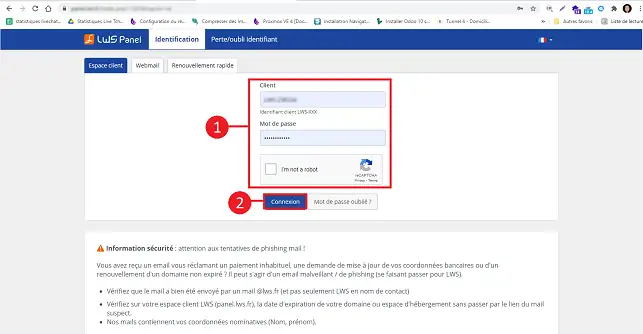
1. Log in to your LWS Panel customer area
How do I restore a backup of my dedicated VPS server?

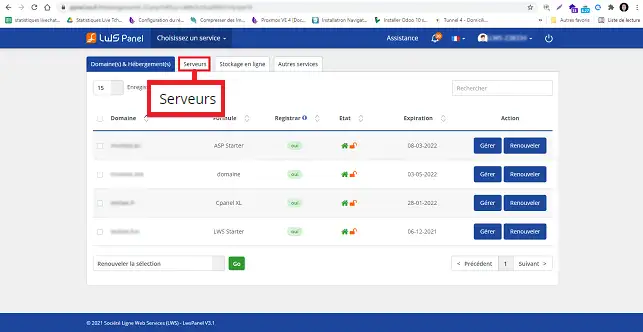
2. Click on the"Servers" tab at the top of the page.
How do I restore a backup of my dedicated VPS server?

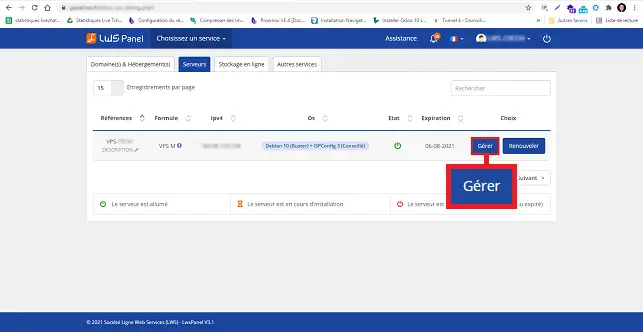
3. Click on the "Manage" button behind the server in question.
How do I restore a backup of my dedicated VPS server?


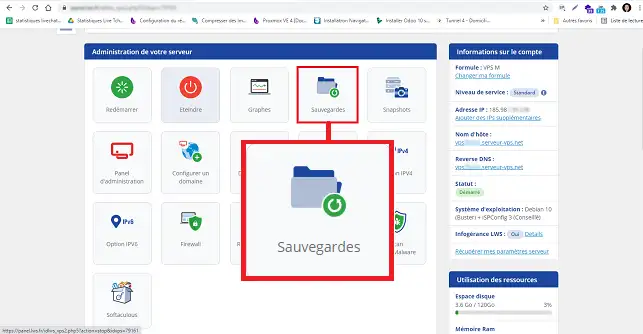
4. Click on the Backups button

How do I restore a backup of my dedicated VPS server?


5. You can then choose the backup of your choice and click on the Restore button.
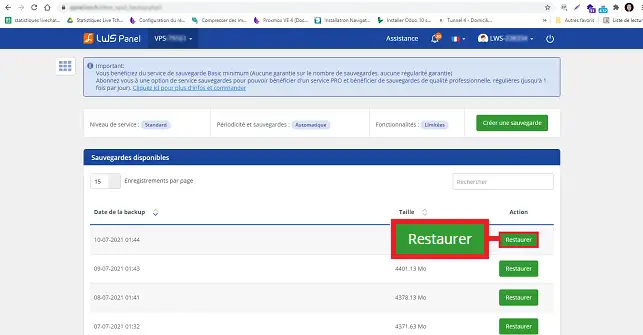
How do I restore a backup of my dedicated VPS server?


8. All you have to do is confirm by clicking on the "Confirm" button.
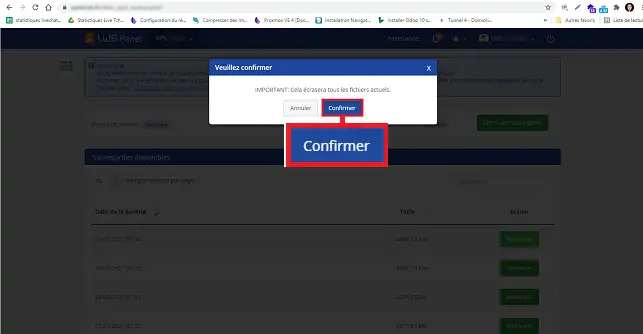
How do I restore a backup of my dedicated VPS server?


How do you restore a backup manually under debian?

  • Run putty. Log on as root. Go to the root of your server with the following command:
cd /

  • Create the folder for the backup
mkdir backups

  • Go to the backups folder then :
cd backups

  • Create a new file using the nano command
nano fullserver.sh

  • Then specify the following:
tar -cvpf /backups/fullbackup.tar --directory=/ --exclude=proc--exclude=sys --exclude=dev/pts --exclude=backups

  • You then need to set the right permissions on the file and make it executable
chmod 750 /backups/fullserver.sh./backups/fullserver.sh

  • To restore your backup, use the following command:
tar -xvpf /fullbackup.tar

help.lws.net/a/615
Was this article helpful?

Yes

No

Read 20 927 times

Thank you! Feel free to ask questions about our documentation if you would like more information, and help us improve it.

Similar articles

A question about this article?

Ask the LWS team and the community. Answers are published after moderation.

Ask the LWS team and its community a question

GDPR: Controller: LWS-Ligne Web Services. Purpose: moderation and public publication of your question, possible notification of an answer. Legal basis: consent (Art. 6(1)(a) GDPR). Email retention: 90 days after notification, 12 months maximum without an answer. To exercise your rights, see the GDPR section of our Terms and Conditions.