
Online help
The web host accessible to all
Procédure
Fail2ban is an anti-brute-force software that we install with all our ISPconfig packages.
It protects your VPS against people trying to "crack" your passwords.
By analysing your server's log files, it detects failed connection attempts on several services. Whether it's SSH, FTP, IMAP or MySQL.
The only problem is that your IP address may be blocked. It could happen that you have forgotten your MySQL password and you make several erroneous connection attempts.
Enough to get you blocked by Failban.
We'll look at how to find the list of IPs blocked by Fail2ban and how to unblock them.
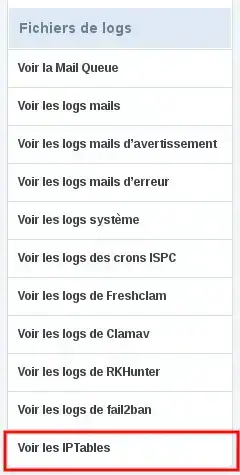
Go to your ISPconfig panel and under the Monitoring tab, View IPTables section:

You will find something like this:
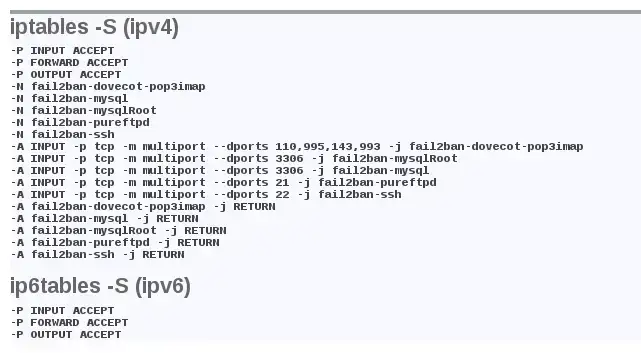
For the moment nothing abnormal. To find a blocked IP you will need to look for lines like :
fail2ban-SERVICE
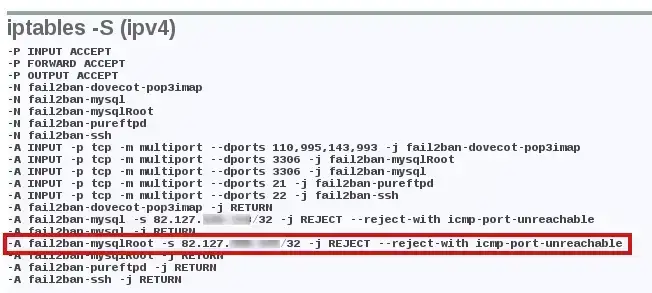
Here we can see that the address 82.127.x.x has been blocked by Fail2ban because too many failed connection attempts have been made to the mysqlRoot service (this is a filter that we have added to Fail2ban and which checks connections to the MySQL service with the root user). This IP will therefore no longer be able to connect to the MySQL service, at least temporarily.
For this step, you will need to connect via SSH(How to connect as root on a dedicated VPS server).
Once connected, use the following command:
fail2ban-client set SERVICE unbanip IP
In our example :
fail2ban-client set mysqlRoot unbanip 82.127.x.x
Go back to your ISPconfig panel, the IP has been unblacklisted:
Ask the LWS team and the community. Answers are published after moderation.
 About LWS :
LWS is a 100% French web hosting company that focuses on quality and innovation and offers a responsive and competent technical service at affordable prices.
About LWS :
LWS is a 100% French web hosting company that focuses on quality and innovation and offers a responsive and competent technical service at affordable prices.



 Yes
Yes No
No