
Online help
The web host accessible to all
Procédure
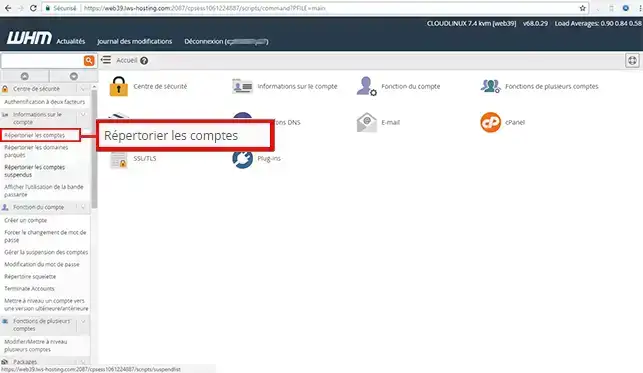
2. Open the"Account Information" menu on the left of your screen, and select"List Accounts".
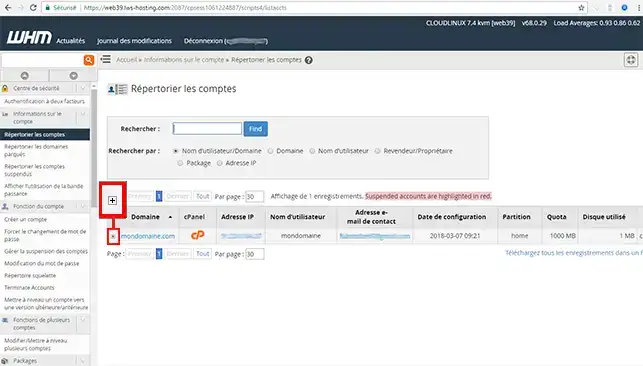
3. Click on the"+" icon of the account whose password you wish to change
4. Enter the new password, then click on"Change password".
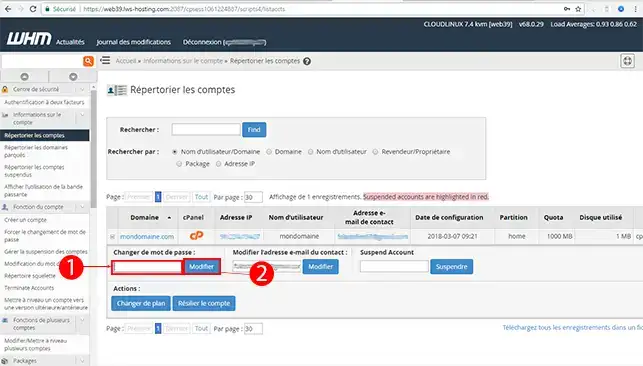
The change is immediate, and you can now use this new password to connect to the VHM account for this domain.
Need help using WHM?
See all our WHM training videos
You are now able to change the password of one of your customers' account through your WHM interface with LWS.
Don't hesitate to share your comments or questions!
Ask the LWS team and the community. Answers are published after moderation.
 About LWS :
LWS is a 100% French web hosting company that focuses on quality and innovation and offers a responsive and competent technical service at affordable prices.
About LWS :
LWS is a 100% French web hosting company that focuses on quality and innovation and offers a responsive and competent technical service at affordable prices.



 Yes
Yes No
No