Contact us
 Customer Area


 Visit LWS
Rate this article :
This article was useful to you ?
 Yes
Yes
 No
No
 Article read
14717 once
Article read
14717 once Merci ! N'hésitez pas à
poser des questions sur nos documentations si vous souhaitez plus d'informations et nous aider à les
améliorer.
Merci ! N'hésitez pas à
poser des questions sur nos documentations si vous souhaitez plus d'informations et nous aider à les
améliorer.Vous avez noté 0 étoile(s)



Sommaire
Procédure
It can be interesting and quicker to be able to modify some or all of your customer accounts in a single step when, for example, you change the web hosting packages you offer.
Bulk management allows you to change the language of the customer areas, as well as the package attached to each customer account.
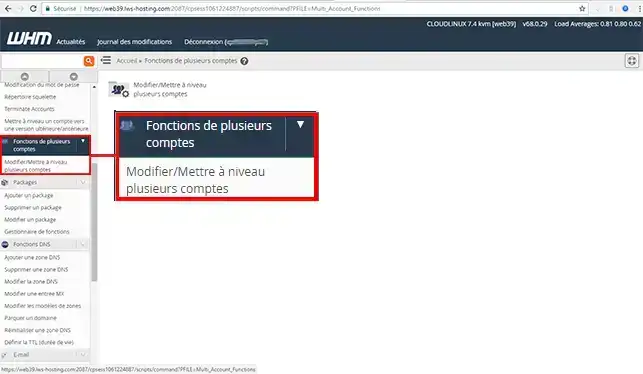
2. Click on the"Multiple account function" drop-down menu on the left of your screen
3. Tick the client accounts you wish to modify. Choose the language you wish to use for each of the client accounts and/or the Web Hosting Pack. Finally, click on the"Change" button to save your changes.
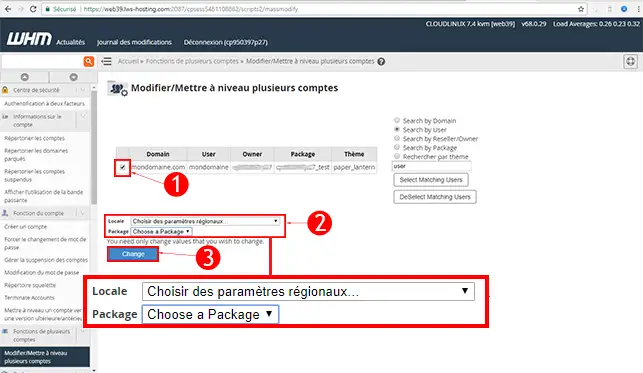
This section allows you to upgrade one or more customer accounts.
You can now make mass changes to all the customer accounts linked to your Web Reseller space with LWS. Bulk modification of certain information will save you time.
Don't hesitate to share your comments and questions!
Rate this article :
This article was useful to you ?
Yes
No
1mn reading
How do I create a web hosting package in WHM?
6mn reading
How do I edit or delete a web hosting package in WHM?
1mn reading
How do I upgrade a WHM customer account?
1mn reading
How do I initialise the bandwidth of a Client account in WHM?
 About LWS :
LWS is a 100% French web hosting company that focuses on quality and innovation and offers a responsive and competent technical service at affordable prices.
About LWS :
LWS is a 100% French web hosting company that focuses on quality and innovation and offers a responsive and competent technical service at affordable prices.