How do I save emails in webmail?

Procédure

Why export emails?

It can be useful to be able to save your emails on your computer. This allows you to keep an archive of your emails, but also to be able to restore them if necessary.

The procedure differs slightly depending on the graphical theme used in Roundcube. This documentation explains the two procedures depending on the theme you are using.

Procedure with the Larry theme


Download a single email

1. To download an e-mail, first select one in the Mail list, then click on the "More" icon.
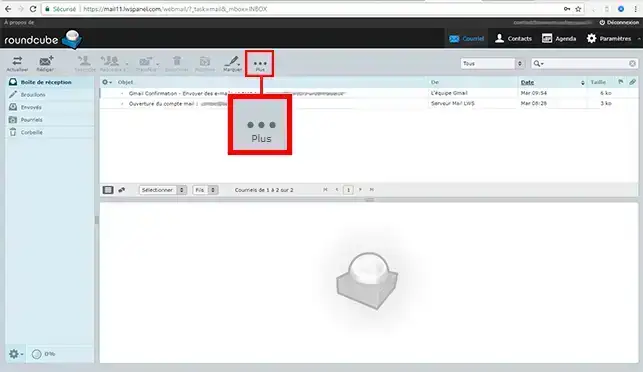
How do I save emails in webmail?


2. Click on "Download as .eml" and the file will be in your Download folder.
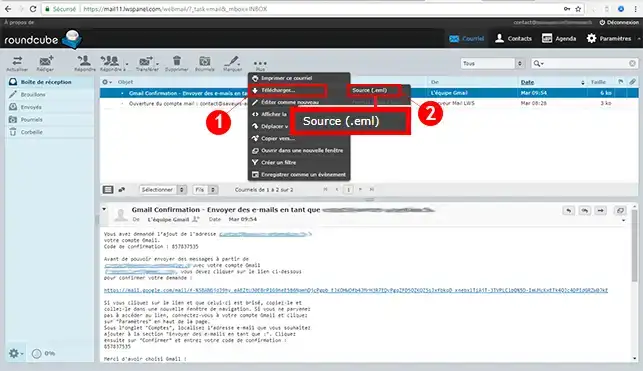
How do I save emails in webmail?

Downloading several emails

If you download several emails, they will be zipped together. Select the individual emails in the Email List and then follow the instructions for downloading a single email. You will need to extract the .zip file in order to access the individual email files.

Procedure with the Elastic theme

How do I save an email on Webmail?

Go to the URL of your Webmail and connect to it.
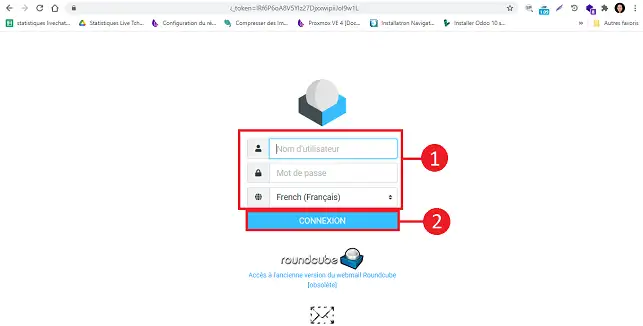
How do I save emails in webmail?

Click on the email in question to select it.
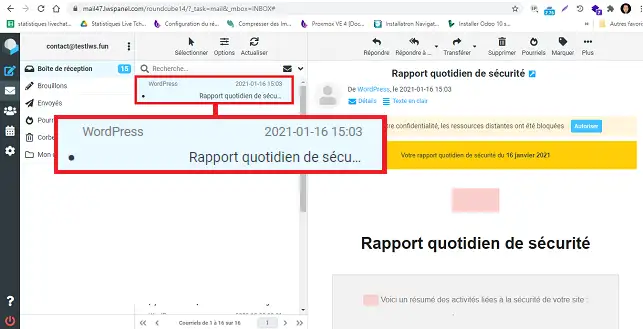
How do I save emails in webmail?

Click on"More" on the right-hand side of your screen and then on"Download". Choose"Source eml".
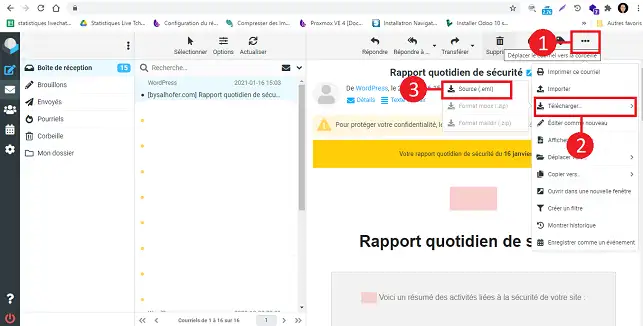
How do I save emails in webmail?

How do I back up several emails to Webmail?

Once you are connected to your Webmail, select all the emails you want to back up, click on"More", then on"Download" and finally on"eml source". All the emails will be downloaded in a zip file. You will need to extract all the files in this zip in order to access the various email files.

Conclusion

You can now back up emails from Webmail with your LWS hosting package. This allows you to archive certain emails securely on your computer.

Don't hesitate to share your comments and questions!

help.lws.net/a/811
Was this article helpful?

Yes

No

Read 168 330 times

Thank you! Feel free to ask questions about our documentation if you would like more information, and help us improve it.

Similar articles

Questions about the article 2

Ask a question
jeanfabrice yapo
7 Dec 2022
après la sauvegarde comment les restaurer au besoin
fabrice-LWS Official answer
14 Dec 2022
Bonjour, vous pouvez restaurer des emails en vous rendant sur le Webmail, cliquez ensuite sur "plus" se trouvant coté droit du webmail , en haut de page, puis sur "Importer".
Was this answer helpful?
Olivier
18 Sept 2023
Bonjour, il m'est impossible d'archiver plus de un mail à la fois sur Roundcube Webmail. Lorsque je sélectionne un dossier de mail ou juste deux mails la fonction téléchargé n'est plus accessible.
Benjamin-LWS Official answer
19 Sept 2023

Bonjour,

Nous vous remercions pour votre question et votre intérêt envers LWS. Malheureusement, nous ne pouvons pas vous aidez viacette plateforme de questions via nos aides LWS.

Nous vous invitons donc à contacter notre système de support client pour obtenir de l'aide spécifique à votre situation. Nous avons une équipe de professionnels qualifiés prêts à vous aider et à répondre à toutes vos questions avec précision et rapidité. (Contacter le support LWS)

Merci de votre compréhension et nous espérons pouvoir vous aider bientôt.

Cordialement, L'équipe LWS
 

Was this answer helpful?

A question about this article?

Ask the LWS team and the community. Answers are published after moderation.

Ask the LWS team and its community a question

GDPR: Controller: LWS-Ligne Web Services. Purpose: moderation and public publication of your question, possible notification of an answer. Legal basis: consent (Art. 6(1)(a) GDPR). Email retention: 90 days after notification, 12 months maximum without an answer. To exercise your rights, see the GDPR section of our Terms and Conditions.


