
Online help
The web host accessible to all
Procédure
Google Adsence allows you to monetise your website created with Sitebuilder Pro. It allows you to generate additional revenue through targeted advertising. Any website publisher can join the Google Adsence programme free of charge. By simply adding a small HTML script, you can benefit from advertising displays to make your site more profitable.
To insert a Google Adsence ad on SiteBuilder Pro, you first need to connect to your website administration.
1. Click on the"Advanced" tab in the SiteBuilder Pro toolbar.

2. Click on"Adsence" to select this tool.
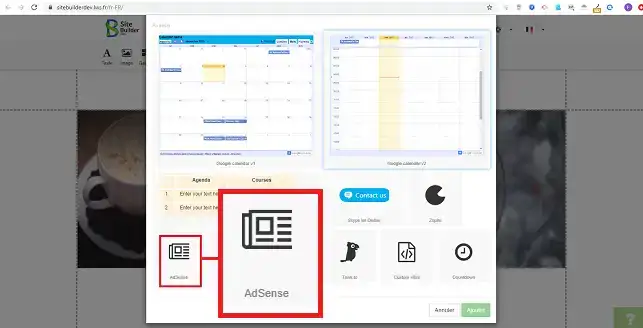
3. Click on the stylus on the right-hand side of the element and then on"Properties" to configure the module.

4. You must register on the Google AdSence Programme Site in order to be able to retrieve an HTML script and insert it into your module's configuration system.
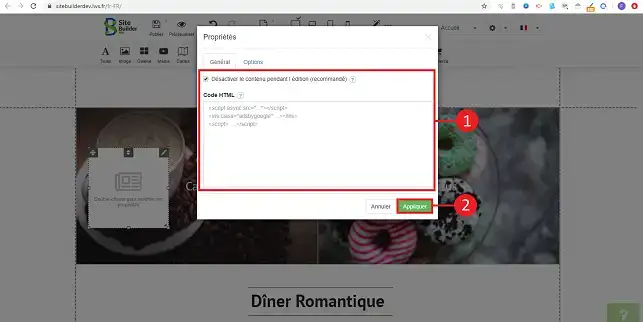
You can now insert Google Adsence advertising on your website created with SiteBuilder Pro. Google Adsence will allow you to monetise your site and earn money from targeted advertising.
Don't hesitate to share your comments and questions!
Ask the LWS team and the community. Answers are published after moderation.
 About LWS :
LWS is a 100% French web hosting company that focuses on quality and innovation and offers a responsive and competent technical service at affordable prices.
About LWS :
LWS is a 100% French web hosting company that focuses on quality and innovation and offers a responsive and competent technical service at affordable prices.



 Yes
Yes No
No