Cloudflare is a performance and security service. On average, a site using Cloudflare loads 40% faster, uses 60% less bandwidth, has 65% fewer requests and is more secure.
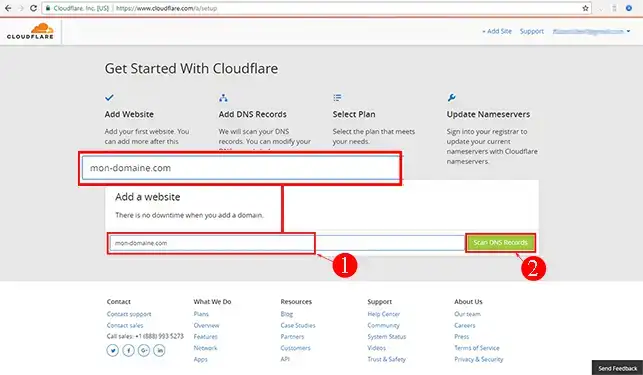
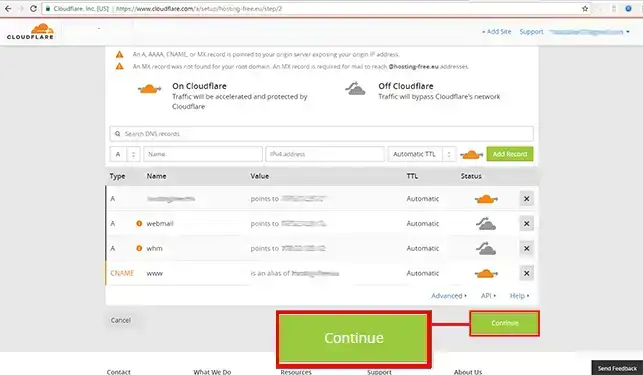
2. As soon as the analysis is complete, you can click on the button at the bottom right"I've added all missing records, continue" without any further configuration.
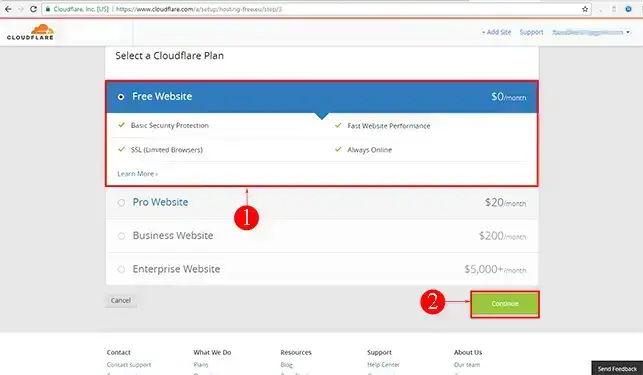
3. Then select the Cloudflare package that suits your needs. These packages start at €0.
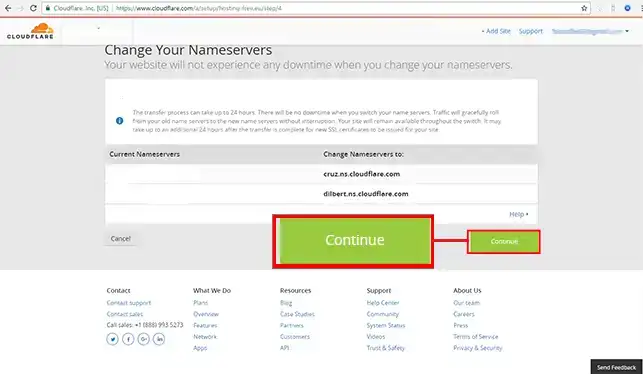
4. Click on continue at the bottom of the page
Take careful note of the information displayed on the screen. These are the DNS servers to be modified on your domain from your LWS customer space.
Your domain is now configured on Cloudflare. It may take some time (12 to 24 hours) for your domain name to be configured.
Finalising the configuration at LWS
Finally, all you need to do is change your domain's DNS servers to match those provided by Cloudflare.
1. Go to your LWS customer area and change the DNS servers according to the instructions provided by Cloudflare.
2. As soon as the configuration of your domain is effective on Cloudflare (an email will be sent to you to confirm this information), go to your Cloudflare space to manage your options and configurations (DNS zones, emails, etc.).
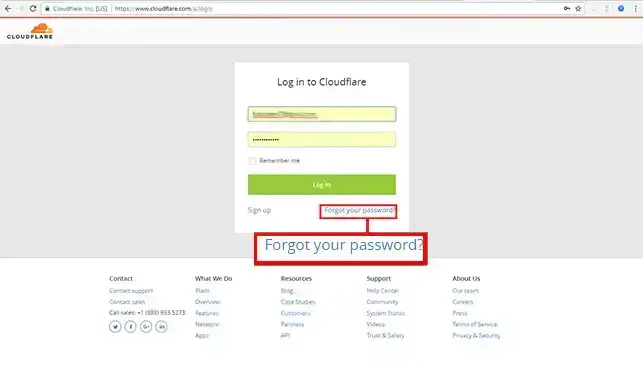
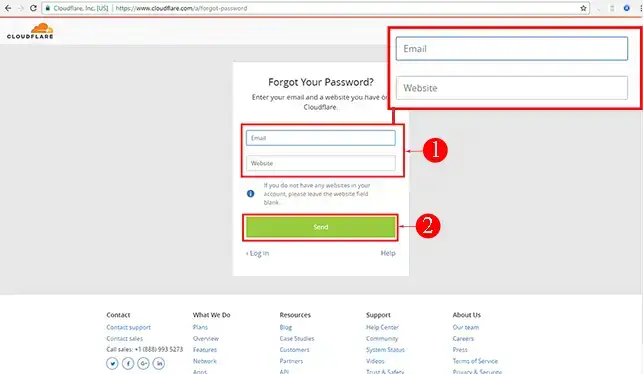
I've lost the password to my Cloudflare account. What should I do?
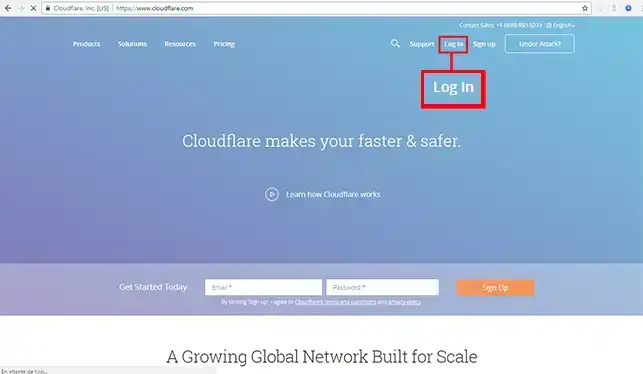
To recover the password to your Cloudflare account, follow these steps:
Ce n'est pas clair. Sur le site cloudflare, ce ne sont pas les mêmes affichages que sur le tuto.
Cloudflare donne 2 adresses DNS, sur LWS, il y en a 4. Lesquelles modifier?
B✓
Benjamin-LWS Official answer
23 Jan 2023
Bonjour, merci pour votre retour,
Sur le LWS Panel, lorsque vous souhaitez mettre d'autres serveurs DNS que les nôtres, il faudra cliquer sur le bouton "Autres serveurs" quand vous vous trouvez dans l'espace dédié au changement de vos serveurs DNS.
Ensuite, il n'est pas nécessaire d'avoir 4 serveurs DNS à configurer, si Cloudflare vous en transmet 2 à configurer, mettez seulement les deux.
Nous vous invitons à contacter notre service support à travers votre espace client, afin de vous apporter une aide si vous rencontrez des difficultés sur cette manipulation. (https://aide.lws.fr/a/268)
Was this answer helpful?
L
LionelR
28 Mar 2023
Il faudrait préciser que DNSSEC n'est PAS utilisable entre CF et LWS. CF précise qu'il faut IMPERATIVEMENT désactiver DNSSEC avant de passer aux DNS de CF mais ensuite, il est impossible de configurer les champs DS chez LWS. Résultat, plus de DNSSEC.
B✓
Benjamin-LWS Official answer
4 Apr 2023
Bonjour,
Merci de votre retour.
DNSSEC est une fonctionnalité qui permet d'assurer la sécurité des données DNS. Lorsqu'elle est activée, vos données DNS sont cryptées et vérifiées.
Cette fonctionnalité va être ajoutée très prochainement afin que nos clients puissent activer le DNSSEC en utilisant les DNS de Cloudflare.
Je vous remercie de votre attention et reste à votre disposition pour toute autre question ou complément d'information.
Nous vous invitons à contacter notre service support à travers votre espace client, afin de vous apporter une aide si vous rencontrez des difficultés quelconque. (https://aide.lws.fr/a/268)
Cordialement, L'équipe LWS
Was this answer helpful?
V
VLB
21 Feb 2025
Je ne comprends pas. Mon site internet est hébergé via un autre compte LWS multidomaine. Si je modifie les zones DNS du nom de domaine pour les remplacer par les NS Cloudfare, comment le site hébergé sur l'autre compte peut-il encore s'afficher ?
J✓
Jordan-LWS Official answer
25 Feb 2025
Bonjour,
Je vous remercie pour votre message
Si vous modifiez les serveurs de noms (NS) pour ceux de Cloudflare, la gestion de la zone DNS se fera depuis Cloudflare et non plus depuis votre compte LWS.
Pour que votre site continue de fonctionner, vous devrez recréer dans la zone DNS Cloudflare les mêmes enregistrements que ceux actuellement configurés sur l'hébergement LWS (notamment l’enregistrement A ou CNAME pointant vers l’adresse IP du serveur où est hébergé votre site).
Concernant le site en multi-domaine, étant donné qu'il dispose de sa propre gestion DNS, il est tout à fait normal que ce dernier continue de fonctionner, car il est toujours configuré avec les enregistrements nécessaires pour utiliser votre serveur d'hébergement.
Je vous remercie pour votre attention et reste à votre disposition pour toute autre question ou complément d'information.
Cordialement, L'équipe LWS
Was this answer helpful?
A question about this article?
Ask the LWS team and the community. Answers are published after moderation.
Ask the LWS team and its community a question
!
To enable this form, please tick the two consent boxes below.



 Yes
Yes No
No About
About 