
Online help
The web host accessible to all
Procédure
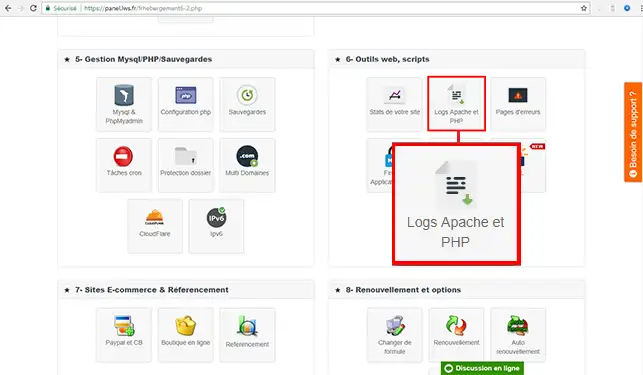
1. To access the logs for the PHPMail() function on your shared hosting, connect to the management interface for your web hosting and click on the"Apache and PHP logs" button.
2. Go to the bottom of the page, to the"Logs of mail sent using the PHP Mail() function" section to find out more about the sending error.
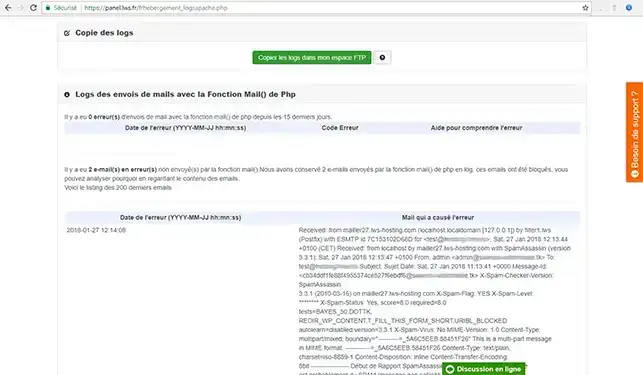
SpamAssassin runs a number of tests on your messages before they are sent. Depending on the results, a score is assigned to your message.
If the score exceeds a defined threshold, the email is considered spam. A filter is then created to direct the message to the recycle bin. All messages must pass through SpamAssassin before being sent. SpamAssassin sets two new headers in the event of Spam: X-Spam-Status and X-Spam-Level.
The logs allow you to see where the problem comes from and the reason why your email has been considered as Spam. The most common reasons are
The log file gives you an overview of the error as well as its source ( incorrect email, coding problem on one of your PHP web pages , for example). When there is too much spam coming from your website, the PHPMail() function may be automatically deactivated for a predefined period.
To obtain the PHP file that caused this blocking/sending, you will need to search for the term X-PHP-Originating-Script in the email that caused the error.
You can now access the logs for the PHPMail() function on your hosting mutuailised with LWS. The logs of the PHPMail() function give you an indication of errors when sending emails.
Don't hesitate to share your comments and questions!
Ask the LWS team and the community. Answers are published after moderation.
 About LWS :
LWS is a 100% French web hosting company that focuses on quality and innovation and offers a responsive and competent technical service at affordable prices.


 Yes
 No