
Online help
The web host accessible to all
Procédure
UTF-8 encoding is a type of computer coding used to encode all existing characters in any alphabet. UTF-8 is currently used on more than 82.2% of websites and remains compatible with the ASCII standard, which is limited to the English language.
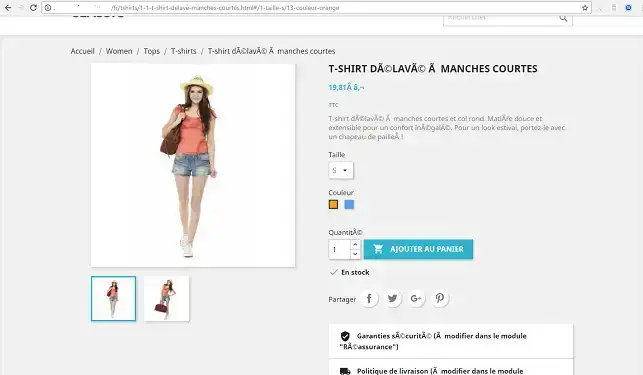
When you install a theme or a module on your Prestashop site, you may encounter spelling errors, as special characters can regularly appear on your website, as shown in the following image:
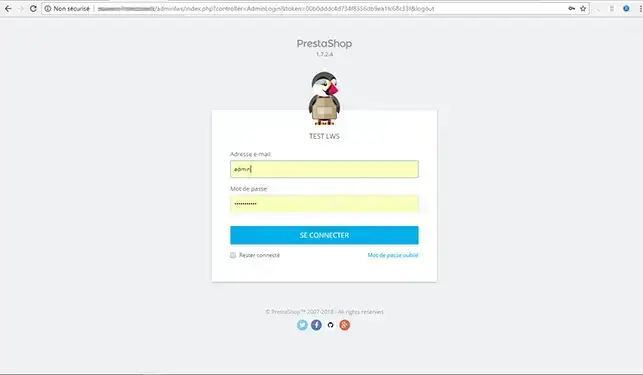
1. Connect to your Prestashop dashboard
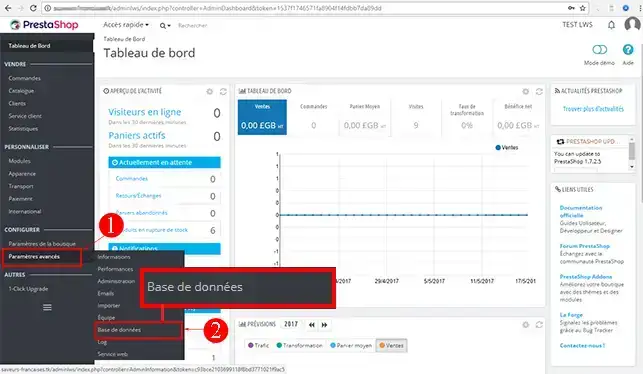
2. Click on the"advanced settings" tab in your menu. Then click on the "Database" tab.
3. ChooseUTF-8 encoding and click"Save".
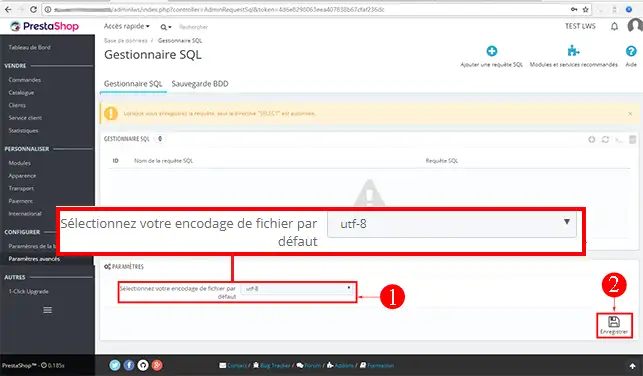
You are now able to change the database encoding for your Prestashop site on your shared hosting.
Don't hesitate to share your comments or questions!
Ask the LWS team and the community. Answers are published after moderation.
 About LWS :
LWS is a 100% French web hosting company that focuses on quality and innovation and offers a responsive and competent technical service at affordable prices.
About LWS :
LWS is a 100% French web hosting company that focuses on quality and innovation and offers a responsive and competent technical service at affordable prices.



 Yes
Yes No
No