
Online help
The web host accessible to all
Procédure
Service concerned: LWS VPS server
Panel concerned: ISPConfig 3
Level: beginner
An SSL certificate allows you to access your site with an address starting with https:// and encrypts exchanges between the site and its visitors.
ISPConfig can generate a free Let’s Encrypt certificate for a site already configured on your VPS. The certificate will then be renewed automatically, provided that the domain continues to point correctly to the server.
This help concerns VPS servers using ISPConfig.
Are you using another environment?
The site must already have been added in ISPConfig.
The domain name must also point to your VPS IP address. If you want to use the address with www, it must also point to the server.
Do not enable Let’s Encrypt immediately after a DNS change. Wait until propagation is complete.
If the domain does not yet point to the VPS, ISPConfig will not be able to generate the certificate.
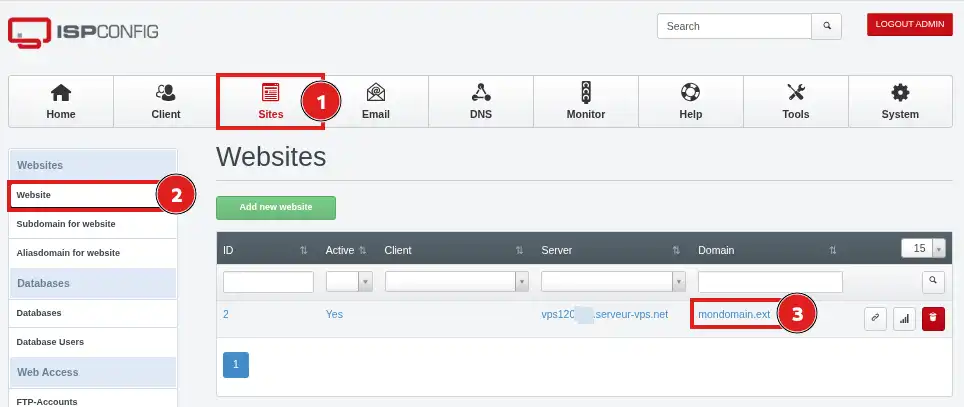
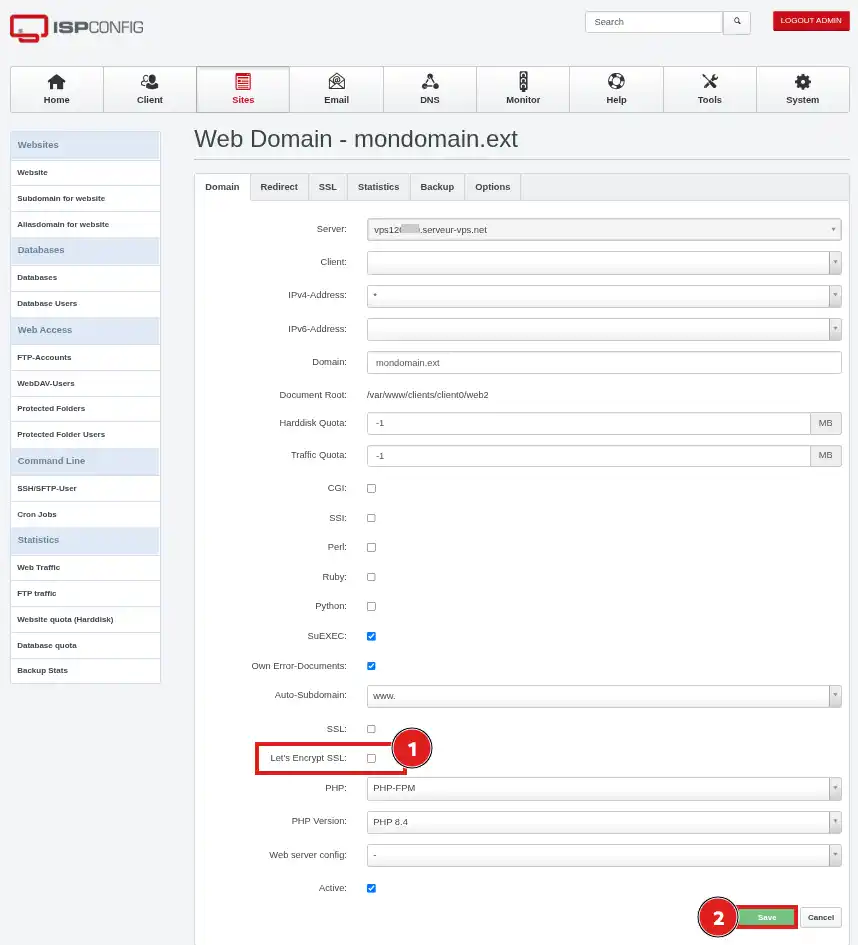
www if your site must be accessible with and without www;www if this address is not configured in your DNS zone.ISPConfig then starts creating the certificate. The operation may take a few minutes.
Open your site in a new tab using an address starting with https://, for example:
https://your-domain.fr
If you have also configured the address with www, test it separately:
https://www.your-domain.fr
The certificate is correctly installed when the site opens over HTTPS without any security warning in the browser.
Installing the certificate makes HTTPS available, but it does not necessarily redirect visitors who are still using an address with http://.
To automatically force the use of HTTPS, you will need to set up a script (.htaccess) or a plugin (if using a CMS) to perform the automatic redirection.
The Let’s Encrypt certificate is renewed automatically by ISPConfig. No manual intervention is required as long as the domain remains correctly configured and accessible from the VPS.
The Let’s Encrypt option becomes unchecked after saving
This usually means that ISPConfig was unable to generate the certificate.
Check the following elements:
www also points to the VPS if it is enabled in ISPConfig;After correcting the pointing, check SSL and Let’s Encrypt SSL again, then save.
The site works without www, but not with www
The www address probably does not point to your VPS or was not included in the site configuration.
Check the DNS record for www, then review the automatic subdomain setting in ISPConfig.
A certificate warning appears in the browser
Check that you are viewing exactly the domain name for which the certificate was created.
A certificate generated only for your-domain.fr does not necessarily cover www.your-domain.fr, and vice versa.
My site remains accessible over HTTP
This behavior is normal if no redirection has been configured. The certificate enables HTTPS, but does not automatically force its use.
Set up a permanent redirect from HTTP to HTTPS to send all visitors to the secure version of the site.
HTTPS works, but some resources are reported as insecure
Your site is probably still loading images, scripts, or style sheets with addresses starting with http://.
Replace these addresses with their https:// version or correct your application’s configuration.
Ask the LWS team and the community. Answers are published after moderation.
 About LWS :
LWS is a 100% French web hosting company that focuses on quality and innovation and offers a responsive and competent technical service at affordable prices.
About LWS :
LWS is a 100% French web hosting company that focuses on quality and innovation and offers a responsive and competent technical service at affordable prices.



 Yes
Yes No
No