
Online help
The web host accessible to all
Procédure
Chmod represents file permissions, for example to write, execute, modify and read a file or folder. It is important to protect your files to prevent external connections to your server folders. By default, the root user or server administrator has full access to all permissions. You can change this easily in all our shared hosting packages with the Plesk Panel.
| Write | You can write lines of code to your file. For example, when you install a Joomla module. This writes new lines to the configuration file. |
| Run | You can run a php script. For example, when you install joomla , you need to go to the install.php file at the root of your server if the file does not have sufficient permissions. It will be impossible to install your cms. |
| Read | You can read a file. For example, when you create a sitemap for your site to reference your site in a document, the Google robot must have this permission to be able to read the links and reference them. |
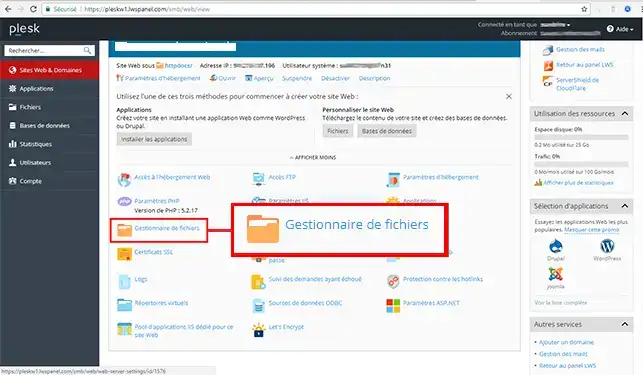
1. Connect to Plesk and select your domain and click on"File Manager".
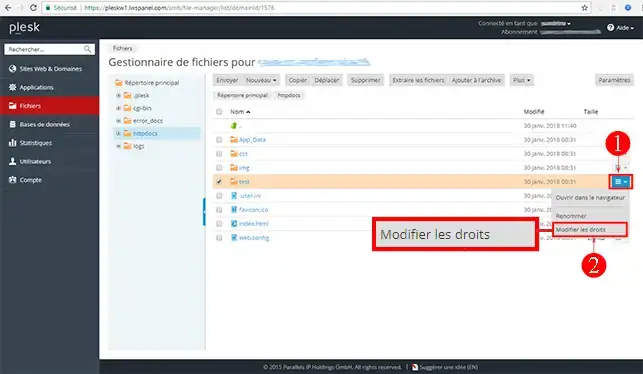
2. Select your Folder or File, click on the arrow and then on "Modify rights".
3. Once in the folder administration, you can change the Permissions (click on Advanced for more permissions) and click on Ok to confirm.
To find out more about the plesk panel you can consult the official resources:
Ask the LWS team and the community. Answers are published after moderation.
 About LWS :
LWS is a 100% French web hosting company that focuses on quality and innovation and offers a responsive and competent technical service at affordable prices.
About LWS :
LWS is a 100% French web hosting company that focuses on quality and innovation and offers a responsive and competent technical service at affordable prices.



 Yes
Yes No
No