


Configuring your email addresses in email software

Procédure

How do you configure your email addresses in your email software (Outlook Thunderbird, Windows Live Mail, iPhone, Mac)?

1. Connect to the cPanel interface.

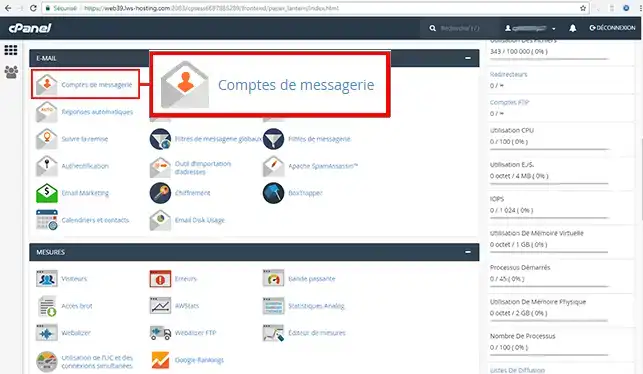
2. Click on the"Mail accounts" button in the"E-mail" section of your cPanel interface.

Configuring your email addresses in email software

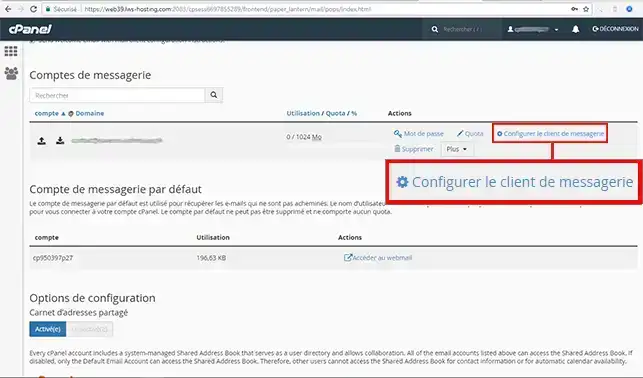
3. Click on the"Configure email client" tab.

Configuring your email addresses in email software

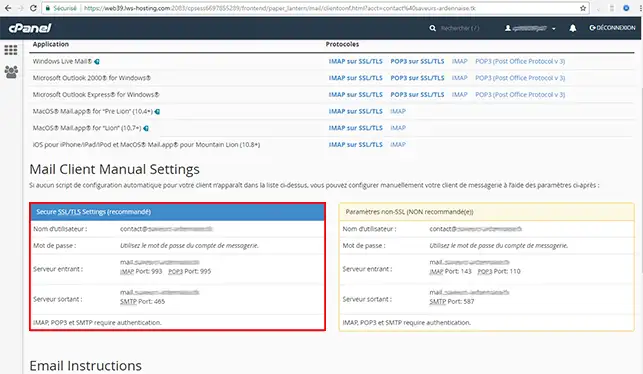
4. The"Mail Client Manual Setting" section lets you configure your mail client manually.

Configuring your email addresses in email software

  • Username: the username is always the full email address
  • Password: this is the password you set up when you created your mailbox
  • Incoming server (IMAP): the incoming server is in the form of mail.yourdomain.com (yourdomain.com being your domain name)
  • IMAP port: 993
  • Outgoing server (SMTP): the outgoing server is in the form of mail.yourdomain.com as for the IMAP server
  • SMTP port: 465

How do you automatically configure your email client?

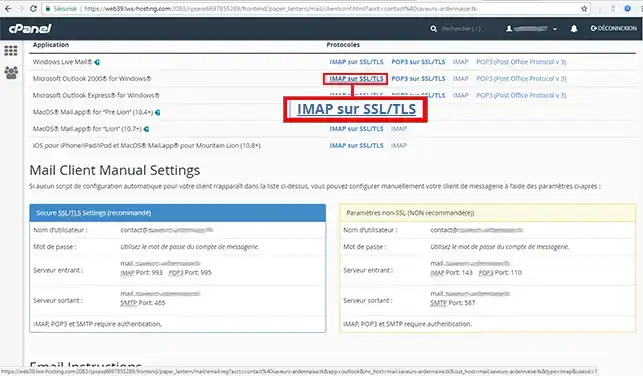
cPanel lets you automatically configure your email client, whether you're using Mac OS or Windows. To do this, connect to your cPanel management interface and click on"Mail account" in the"E-mail" section.

1. Then click on the"IMAP over SSL/TLS" tab behind the e-mail client you wish to configure.

Configuring your email addresses in email software

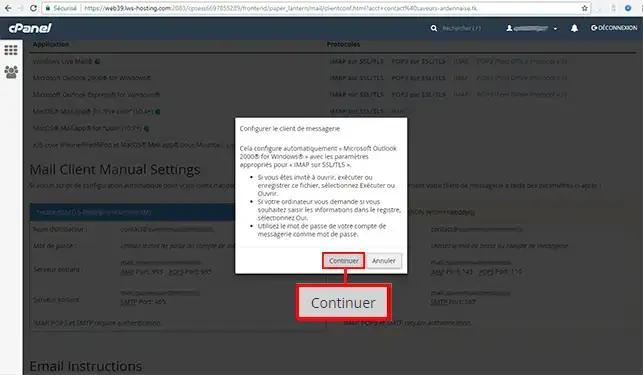
2. A new window will open. Click on"Continue" to automatically configure your client.

Configuring your email addresses in email software


Conclusion

You can now configure your cPanel email client manually and automatically with LWS.

Don't hesitate to share your comments and questions!

help.lws.net/a/1022
Was this article helpful?

Yes

No

Read 42 245 times

Thank you! Feel free to ask questions about our documentation if you would like more information, and help us improve it.

Similar articles

Questions about the article 3

Ask a question
Toni
15 Dec 2022
Aidez-moi à configurer mon mail pro avec Outlook via mobile. Merci
fabrice-LWS Official answer
17 Dec 2022
Bonjour, vous avez la possibilité de configurer une adresse email sur un téléphone Android en suivant la procédure suivante: https://aide.lws.fr/a/73 . Si vous disposez d'un iphone, la procédure sera la suivante: https://aide.lws.fr/a/72
Was this answer helpful?

Tom
19 May 2023
Bonjour, la procédure ne fonctionne pas sur la messagerie mail d'IOS. De plus vous indiquez de mettre les serveurs IMPA web51.lws-hosting.com ou [domaine masqué] et aucun des 2 ne fonctionnent. Que se pass-t-il ?
Benjamin-LWS Official answer
24 May 2023

Bonjour,

Merci de votre retour.

Pour la configuration d'une boite-mail sur une application mail, les problèmes de connexions peuvent survenir de plusieurs endroits dans votre configuration.

Quelques points à vérifier :

  • Les ports liés au serveur, voir cette documentation suivante : Quels ports utiliser ?
  • Les serveurs utilisés, si dans votre zone DNS, le sous-domaine mail.mondomaine.com pointe vers votre serveur mail, vous pouvez l'utiliser, sinon il faudra créer ce champ.
  • Si l'adresse-mail utilisé est bien créé.
  • Si le mot de passe est bien le bon, sinon changer le.

Si malgré ces vérifications, vous n'arrivez toujours pas à connecter votre adresse sur votre application de mail, nous vous invitons à contacter notre service support à travers votre espace client, afin d que l'on puisse vous aidez à configurer votre boite-mail. (Contacter le support LWS)

Cordialement, L'équipe LWS 

Was this answer helpful?
lws-619037 LWS team
29 May 2023
je n arrives pas a recevoir de mail depuis gmail hotmail yahoo outlook
Benjamin-LWS Official answer
30 May 2023

Bonjour, 

Merci de votre retour.

Il est possible que vous ayez mal configuré votre adresse-mail sur votre logiciel de messagerie, ce qui empêche surement la réception des mails.

Dans ce cas, nous vous invitons à contacter notre service support à travers votre espace client, afin de vous apporter une aide. (Contacter le support LWS)

Cordialement, L'équipe LWS 

Was this answer helpful?

A question about this article?

Ask the LWS team and the community. Answers are published after moderation.

Ask the LWS team and its community a question

GDPR: Controller: LWS-Ligne Web Services. Purpose: moderation and public publication of your question, possible notification of an answer. Legal basis: consent (Art. 6(1)(a) GDPR). Email retention: 90 days after notification, 12 months maximum without an answer. To exercise your rights, see the GDPR section of our Terms and Conditions.