How do I restore a backup of my dedicated VPS server?

Procédure

How do I restore a backup from the LWS Panel customer area (with the Business option)?

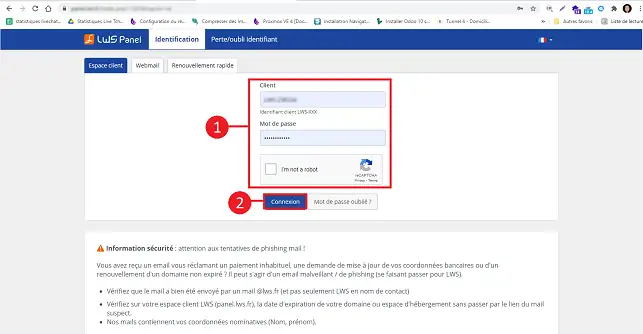
1. Log in to your LWS Panel customer area
How do I restore a backup of my dedicated VPS server?

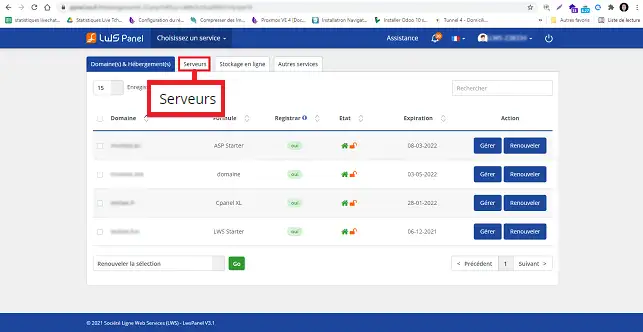
2. Click on the"Servers" tab at the top of the page.
How do I restore a backup of my dedicated VPS server?

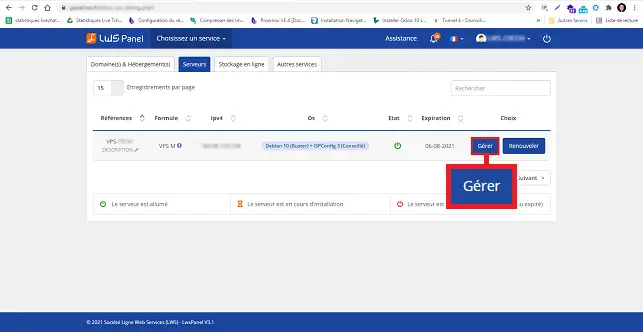
3. Click on the "Manage" button behind the server in question.
How do I restore a backup of my dedicated VPS server?


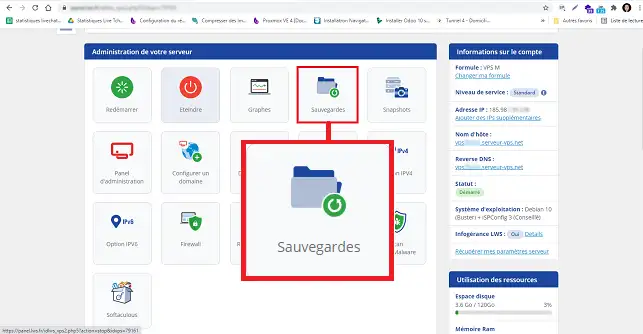
4. Click on the Backups button

How do I restore a backup of my dedicated VPS server?


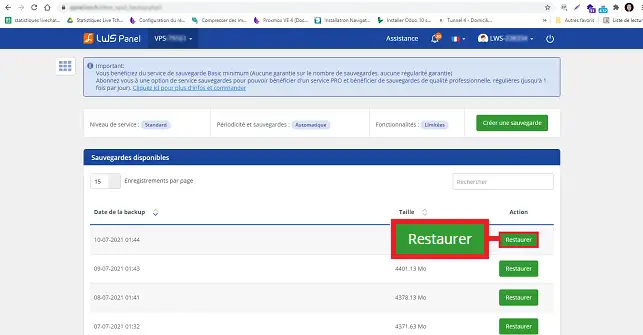
5. You can then choose the backup of your choice and click on the Restore button.
How do I restore a backup of my dedicated VPS server?


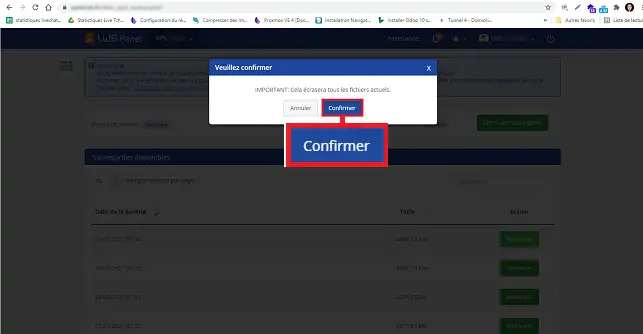
8. All you have to do is confirm by clicking on the "Confirm" button.
How do I restore a backup of my dedicated VPS server?


How do you restore a backup manually under debian?

  • Run putty. Log on as root. Go to the root of your server with the following command:
cd /

  • Create the folder for the backup
mkdir backups

  • Go to the backups folder then :
cd backups

  • Create a new file using the nano command
nano fullserver.sh

  • Then specify the following:
tar -cvpf /backups/fullbackup.tar --directory=/ --exclude=proc--exclude=sys --exclude=dev/pts --exclude=backups

  • You then need to set the right permissions on the file and make it executable
chmod 750 /backups/fullserver.sh./backups/fullserver.sh

  • To restore your backup, use the following command:
tar -xvpf /fullbackup.tar

Rate this article :

5/5 | 1 opinion

This article was useful to you ?

Article utileYes

Article non utileNo

MerciMerci ! N'hésitez pas à poser des questions sur nos documentations si vous souhaitez plus d'informations et nous aider à les améliorer.


Vous avez noté 0 étoile(s)

Similar articles

3mn reading

How do you trigger outsourcing?

1mn reading

How do I back up a dedicated server?

4mn reading

Contact technical support by e-mail


Questions sur cet article

Ask the LWS team and its community a question

RGPD : Responsable LWS-Ligne Web Services. Finalité : modération et publication publique de votre question, notification éventuelle d'une réponse. Base légale : consentement (art. 6.1.a RGPD). Conservation des emails : 90 jours après notification, 12 mois maximum sans réponse. Vous pouvez exercer vos droits via notre nos CGV - section RGPD.