
Online help
The web host accessible to all
Procédure
The SSL protocol stands for Secure S Layer. This protocol encrypts the data on your pages, preventing the theft of form or credit card data , for example. The Let's Encrypt SSL certificate is available on all the Web hosting packages offered by LWS.
In order to activate HTTPS (SSL) on your Wordpress website, you need to:
To have a secure website, you can activate an SSL certificate to have an https url:
1. To activate it on your site, you need to go to the administration of your Wordpress site via a URL in the following format: "http://monsitewordpress.fr/wp-admin".
2. By default you have a URL of the type http://www.leNomDeVotreSite.fr. You need to change this URL tohttps://www.leNomDeVotreSite.fr for your certificate to work.
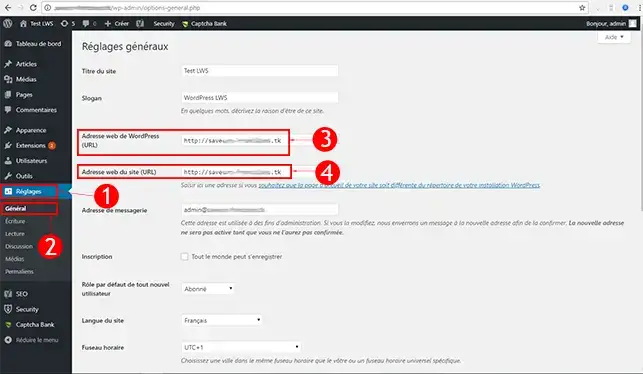
You can now activate the HTTPS protocol on your Wordpress website with LWS. The SSL protocol allows you to secure the data on your website.
Don't hesitate to share your comments and questions!
Ask the LWS team and the community. Answers are published after moderation.
 About LWS :
LWS is a 100% French web hosting company that focuses on quality and innovation and offers a responsive and competent technical service at affordable prices.
About LWS :
LWS is a 100% French web hosting company that focuses on quality and innovation and offers a responsive and competent technical service at affordable prices.



 Yes
Yes No
No