
Online help
The web host accessible to all
Procédure
The e-mail address resolution manager available in your WHM reseller area allows you to check the correct configuration of the destination e-mail address.
You can test it:
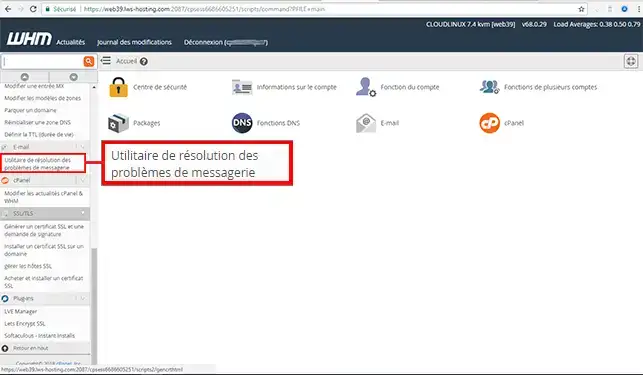
2. Go to the"E-mail" section on the left of your screen, and select"E-mail Troubleshooting Utility".
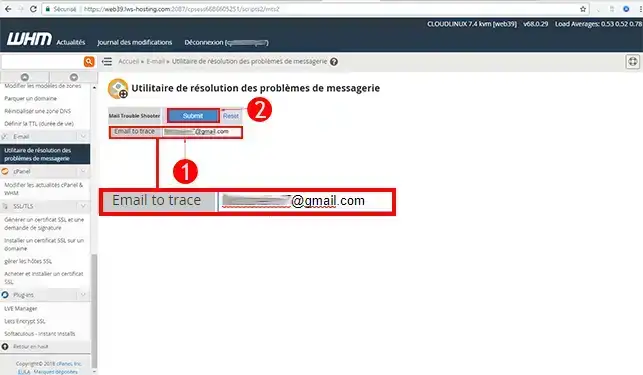
3. Enter the email address you wish to check, then click on"Submit".
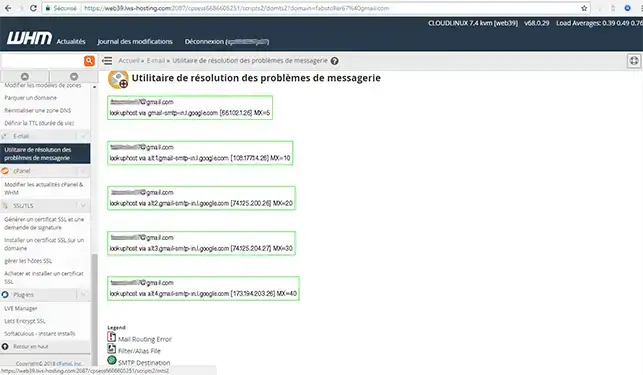
4. You will be informed whether or not there is a problem on the email problem resolution manager
You are now able to test the resolution of email addresses using the manager in your reseller area with LWS.
Don't hesitate to share your comments and questions!
Ask the LWS team and the community. Answers are published after moderation.
 About LWS :
LWS is a 100% French web hosting company that focuses on quality and innovation and offers a responsive and competent technical service at affordable prices.
About LWS :
LWS is a 100% French web hosting company that focuses on quality and innovation and offers a responsive and competent technical service at affordable prices.



 Yes
Yes No
No