
Online help
The web host accessible to all
Procédure
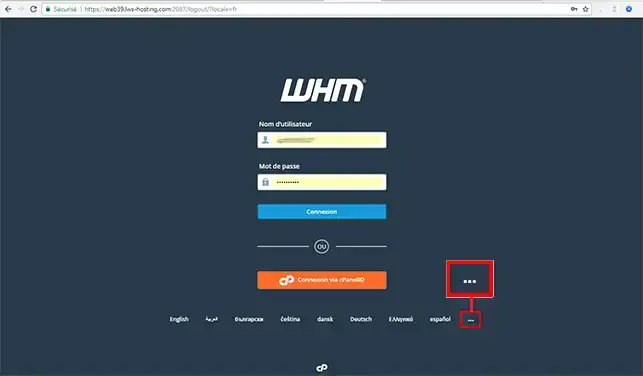
1. Before logging into your WHM management interface, click on the "..." button to display all available languages.
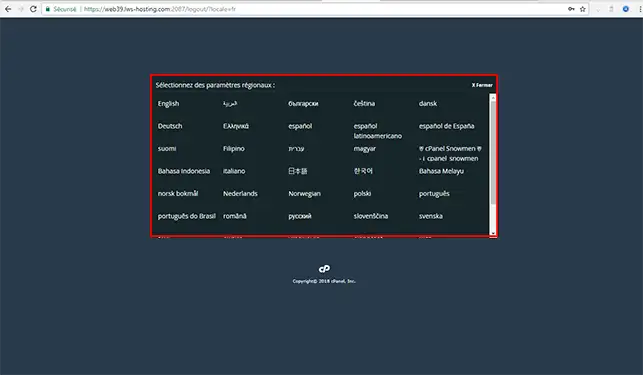
2. Choose your language in the drop-down window.
3. Once you have chosen your language, connect to your WHM management interface.
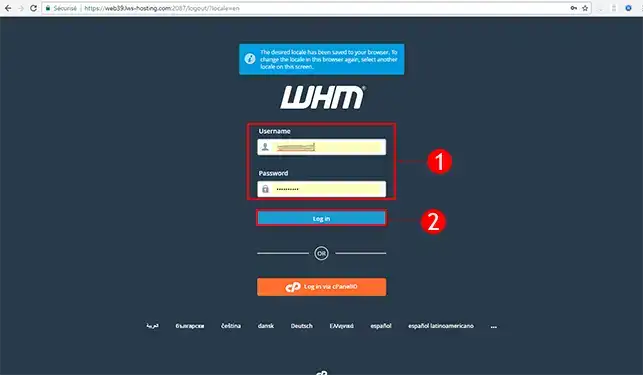
You are now able to change the language of your WHM reseller interface. Changing the language is done via a cookie on your computer. If you delete the cookies, you may have to set the language again.
Do not hesitate to share your comments and questions!
Ask the LWS team and the community. Answers are published after moderation.
 About LWS :
LWS is a 100% French web hosting company that focuses on quality and innovation and offers a responsive and competent technical service at affordable prices.
About LWS :
LWS is a 100% French web hosting company that focuses on quality and innovation and offers a responsive and competent technical service at affordable prices.



 Yes
Yes No
No