
Online help
The web host accessible to all
Procédure
In Plesk, tasks can be configured to run automatically for a given period of time and on given dates. An administrator can use automated tasks to make periodic backups, monitor the system, run custom scripts, etc.
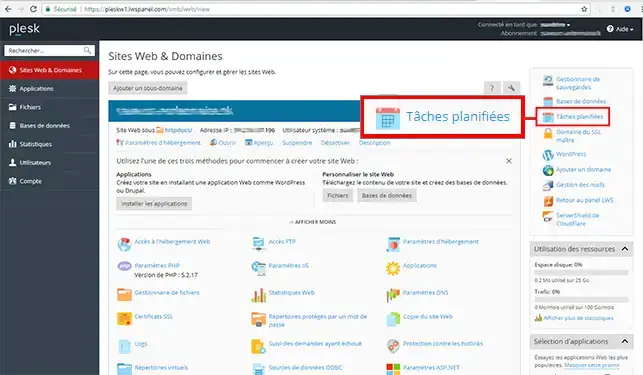
1. Connect to Plesk and select"Scheduled tasks".
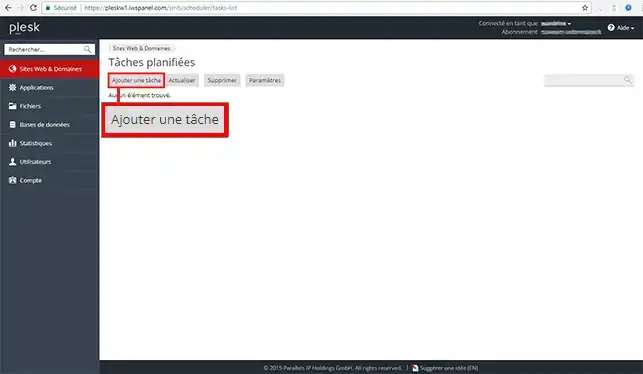
2. Click on"Add a task".
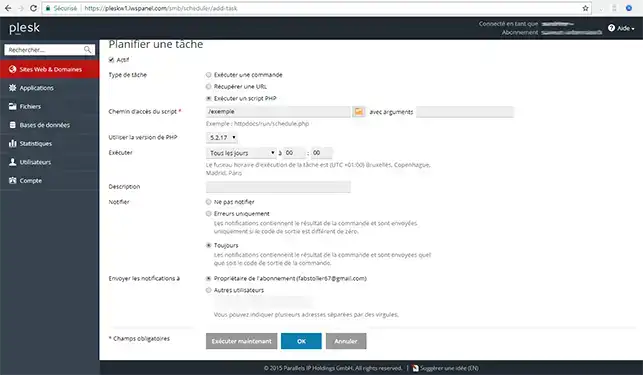
4. Fill in the fields (Description , Notification , Path , Arguments , Time) and click on"Execute Now" or"Ok" to validate.
To find out more about the plesk panel, you can consult the official resources:
Ask the LWS team and the community. Answers are published after moderation.
 About LWS :
LWS is a 100% French web hosting company that focuses on quality and innovation and offers a responsive and competent technical service at affordable prices.
About LWS :
LWS is a 100% French web hosting company that focuses on quality and innovation and offers a responsive and competent technical service at affordable prices.



 Yes
Yes No
No