
Online help
The web host accessible to all
Procédure
Do you have a lot of web data to process on your website? Do you want your visitors to be able to register on your website or subscribe to your newsletter? Databases are there to help you.
A MySQL database is a Database Management System that allows you to manage large amounts of information in a minimum of time. A MySQL database is usually combined with other Web languages such as PHP. Many websites such as Wordpress and Prestashop use databases to store all the information needed for the website to function properly.
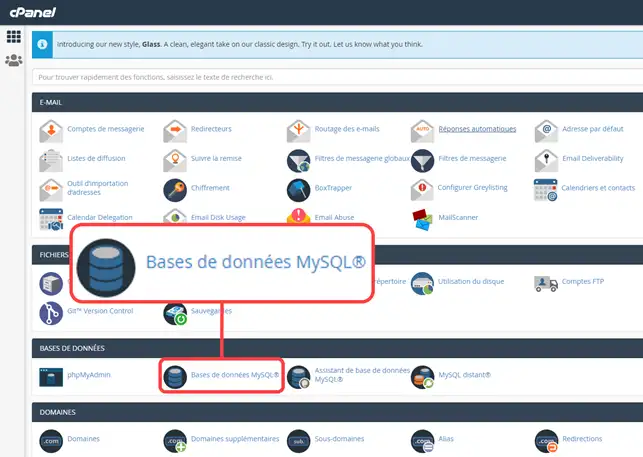
1. Log in to your cPanel account, scroll down the page and click on the "MySQL databases" icon.
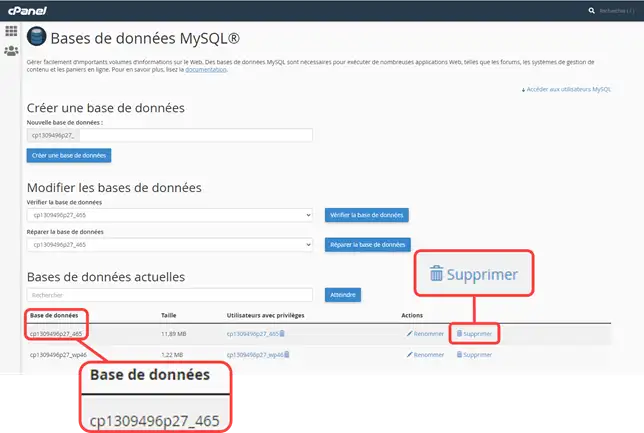
2. Click on the "Delete" button located to the right of the name of the database you wish to delete.
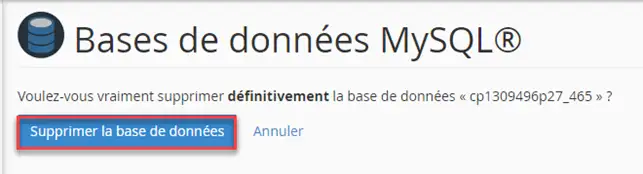
3. Press the "Delete database" button in the confirmation window
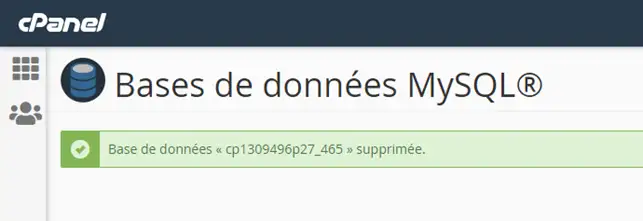
4. The following message will be displayed to confirm the deletion of your database.
To be able to access the MySQL databases you have created, you need to create a MySQL user authorised to access them.
1. Go back to the"MySQL databases" section,"MySQL users" section.
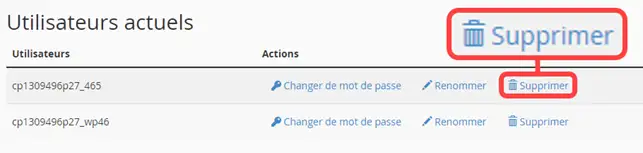
2. Click on the"Delete" button to the right of the user name you wish to delete.
You are now able to delete a MySQL database on your cPanel web hosting. A database is very useful if you want your visitors to be able to subscribe to your website or a newsletter, but also when creating an online shop.
Don't hesitate to share your comments or questions!
Ask the LWS team and the community. Answers are published after moderation.
 About LWS :
LWS is a 100% French web hosting company that focuses on quality and innovation and offers a responsive and competent technical service at affordable prices.
About LWS :
LWS is a 100% French web hosting company that focuses on quality and innovation and offers a responsive and competent technical service at affordable prices.



 Yes
Yes No
No