Procédure
What is a MySQL database?
You have a lot of web data to process on your website, you want your visitors to be able to subscribe to your website or your newsletter? Databases are there to help you.
A MySQL database is a Database Management System that allows you to manage large amounts of information in a minimum of time. A MySQL database is usually combined with other Web languages such as PHP. Many websites such as Wordpress and Prestashop use databases to store all the information needed for the website to function properly.
How do I create a MySQL database in cPanel?
There are three steps to creating your MySQL database:
- Creating the database name
- Creating the database user
- Giving the user access rights to the database
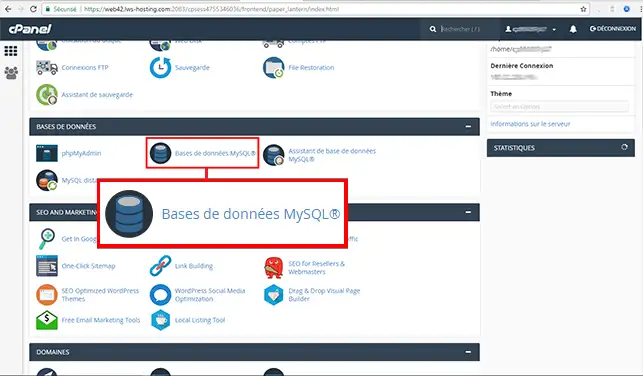
1. Log in to your cPanel account, scroll down the page and click on the "MySQL databases" icon.
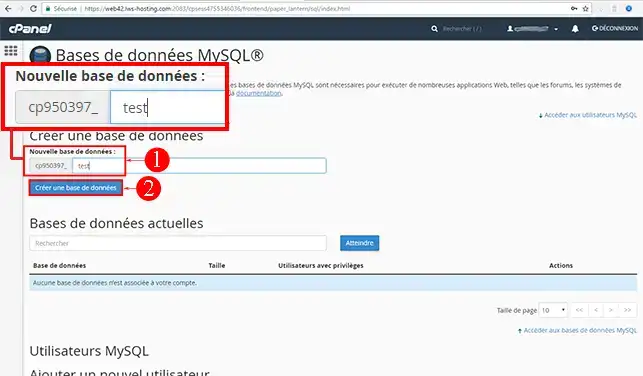
2. Enter the name you wish to give to this database and then click on the "Create a database" button.
Note: The name of your database will always begin with a few letters/numbers followed by the _ character
in this example, the database will be called: named123_test
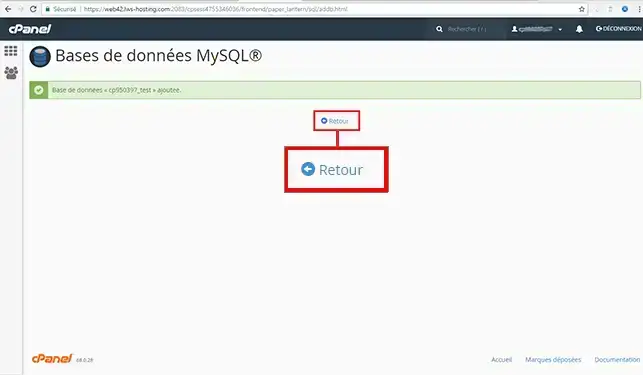
The database has been created:
How do I create a MySQL user in cPanel?
To be able to access the MySQL databases you have created, you need to create a MySQL user authorised to access them.
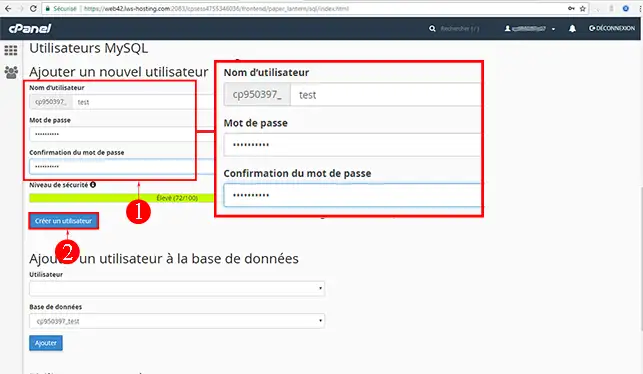
1. Go back to the"MySQL databases" section,"MySQL users" section.
Fill in the required fields under"Add a new user" then click on the"Create a user" button.
Note: The MySQL user name will always begin with a few letters / numbers followed by the _ character
in this example, the database will be named: nomd123_test
2. Now that the user has been created, you need to assign him/her to the database that he/she will be authorised to manage.
To do this, click on the"back" link:
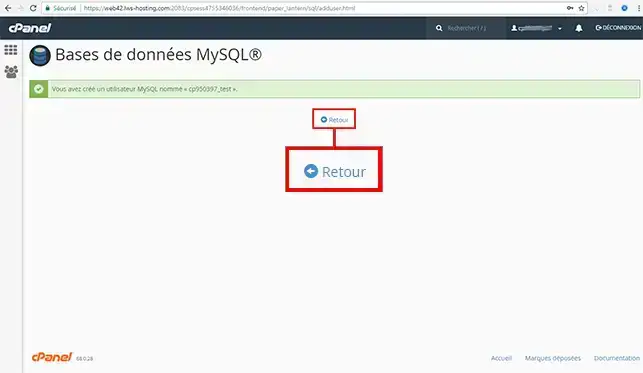
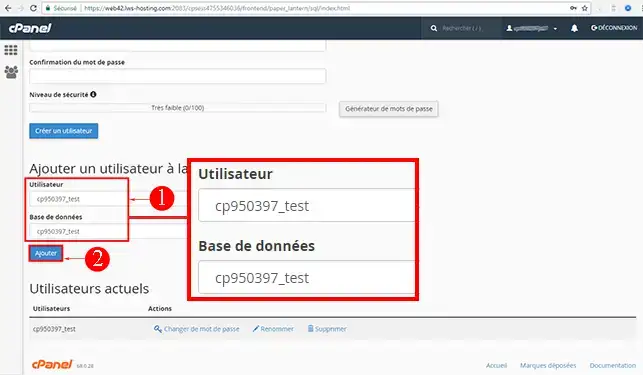
3. Select the user name you have just created, and the database he/she will be authorised to manage.
Click on the"Add" button (you can assign as many users as you wish to a database).
4. Tick the privileges you wish to grant to this user, then click on the"Make changes" button.
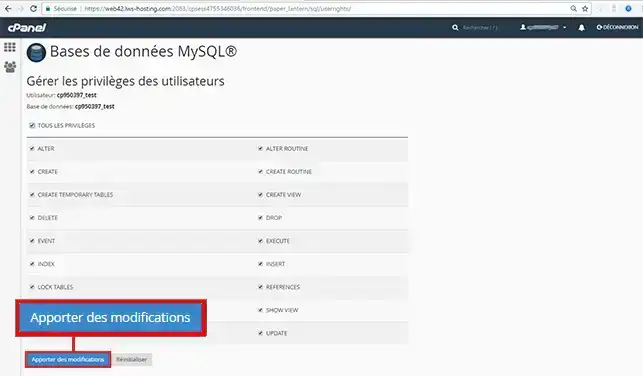
Your MySQL user is immediately operational and can manage the database according to the privileges you have granted him/her.
cPanel video tutorial: How do I create a MySQL database in cPanel?
Need help using cPanel?
See all our cPanel training videos
Modifying an existing MySQL database
The database creation tool, accessible by going to the"MySQL database" tab in the"Databases" section, allows you to perform a number of different actions, as follows:
- Check or repair your MySQL database
- Rename your current database. If you decide to change the name of your database, you will need to change the parameters in your website configuration file.
- Delete the database. Please note that deleting a database is irreversible.
- Change a user's password.
- Rename or delete a user.
Conclusion
You are now able to add a MySQL database to your cPanel web hosting. A database is very useful if you want your visitors to be able to subscribe to your website or a newsletter, but also when creating an online shop.
Don't hesitate to share your comments or questions!

 Contact us
 Customer Area


 Visit LWS


 Yes
Yes No
No Article read
34226 once
Article read
34226 once Merci ! N'hésitez pas à
poser des questions sur nos documentations si vous souhaitez plus d'informations et nous aider à les
améliorer.
Merci ! N'hésitez pas à
poser des questions sur nos documentations si vous souhaitez plus d'informations et nous aider à les
améliorer.
 About
About 