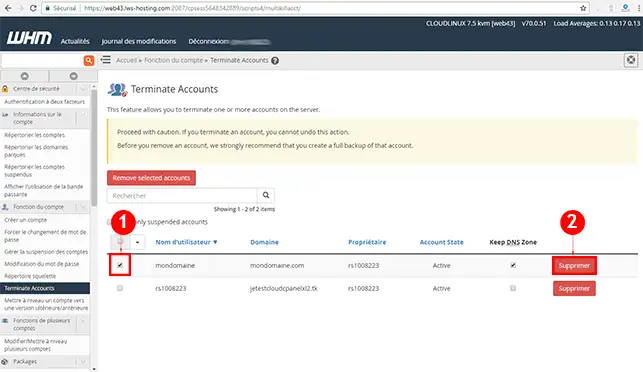
22. Check the box in front of the cPanel account you wish to delete and then click on the"Delete" button.
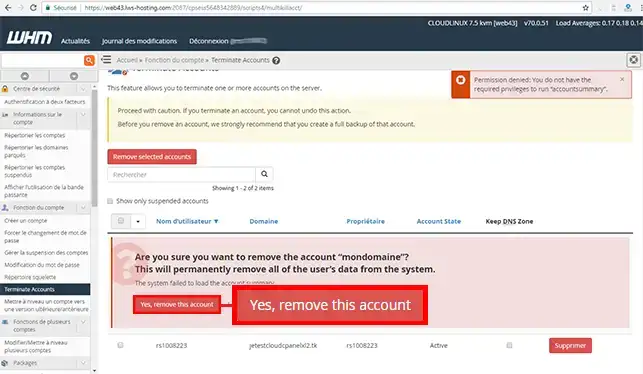
33. Click on the"Yes, Remove this Account" button to permanently delete the cPanel account. Please note that deleting the account is definitive and that it will not be possible to recover the customer account at a later date. All information attached to the cPanel account will be deleted (Emails, FTP account, database).
Deleting a cPanel account in Video
Conclusion
You can now delete a cPanel account via your WHM interface on your cPanel Cloud Server with LWS. This action is irreversible and it will not be possible to recover a deleted account.
Don't hesitate to share your comments and questions!
Comment rendre accessible le compte Cpanel que j'ai crée ??
F✓
fabrice-LWS Official answer
27 Jul 2022
Bonjour, si vous désirez pouvoir bénéficier d'un cPanel, il vous faudra souscrire à une formule se trouvant sur la page suivante : https://www.lws.fr/hebergement-cpanel.php
Was this answer helpful?
A question about this article?
Ask the LWS team and the community. Answers are published after moderation.
Ask the LWS team and its community a question
!
To enable this form, please tick the two consent boxes below.



 Yes
Yes No
No About
About 