
Online help
The web host accessible to all
Procédure
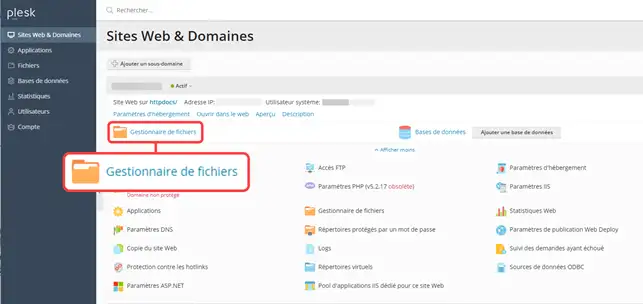
1. Log in to your Plesk account and click on the "File managers" icon.
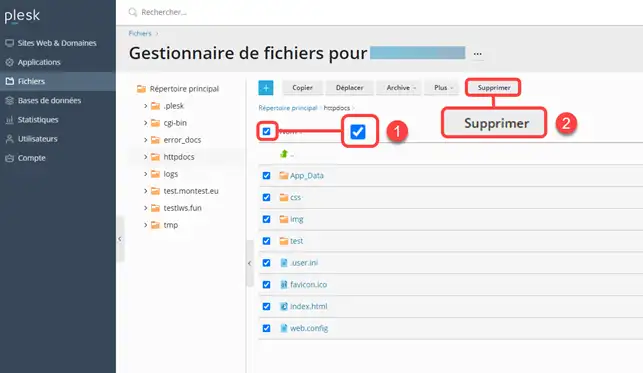
2. Select the set of files you wish to delete (1) then click on"delete" (2)
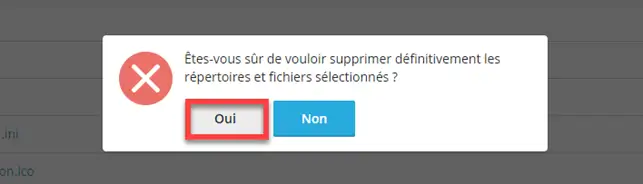
3. Then click"Yes " to confirm deletion of the files
The following message will be displayed to confirm that the files have been deleted:

Important information : By default, your site files are placed in the "httpdocs" folder in the file manager. Files may be placed in another folder if you explicitly request this or if you add sub-domains or additional domains. Be careful not to delete the system folders/files, as this could cause your hosting package to malfunction irreversibly.
Ask the LWS team and the community. Answers are published after moderation.
 About LWS :
LWS is a 100% French web hosting company that focuses on quality and innovation and offers a responsive and competent technical service at affordable prices.
About LWS :
LWS is a 100% French web hosting company that focuses on quality and innovation and offers a responsive and competent technical service at affordable prices.



 Yes
Yes No
No