


How can you force HTTPS protocol on your Wordpress site?

Procédure

How do you force HTTPS to be used on your Wordpress site?

Once you have activated the SSL certificate in your customer area, you need to redirect all HTTP pages to HTTPS for security reasons.

To do this, there are two easy-to-use modules that allow you to force the use of the HTTPS protocol on your Wordpress site with just a few clicks of the mouse.

Install WP Force SSL on your website

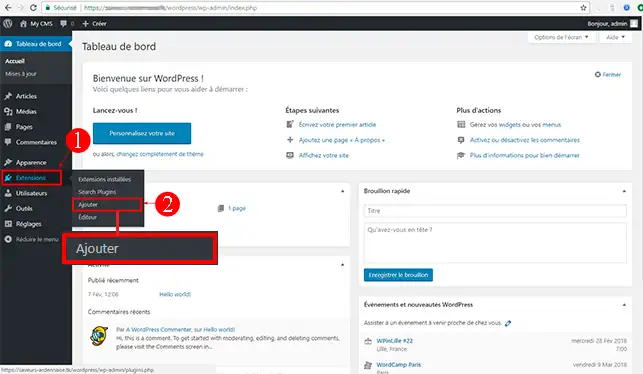
1. Connect to your Wordpress dashboard, click on"Extensions" and then on"Add".

How can you force HTTPS protocol on your Wordpress site?


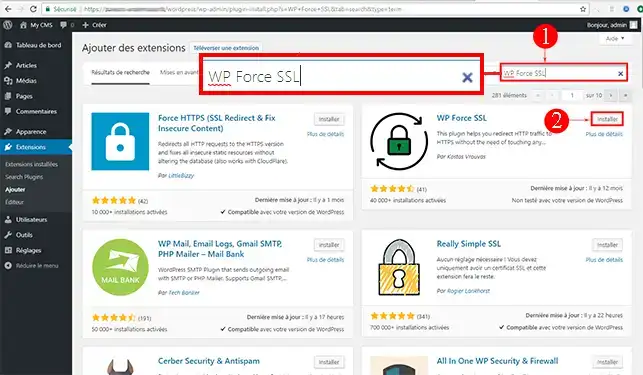
2. Using the search system on the right-hand side of your window, search for the"WP Force SSL" module and click on the"Install" button behind the module.

How can you force HTTPS protocol on your Wordpress site?


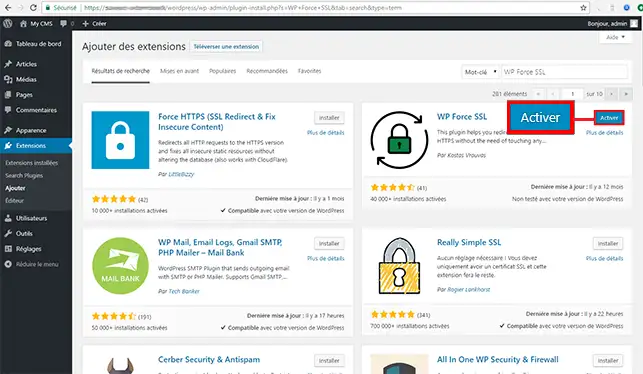
3. Once the extension is installed, click on"Activate".

How can you force HTTPS protocol on your Wordpress site?


How do I install Really Simple SSL?

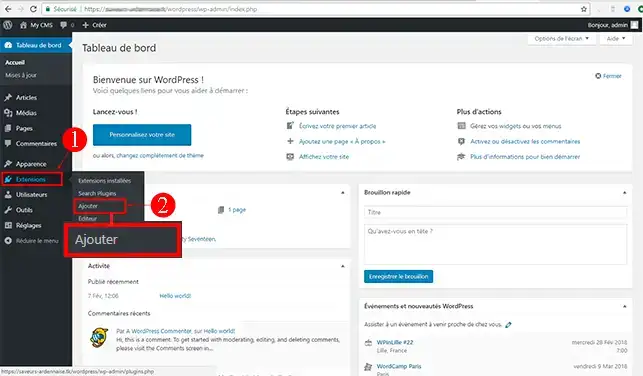
1. Connect to the dashboard of your Wordpress website, click on the"Extensions" tab in the left-hand menu and then on"Add".

How can you force HTTPS protocol on your Wordpress site?


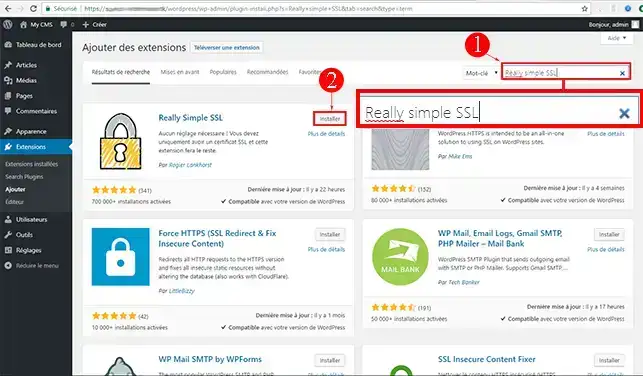
2. Search for the"Really Simple SSL" extension using the search bar, then click on the"Install" button for the relevant module.

How can you force HTTPS protocol on your Wordpress site?


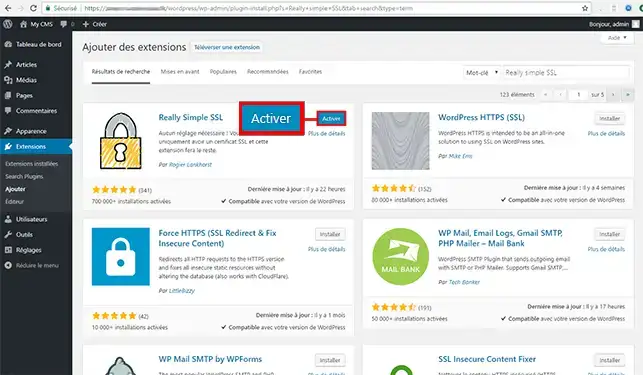
3. Click on the "Activate" button to go on to the next step.

How can you force HTTPS protocol on your Wordpress site?


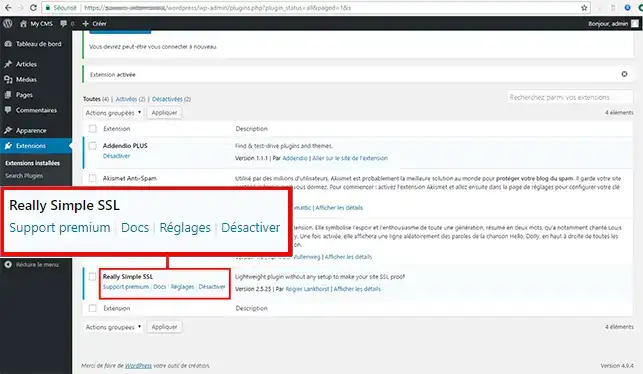
4. You will be redirected to the page for all installed extensions. Find the"Really Simple SSL" module and click on the"Settings" tab.

How can you force HTTPS protocol on your Wordpress site?


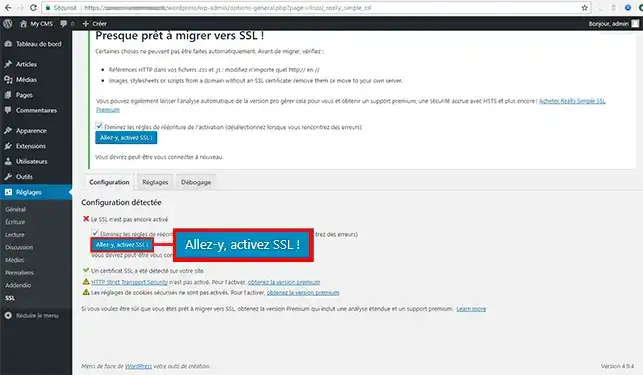
5. Finally, click on the"Go ahead, activate SSL" button.

How can you force HTTPS protocol on your Wordpress site?

Conclusion

You are now able to force the use of the HTTPS protocol on your Wordpress website. Using the HTTPS protocol on your website increases its security.

Don't hesitate to share your comments and questions!

help.lws.net/a/991
Was this article helpful?

Yes

No

Read 34 218 times

Thank you! Feel free to ask questions about our documentation if you would like more information, and help us improve it.

Similar articles

Questions about the article 1

Ask a question
gilloup
21 Jan 2023
Bonjour, Est il possible de se passer de plugin (j'utilise WP force SSL) pour passer en Https ? J'ai modifié le fichier .htaccess, avec ce tutoriel : https://[domaine masqué]/wordpress-force-https/ Mais ça ne fonctionne pas. Cordialement.
Benjamin-LWS Official answer
24 Jan 2023

Bonjour, merci de votre retour.

Il est effectivement possible de passer en HTTPS sans utiliser de plugin, en utilisant un certificat SSL gratuit. Pour activer un certificat SSL gratuit sur le LWS Panel, voici les étapes à suivre :

  1. Connectez-vous à votre hébergement LWS via le LWS Panel.

  2. Cliquez sur l'onglet "SSL" dans le menu de gauche.

  3. Cliquez sur le bouton "Ajouter un certificat gratuit" pour installer un certificat Let's Encrypt.

  4. Sélectionnez le domaine pour lequel vous souhaitez installer le certificat SSL.

  5. Cliquez sur "Valider" pour installer le certificat.

  6. Une fois le certificat installé, vous pouvez activer la redirection automatique vers HTTPS en suivant les étapes décrites dans la documentation que je vous ai donnée précédemment.

Il est important de noter que cette méthode ne garantit pas une compatibilité avec tous les thèmes ou plugins, il est donc important de vérifier que tout fonctionne correctement après l'installation du certificat SSL et l'activation de la redirection HTTPS.

N'hésitez pas à consulter notre documentation pour plus d'informations sur l'installation et la configuration de certificats SSL sur LWS Panel : https://aide.lws.fr/a/595

Nous restons à votre disposition via notre service de support client pour toutes demandes supplémentaires. (https://aide.lws.fr/a/268)

Was this answer helpful?

A question about this article?

Ask the LWS team and the community. Answers are published after moderation.

Ask the LWS team and its community a question

GDPR: Controller: LWS-Ligne Web Services. Purpose: moderation and public publication of your question, possible notification of an answer. Legal basis: consent (Art. 6(1)(a) GDPR). Email retention: 90 days after notification, 12 months maximum without an answer. To exercise your rights, see the GDPR section of our Terms and Conditions.