


How do I insert a new item on SiteBuilder Pro?

Procédure

Why add elements on SiteBuilder Pro?

This documentation describes the procedure for the old version of SiteBuilder. If you are using the latest version of SiteBuilder, you will need to refer to this documentation.

It is possible to add elements on SiteBuilder Pro, whether text, images, videos in order to add different content to your website.

It is also possible to add features such as a social media sharing button and an online store from the SiteBuilder Pro Starter plan.

Content and features will allow you to enrich your website.

How do I insert a new element on SiteBuilder Pro?

1. First, log in to your website administration

         
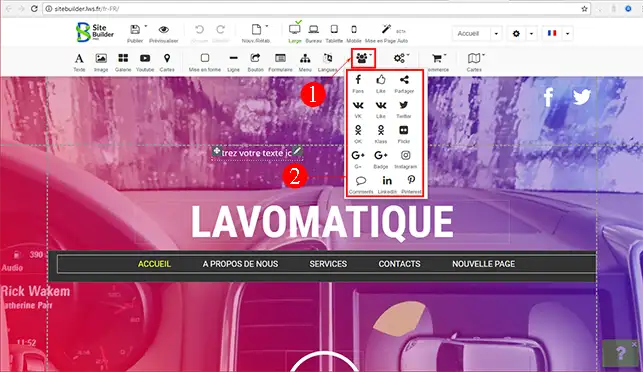
2. Click on the element you want to place on your website and drag it to the desired location.

How do I insert a new item on SiteBuilder Pro?

         
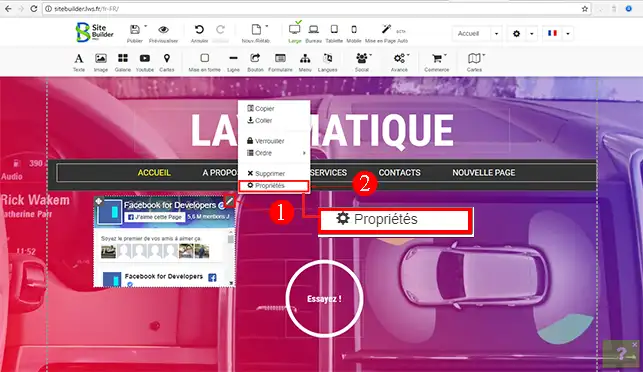
3. Once the element has been placed in the desired location on your page, click on the pencil located at the top right of your element, then on "Properties" in order to configure the new module.

How do I insert a new item on SiteBuilder Pro?

         
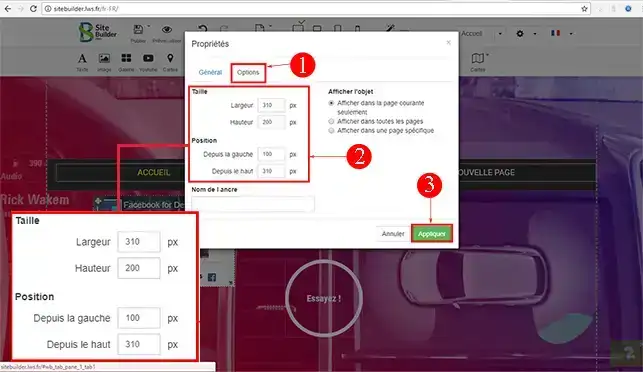
4. In the "Options" section of each element, you can increase and/or decrease the size (width and height) of your module. It is also possible to define the position of your module (from the left and from the top). 

How do I insert a new item on SiteBuilder Pro?

Conclusion

You are now able to set up on SiteBuilder Pro, your various elements such as text elements, videos, but also an online store or a blog.

Feel free to share your comments and questions!

help.lws.net/a/887
Was this article helpful?

Yes

No

Read 25 259 times

Thank you! Feel free to ask questions about our documentation if you would like more information, and help us improve it.

Similar articles

Questions about the article 1

Ask a question
sam
il y a 2 sem.
J'ai besoin d'empêcher les modifications futures de certains blocs dans la structure de sitebuilder pro. Un clic droit sur un élément me propose 'verrouiller' cet élément mais rien n'est verrouillé : l'élément peut être déplacé, modifié, etc. S'agit il d'un bug ?
Jordan-LWS Official answer
il y a 2 sem.

Bonjour,

Si la fonction « Verrouiller » ne fonctionne pas comme prévu et que l’élément reste modifiable ou déplaçable malgré son verrouillage, il peut effectivement s’agir d’un dysfonctionnement.

Je vous recommande dans ce cas de contacter directement le support technique afin qu’ils puissent vérifier le comportement de cette fonctionnalité et déterminer s’il s’agit d’un bug ou d’une mauvaise configuration.

Je ne serai malheureusement pas en mesure de vous accompagner davantage sur ce point via ce canal.

Je vous remercie de votre attention et reste à votre disposition pour toute autre question ou complément d'information.

Cordialement, L'équipe LWS

Was this answer helpful?

A question about this article?

Ask the LWS team and the community. Answers are published after moderation.

Ask the LWS team and its community a question

GDPR: Controller: LWS-Ligne Web Services. Purpose: moderation and public publication of your question, possible notification of an answer. Legal basis: consent (Art. 6(1)(a) GDPR). Email retention: 90 days after notification, 12 months maximum without an answer. To exercise your rights, see the GDPR section of our Terms and Conditions.