
Online help
The web host accessible to all
Procédure
It's software that manages the creation and publication of documents, possibly in a collaborative way.
You can install more than 80 applications via Plesk. Here is a non-exhaustive list of the best-known CMS:
|
Wordpress is a content management system, CMS, with basic functions for editing text, modifying and adding images. It is possible to install extensions to add new functions to the site, such as :
|
||
|
Drupal is a content management system, CMS, you have the basic functions to edit text, modify, add images. It is possible to install extensions to add new features to the site such as :
|
||
|
Joomla is a content management system, CMS, you have the basic functions to edit text, modify, add images. It is possible to install extensions to add new features to the site such as :
|
||
|
osCommerce is a complete online sales tool based on Open Source code.
|
||
|
Coppermine is a PHP/MYSQL application that lets you easily manage and create an online photo gallery. It works a bit like a forum, with the addition of categories, albums and then images. Users and groups can be added and given the option of uploading photos or commenting on them. Visitors will find everything they need with the search function, the latest photo, the E-card and the slideshow. With 10 themes to choose from, you can also modify the skin yourself using templates and style sheets. | ||
|
DokuWiki is an easy-to-use, versatile Open Source wiki that requires no database. Users love it for its clean, readable syntax. Its ease of maintenance, backup and integration make it a favourite with administrators. Built-in access control and authentication connectors make DokuWiki particularly useful in the corporate context, and the large number of plug-ins created by its dynamic community offers a wide range of use cases, well beyond a traditional wiki. |
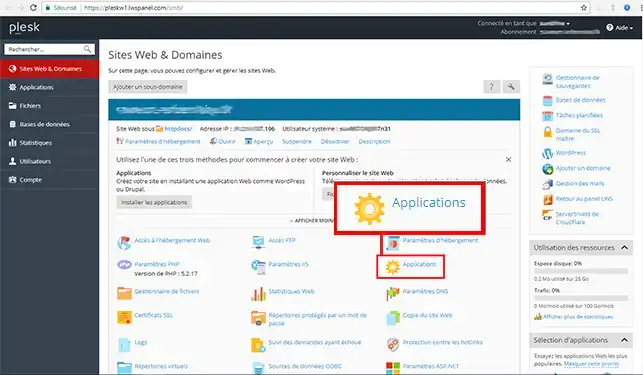
1. Log on to Plesk and click on See the complete list in the Application Selection section.
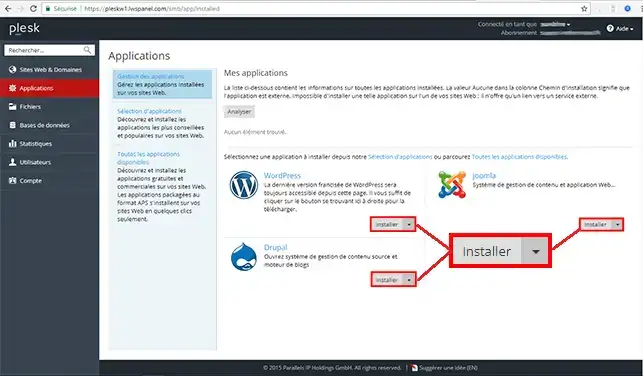
2. Choose your CMS (Wordpress , Joomla or Drupal) and click on"Install".
Ask the LWS team and the community. Answers are published after moderation.
 About LWS :
LWS is a 100% French web hosting company that focuses on quality and innovation and offers a responsive and competent technical service at affordable prices.
About LWS :
LWS is a 100% French web hosting company that focuses on quality and innovation and offers a responsive and competent technical service at affordable prices.



 Yes
Yes No
No