


How do I install software via Softaculous on cPanel?

Procédure

What is Softaculous ?

Some software such as WordPress requires very little knowledge in order to install it on your web space. Powerful and easy to use, many blogging, showcase and e-commerce applications have become extremely popular. Installations can sometimes take a long time.

The Softaculous application installed on cPanel web hosting lets you automate the installation of web software such as WordPress, Joomla and PrestaShop from your web interface.

Softaculous currently has more than 350 software packages that you can install in just one click. This mainly concerns blogs, content management, customer relationship management, customer support and e-commerce.

Installing software through Softaculous is designed to be a 1-click process. All you need to do is fill in the information required to install your software. Softaculous takes care of the rest, including the creation of your database.

How do I install software via Softaculous on cPanel ?

1. Connect to your cPanel interface.

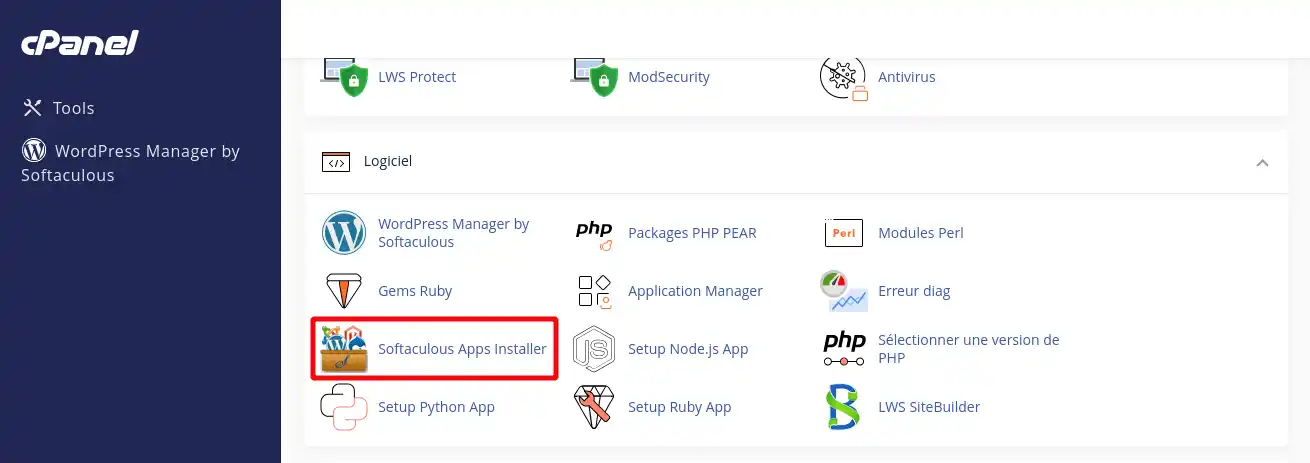
2. Click on the"Softaculous Apps Installer" icon in the"Software" section at the bottom of your cPanel interface.

How do I install software via Softaculous on cPanel?

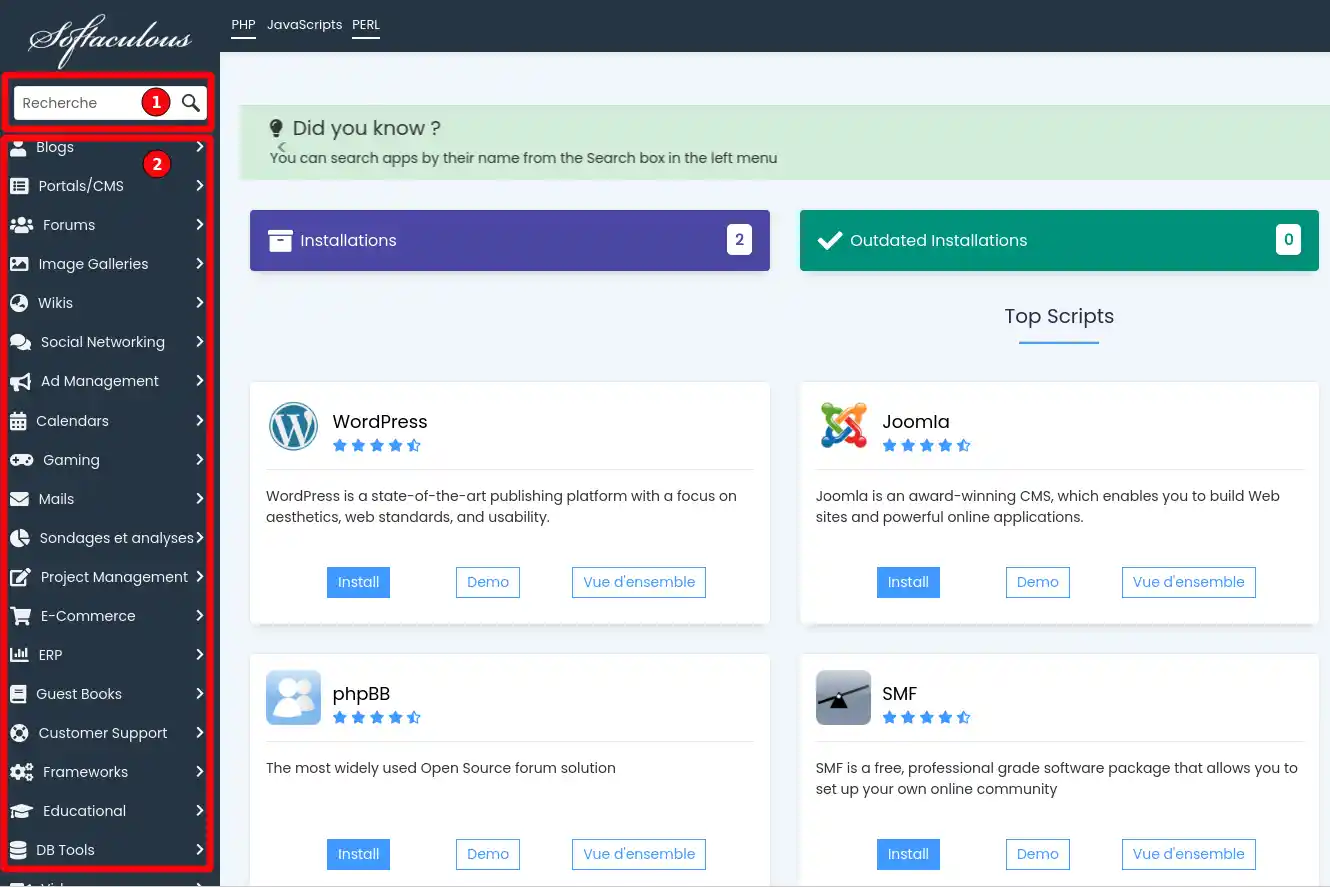
3. Search for the desired software by entering a word in the field (1) or by navigating in the left-hand menu (2).


How do I install software via Softaculous on cPanel?

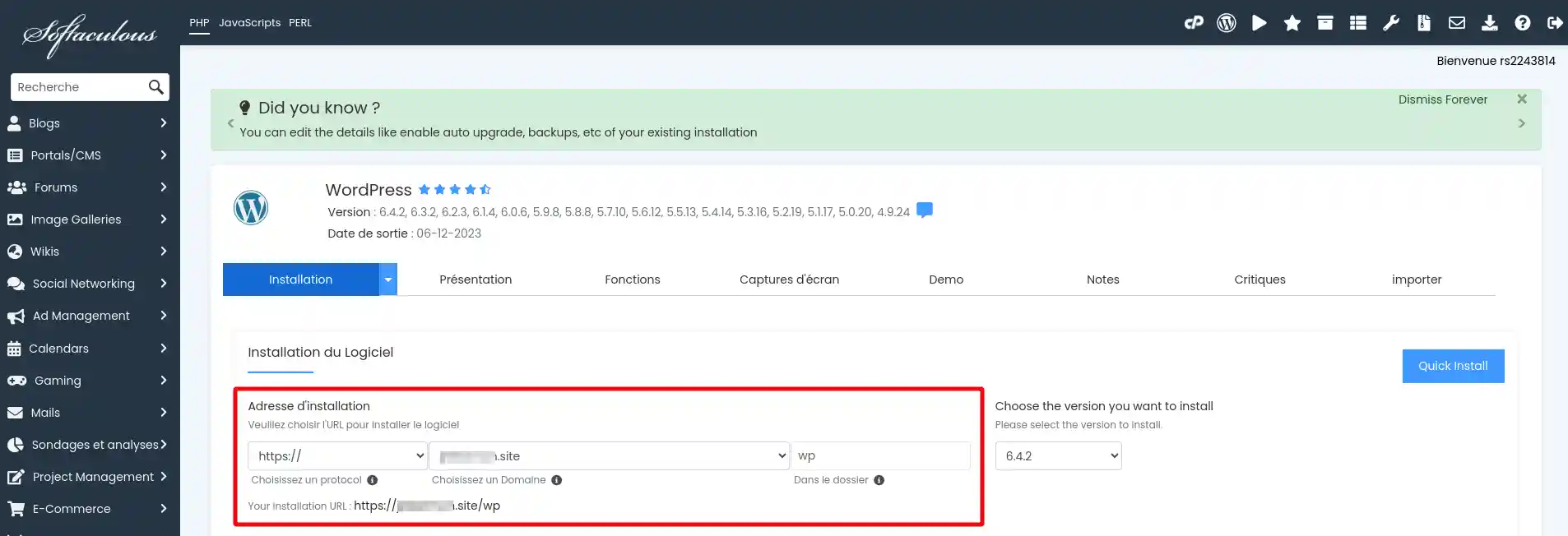
4. Once you have selected the software you want, fill in the various parameters you require, such as the domain name and installation directory.

How do I install software via Softaculous on cPanel?

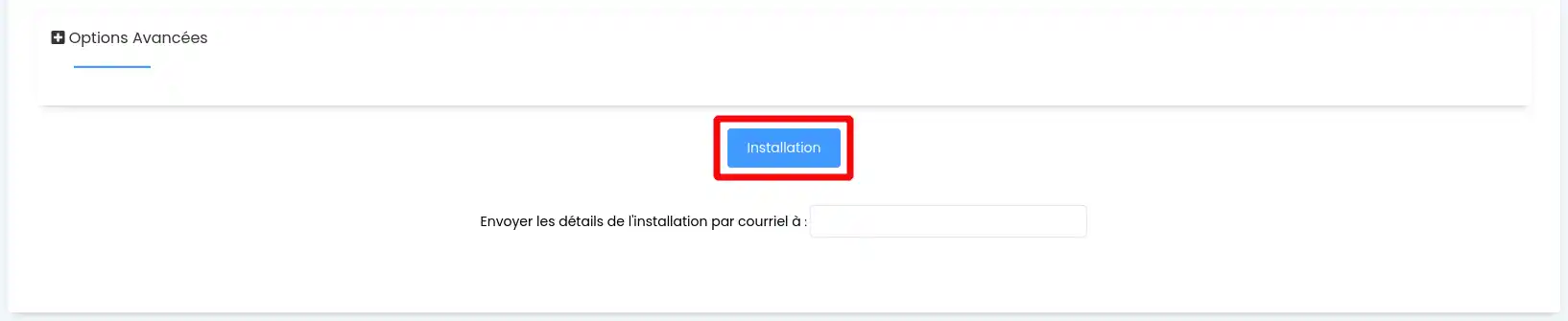
5. Finally, click on the"Install" button at the bottom of the page to proceed with the installation.

How do I install software via Softaculous on cPanel?

Video procedure :


How do you update your software with Softaculous?

The various software packages available for installation are updated regularly and automatically by the application. When you install your software, you can ask for your site to be updated automatically as soon as a new version is available.


Can I choose which version of a software application to install?

Softaculous offers several versions of certain software such as Joomla or PrestaShop that you can install on your web space. However, if you decide to install an older version, you must not tick the box allowing your software to be updated automatically.


Conclusion

You can now use Softaculous to automatically install the software of your choice on your cPanel web hosting with LWS. Softaculous allows you to install several software packages in separate directories and on one or more MySQL databases.

Don't hesitate to share your comments and questions!

help.lws.net/a/1033
Was this article helpful?

Yes

No

Read 30 962 times

Thank you! Feel free to ask questions about our documentation if you would like more information, and help us improve it.

Similar articles

Questions about the article 1

Ask a question
fbernigaud
2 Feb 2024
Est-ce que vous envisagez de proposer l'installation de PMB, logiciel de gestion de bibliothèque assez répondu ?
Jordan-LWS Official answer
6 Feb 2024

Bonjour,

Je vous remercie pour votre message

Actuellement, nous ne proposons pas l'installation de PMB étant donné les ressources nécessaires recommandées par l'éditeur, il est tout de même tout à fait possible d'installer ce type de logiciel de gestion sur un VPS, voici les recommandations faite par l'éditeur :

Machine virtuelle/physique : 

  • Processeur 4 Cœurs
  • 8 Go de mémoire vive (RAM)
  • 50 Go d'espace disque.
  • Système d'exploitation : Ubuntu, Debian, CentOS, RedHat, ....


Il est tout de même à noter qu'un tas d'autres prérequis sont demandé, après vérification avec le service concernée, cela ne devrait pas poser de problème pour l'installer à condition d'être sur une formule de type VPS M au minimum. 

Malheureusement, nous ne proposons pas l'installation de ce type de logiciel de gestion et l'installation devra être réalisé par vos soins, une documentation est mise en place par l'éditeur et cette dernière est tout de même très bien fournis en termes d’instructions/renseignements.


Je vous remercie pour votre attention et reste à votre disposition pour toute autre question ou complément d'information. Vous pouvez nous contacter directement depuis votre espace client aux besoins.

Cordialement, L'équipe LWS.

Was this answer helpful?

A question about this article?

Ask the LWS team and the community. Answers are published after moderation.

Ask the LWS team and its community a question

GDPR: Controller: LWS-Ligne Web Services. Purpose: moderation and public publication of your question, possible notification of an answer. Legal basis: consent (Art. 6(1)(a) GDPR). Email retention: 90 days after notification, 12 months maximum without an answer. To exercise your rights, see the GDPR section of our Terms and Conditions.