
Online help
The web host accessible to all
Procédure
The cPanel interface allows you to change the background colour and style of your control panel to suit your needs perfectly. As well as being able to change the colour and style, you can move your sections up or down by simply"dragging and dropping" them.
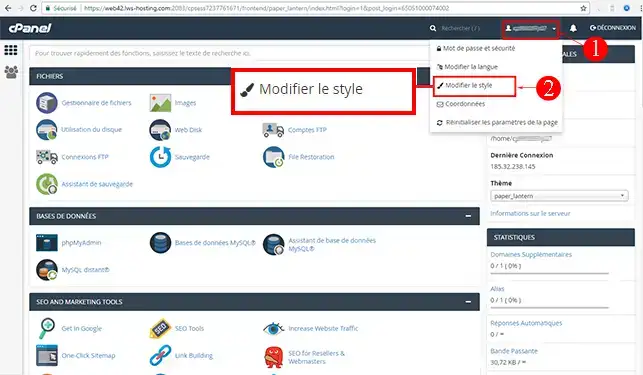
1. Log in to your cPanel account & open the drop-down menu at the top right of your home page.
Click on the"Change style" tab.
2. Click on the"Apply" button for the chosen style
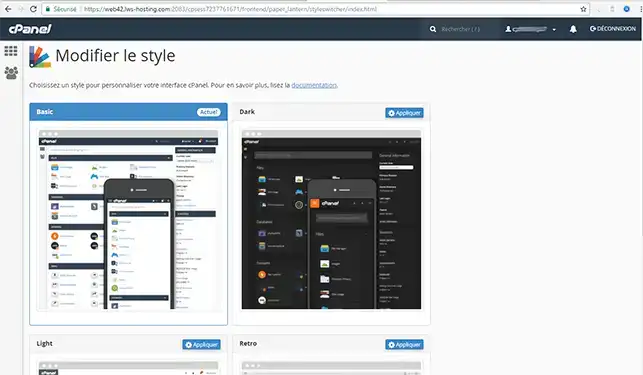
Wait a few moments and your new style will be applied and ready to use.
Need help using cPanel?
See all our cPanel training videos
You can now change the style of your cPanel web interface with LWS. You can change the position of each heading (move them up or down) to enable you to better manage your web space.
Don't hesitate to share your comments or questions!
Ask the LWS team and the community. Answers are published after moderation.
 About LWS :
LWS is a 100% French web hosting company that focuses on quality and innovation and offers a responsive and competent technical service at affordable prices.
About LWS :
LWS is a 100% French web hosting company that focuses on quality and innovation and offers a responsive and competent technical service at affordable prices.



 Yes
Yes No
No