
Online help
The web host accessible to all
Procédure
CardDAV is a protocol designed to allow users to access and share contact information/data on a server.
This article provides instructions for synchronizing cPanel contacts using CardDAV on your Apple devices.
To synchronize the cPanel CardDAV address book with another device, you need to:
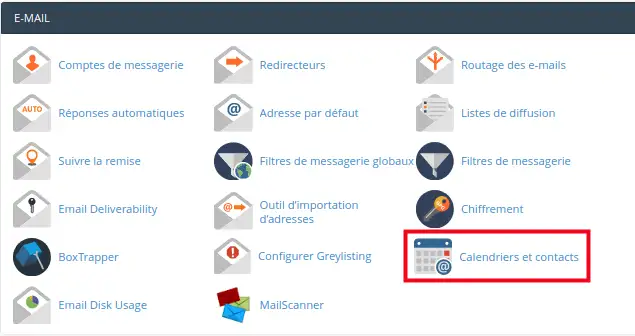
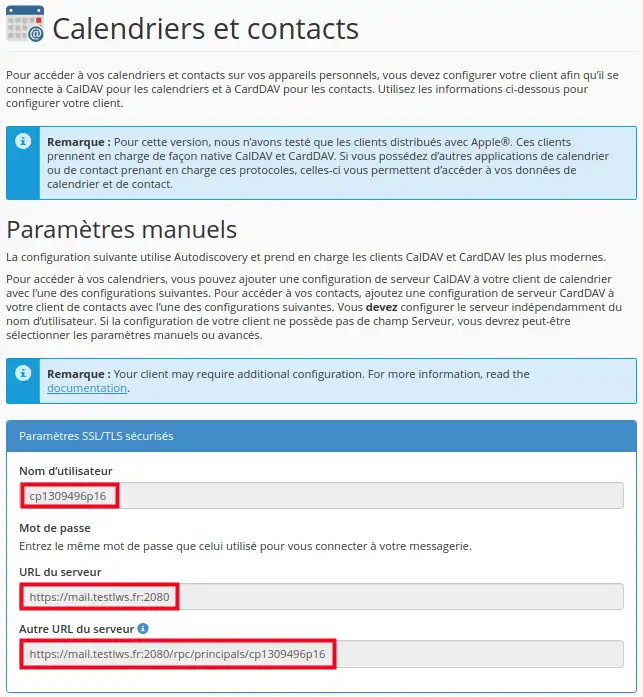
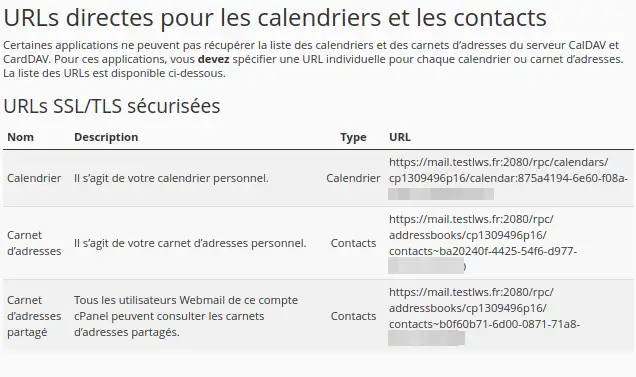
You have learned how to retrieve the information needed to synchronize the CardDAV address book from your cPanel
Feel free to share your comments and questions!
Ask the LWS team and the community. Answers are published after moderation.
 About LWS :
LWS is a 100% French web hosting company that focuses on quality and innovation and offers a responsive and competent technical service at affordable prices.
About LWS :
LWS is a 100% French web hosting company that focuses on quality and innovation and offers a responsive and competent technical service at affordable prices.



 Yes
Yes No
No