
Online help
The web host accessible to all
Procédure
Email tracking allows you to monitor successful delivery of emails sent to your recipients. In fact, it lets you know the date and time of delivery, the sending result, and the score given by the AntiSpam.
In the event of a rejection or an error during sending, you can access a detailed log of the error encountered.
1. Log in to your cPanel interface.
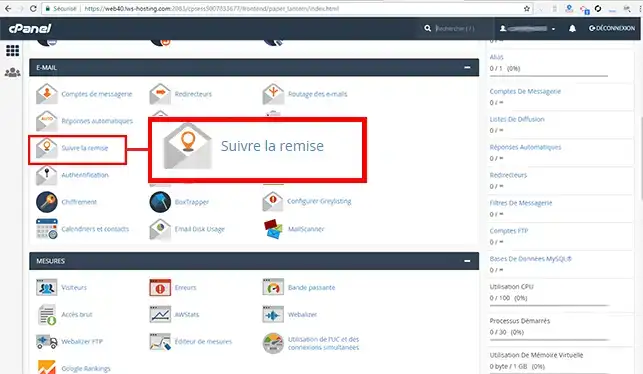
2. Go to the "Email" section and click on the "Track Delivery" tab.
3. You will find a log of sent emails here. This log includes:
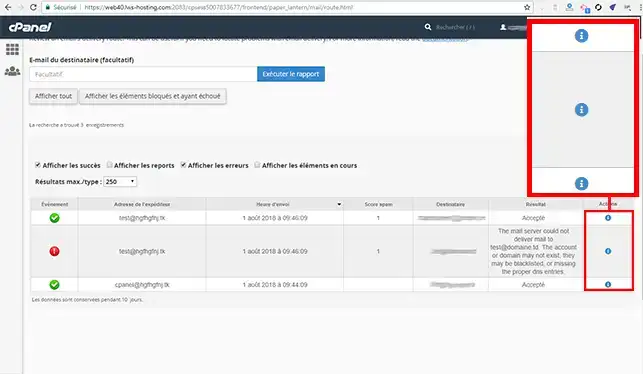
3. If you want more information about the error, you can click on the icon representing a "!" located behind the email concerned.
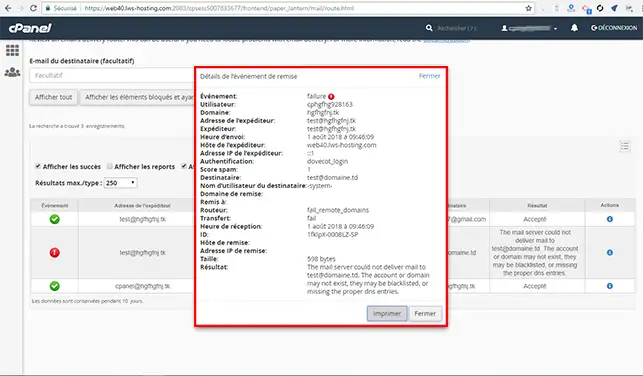
You are now able to track the emails you send and see whether an error occurred during sending an email. Tracking allows you to verify the date and time at which the recipient received your email.
Feel free to share your comments and questions!
Ask the LWS team and the community. Answers are published after moderation.
 About LWS :
LWS is a 100% French web hosting company that focuses on quality and innovation and offers a responsive and competent technical service at affordable prices.
About LWS :
LWS is a 100% French web hosting company that focuses on quality and innovation and offers a responsive and competent technical service at affordable prices.



 Yes
Yes No
No