
Online help
The web host accessible to all
Procédure
A computer file used to operate a hosting server. This file keeps track of all requests made to this server.
These files are very useful for analysing a website's audience, as they provide precise information about the site's traffic.
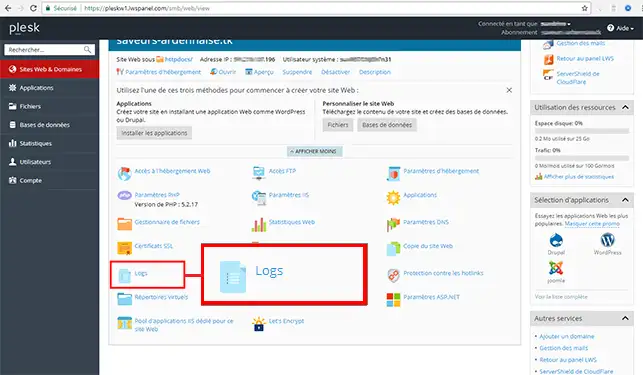
1. Connect to Plesk and select"Logs".
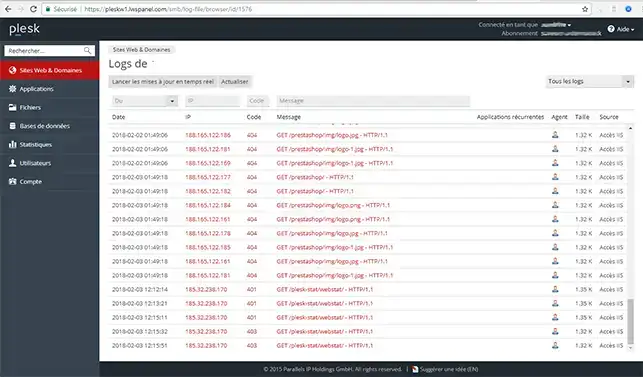
2 You will then be able to view all your logs:
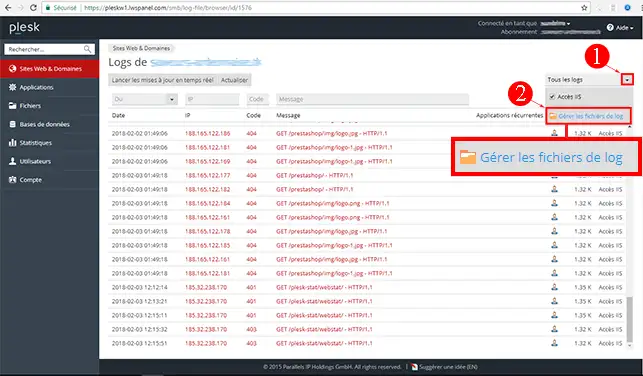
3. Once in the logs, you can also download your logs by clicking on"Manage log files".
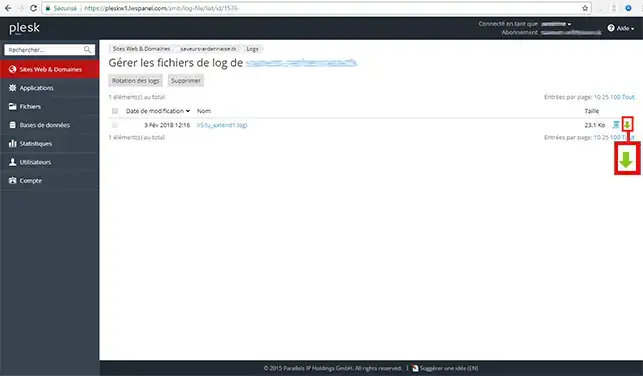
4. You can click on the green arrow to download your logs:
To find out more about the plesk panel, you can consult the official resources:
Ask the LWS team and the community. Answers are published after moderation.
 About LWS :
LWS is a 100% French web hosting company that focuses on quality and innovation and offers a responsive and competent technical service at affordable prices.
About LWS :
LWS is a 100% French web hosting company that focuses on quality and innovation and offers a responsive and competent technical service at affordable prices.



 Yes
Yes No
No