
Online help
The web host accessible to all
Procédure
HSTS is an HTTPS header that instructs the browser to force users to browse the site in HTTPS and to remember this behaviour for a certain period of time (6 months by default). It also prohibits visiting the site if the certificate is not valid. It can therefore completely block access to a site if there is an HTTPS redirect and the certificate is not or is no longer valid.
IMPORTANT: This option should therefore be reserved for users who can be sure that there will be a valid certificate for at least 6 months even after deactivating this option.
Prerequisite: You must have activated the SSL service byinstalling a free Let's Encrypt SSL certificate ora paid SSL certificate.
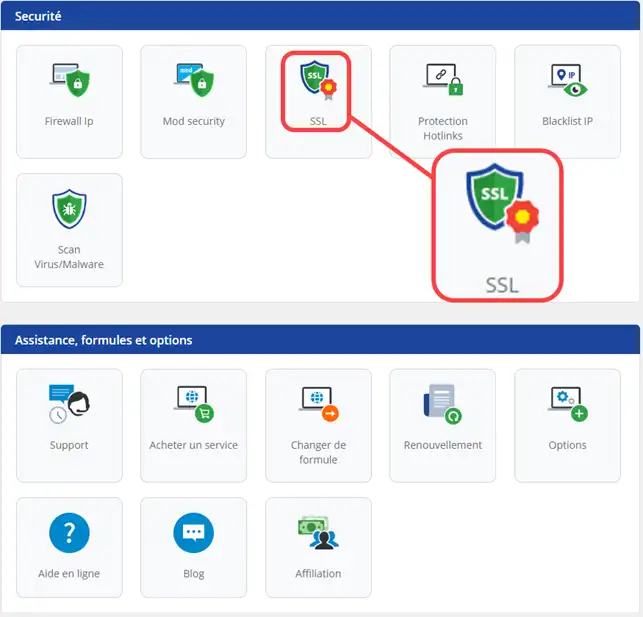
1. Connect to your hosting and click on SSL
2. Activate the HSTS service and confirm.
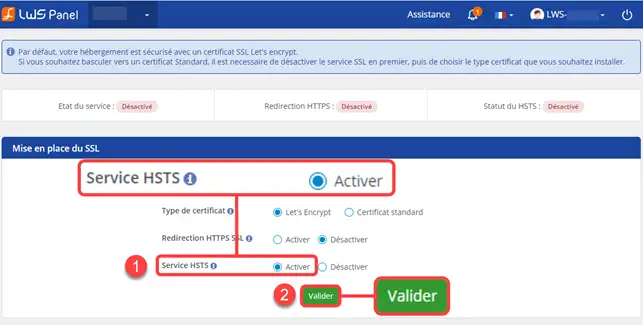
The HSTS service will be activated within an hour.
You can now activate the HSTS service on your shared hosting with LWS. The HSTS protocol allows you to force the HTTPS protocol on your website.
Don't hesitate to share your comments and questions!
Ask the LWS team and the community. Answers are published after moderation.
 About LWS :
LWS is a 100% French web hosting company that focuses on quality and innovation and offers a responsive and competent technical service at affordable prices.
About LWS :
LWS is a 100% French web hosting company that focuses on quality and innovation and offers a responsive and competent technical service at affordable prices.



 Yes
Yes No
No