
Online help
The web host accessible to all
Procédure
The ModSecurity Web Applications Firewall is used to protect your website from web intrusions. By default, we activate this firewall and we strongly recommend that you leave it activated. If it causes problems with your applications, you can however deactivate it.
It secures the application layer before requests arrive on the hosted site. Detection of inclusion attempts, anti-spam, detection of exploits (it hides the version numbers used on error pages returned by the Web server), etc.
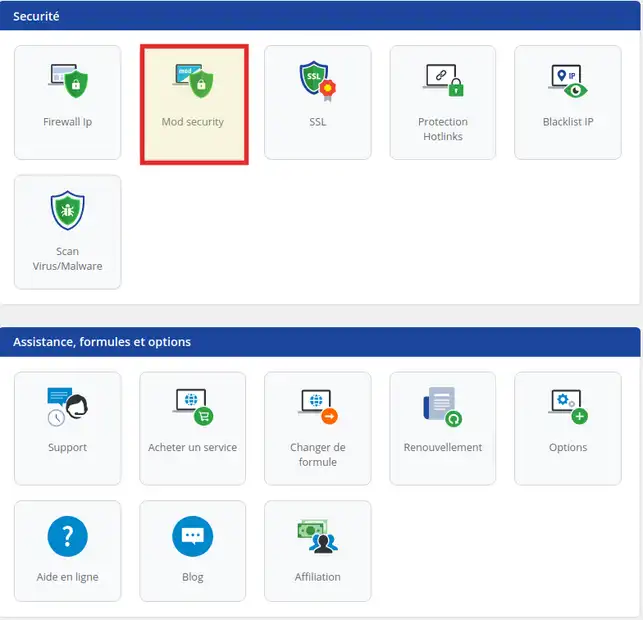
1. Log in to the administration area of your web hosting and click on ModSecurity
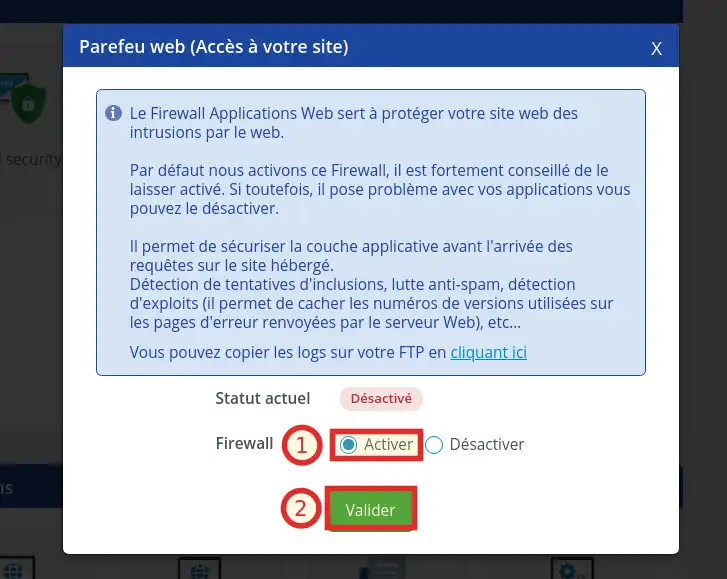
2. Activate ModSecurity by ticking the Activate box (1) and click Validate to save the changes (2).
You are now able to activate the ModSecurity Web Application Firewall on your shared hosting with LWS. The Firewall allows you to secure the application layer when requests arrive on your site.
Don't hesitate to share your comments and questions!
Ask the LWS team and the community. Answers are published after moderation.
 About LWS :
LWS is a 100% French web hosting company that focuses on quality and innovation and offers a responsive and competent technical service at affordable prices.
About LWS :
LWS is a 100% French web hosting company that focuses on quality and innovation and offers a responsive and competent technical service at affordable prices.



 Yes
Yes No
No