
Online help
The web host accessible to all
Procédure
DNS servers are used to translate a domain name into its respective IP address. When a domain name resolution request is made, the DNS records are looked up and, if they are found, the domain name record is returned.
1. Connect to your NordNet customer interface.
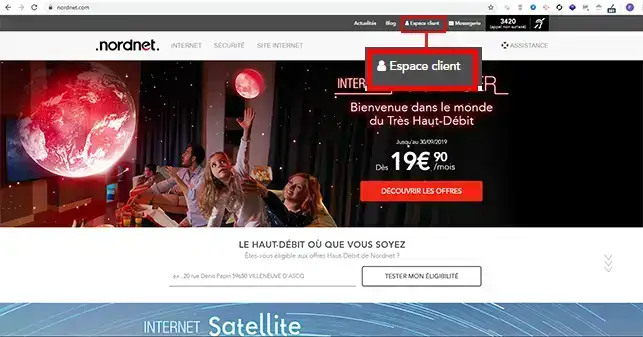
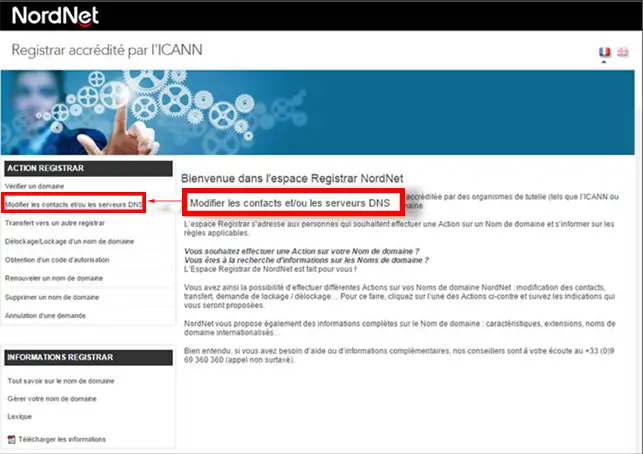
2. Go to"Action Registrar" then click on"Change contacts and/or DNS servers".
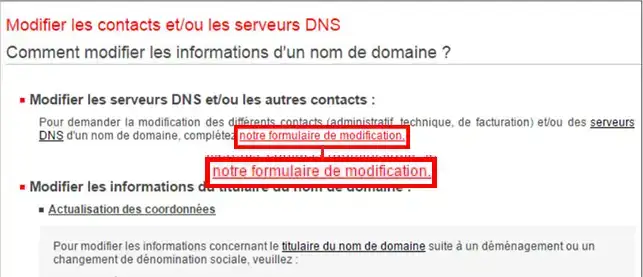
3. Click on the"Our modification form" tab in the"Modify DNS servers and/or other contacts" section.
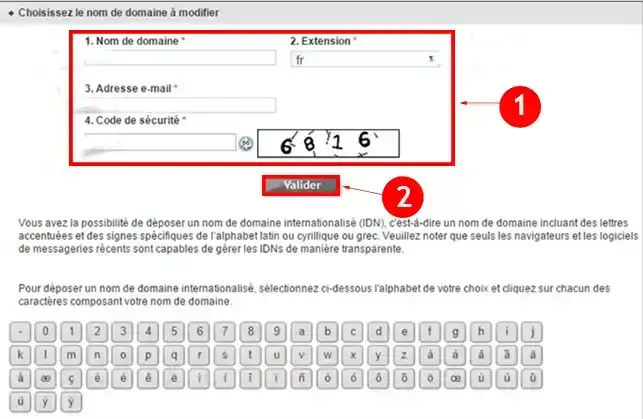
4. Complete the form as follows:
Click on the"Validate" button
5. Change the DNS servers to those of your LWS shared hosting. You can check the DNS servers attached to your Web package by going to your customer area, click on"Domains and Hosting" then on"Admin". Then click on"Domain management". At the top of the page, you'll find a red box listing the DNS servers.
You can now modify the DNS servers of a NordNet domain in order to link it to your LWS shared hosting. Once the DNS servers have been modified, you will need to wait up to 24 hours for the DNS servers to propagate and for your domain name to be linked to your package. If you wish, once the DNS servers have been changed, you can send us the transfer code for your NordNet domain so that we can transfer it to your LWS customer area.
Don't hesitate to share your comments and questions.
Ask the LWS team and the community. Answers are published after moderation.
 About LWS :
LWS is a 100% French web hosting company that focuses on quality and innovation and offers a responsive and competent technical service at affordable prices.
About LWS :
LWS is a 100% French web hosting company that focuses on quality and innovation and offers a responsive and competent technical service at affordable prices.



 Yes
Yes No
No