
Online help
The web host accessible to all
Procédure
The FTP user allows you to connect to your hosting server to add files. FTP access is included in all our packages.
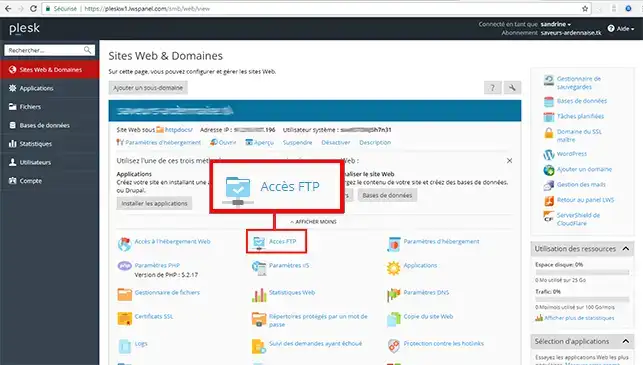
1. Connect to Plesk and click on FTP Access
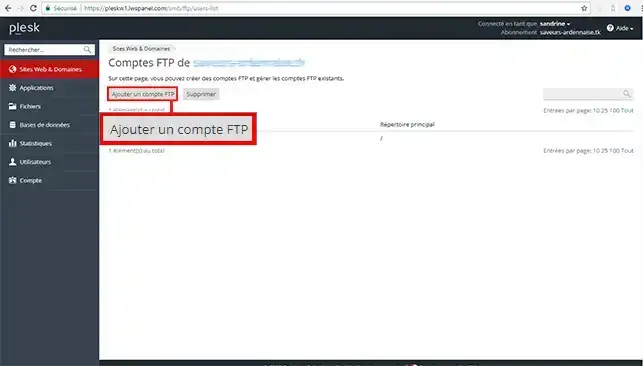
2. Select Create an additional FTP account
3. Create your ftp account as shown below and click OK to confirm.
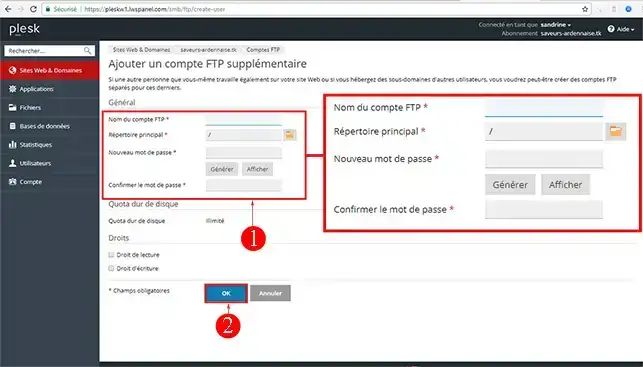
4. About the Main Directory. This is the directory associated with your Domain Name. You can change the directory by clicking on the icon provided.
To find out more about the plesk panel, you can consult the official resources:
Ask the LWS team and the community. Answers are published after moderation.
 About LWS :
LWS is a 100% French web hosting company that focuses on quality and innovation and offers a responsive and competent technical service at affordable prices.
About LWS :
LWS is a 100% French web hosting company that focuses on quality and innovation and offers a responsive and competent technical service at affordable prices.



 Yes
Yes No
No