
Online help
The web host accessible to all
Procédure
Effective management of Prestashop installations on your hosting is essential to ensure the security and performance of your sites. In this article, we will explain how to use PrestashopManager to search for and manage your Prestashop installations. Once you know which installations you have, you can perform various actions to simplify the management of your sites.
Prestashop Manager is a powerful management tool that lets you manage all your Prestashop installations from a single, user-friendly interface. It is accessible from your hosting account and offers a range of features to simplify the management of your Prestashop sites.
First, you need to log in to your LWS account and access the shared hosting containing the Prestashop site you want to manage.
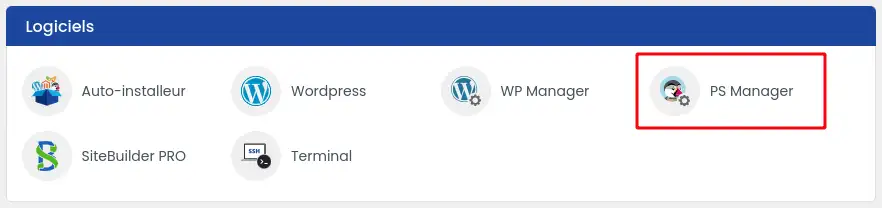
Then click on"PS Manager" in the"Software" section of your web hosting.
If you are accessing this feature for the first time, the list of Prestashop instances should be empty.
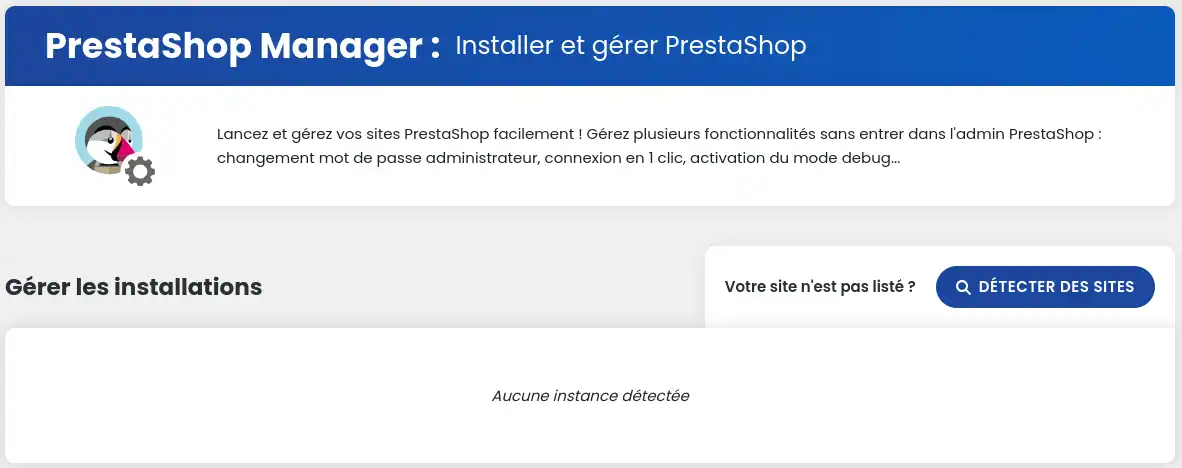
If you have not yet installed an instance of Prestashop on your hosting, we invite you to start by performing an initial installation. You will be offered various choices on this same page, which will redirect you to the corresponding installation with the LWS auto-installer.

To search for Prestashop installations, click on the"Detect sites" button.

Once the detection has been carried out, you should find the list of instances found as follows:

Functional instances appear in black, instances found by the system, but which do not appear to be working correctly, appear in red.
If the scan does not work, check that the Prestashop site is not in error. If it still doesn't work, deactivate all the plugins and run a new scan.
Only shops with a version between 1.5 and 8.0 are compatible with the tool, others will not appear. Also, this tool only searches sites up to 2 levels deep.
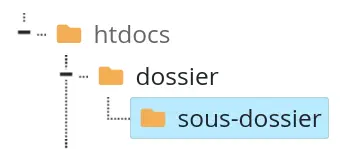
This means that a site installed at the root (htdocs), in a folder at the root (here, folder) or in a subfolder of this same folder (here, subfolder) will be detected by the tool, but a site installed lower down will not.
If your site still doesn't appear, contact LWS support.
You now know how to use Prestashop Manager to search for and manage your Prestashop installations on your hosting. We have gone through the key steps for accessing your LWS account, using the PS Manager interface, and efficiently detecting your Prestashop sites. Whether you're a beginner or an experienced user, this knowledge will help you ensure the security and performance of your online shops. 🛒🔒
By applying these tips, you can not only make it easier to manage your sites, but also prevent technical problems before they occur. If you encounter any difficulties with the detection of your installations or if you have any further questions, please do not hesitate to consult our technical support for personalised assistance. 🛠️💡
We hope this article has been helpful and given you the tools you need to master Prestashop Manager. Thank you for reading! If you have any suggestions or feedback, please leave us a comment, we'd love to hear from you! 👇📝
Ask the LWS team and the community. Answers are published after moderation.
 About LWS :
LWS is a 100% French web hosting company that focuses on quality and innovation and offers a responsive and competent technical service at affordable prices.


 Yes
 No