
Online help
The web host accessible to all
Procédure
When you created a hosting package on your Reseller interface, you defined a bandwidth usage limit that must not be exceeded. If the customer reaches this limit, their website is no longer displayed.
To unblock the situation and make the site accessible again, you can reset the bandwidth of one or more customer accounts to zero at any time.
You can initialise the bandwidth of a web hosting account at any time via your WHM management panel.
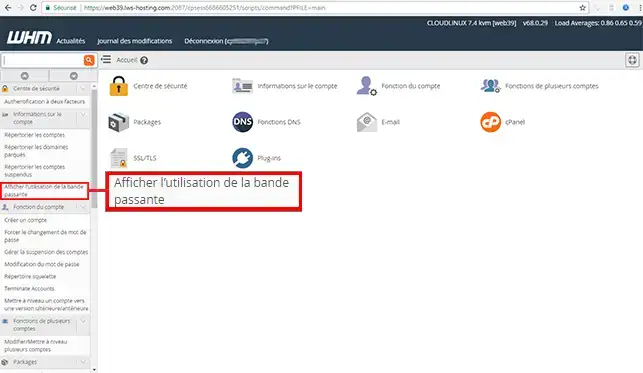
2. Open the"Account Information" drop-down menu on the left of your screen and click on"View Bandwidth Usage".
3. Each web hosting account whose bandwidth has changed from its original quota will display a "Reset bandwidth to original quota" button.
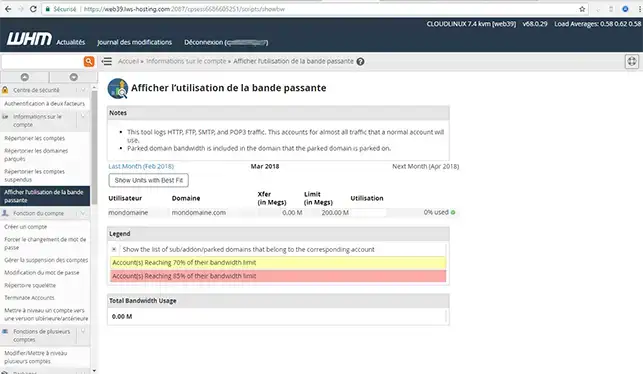
You are now able to initialize the bandwidth of a customer account via your WHM interface with LWS. The itnialisation will allow you to eliminate the use of the bandwidth of the client concerned.
Don't hesitate to share your comments and questions!
Ask the LWS team and the community. Answers are published after moderation.
 About LWS :
LWS is a 100% French web hosting company that focuses on quality and innovation and offers a responsive and competent technical service at affordable prices.
About LWS :
LWS is a 100% French web hosting company that focuses on quality and innovation and offers a responsive and competent technical service at affordable prices.



 Yes
Yes No
No