
Online help
The web host accessible to all
Procédure
This article explains how to retrieve the transfer code (Auth / EPP code) for your domain name registered with LWS.
This code is required if you want to transfer your domain name to another provider (registrar).
The request is made from your LWS customer area, and the code is generally sent by email within up to 6 hours.
Before you begin, make sure that:
| Domain extensions | .fr | .eu et .be | .lu | .ch | .uk |
other extensions |
| Does the extension have transfer protection? | No | No | No | No | No | Yes |
| Do you need a transfer code? | Yes | Yes | No | Yes | No | Yes |
| Do you need the TAG of the new registrar? | No | No | No | No | Yes | No |
| What is the standard transfer duration? | 10 days | immediate | 10 days | 1 to 10 days | immediate | 1 to 10 days |
| What is the maximum possible transfer duration? | 22 days | immediate | 15 days | 10 days | immediate | 10 days |
| Is there a cooling-off period during which transfer is not possible? | No | No | No | 60 days after purchase, transfer, renewal or a change of contact details | 60 days after purchase, transfer, renewal or a change of contact details |
The transfer code (also called Auth code or EPP code) is a unique security code.
It works like a temporary password that allows authorizing the transfer of your domain name to another provider.
Without this code, the transfer cannot be initiated.
This system prevents a third party from transferring your domain without your authorization.
Go to your LWS customer area and log in with your credentials.
Once logged in, go to the list of your domain names.
In the list of your domains:
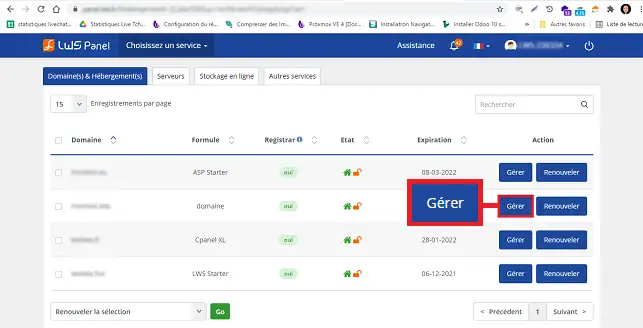
You will then arrive on the management page for that domain.
The transfer code is sent by email to the domain owner's address.
Before requesting the transfer code, check the following points:
If this address is not correct:
For security reasons, domains are generally protected against transfer.
This protection prevents any unauthorized transfer.
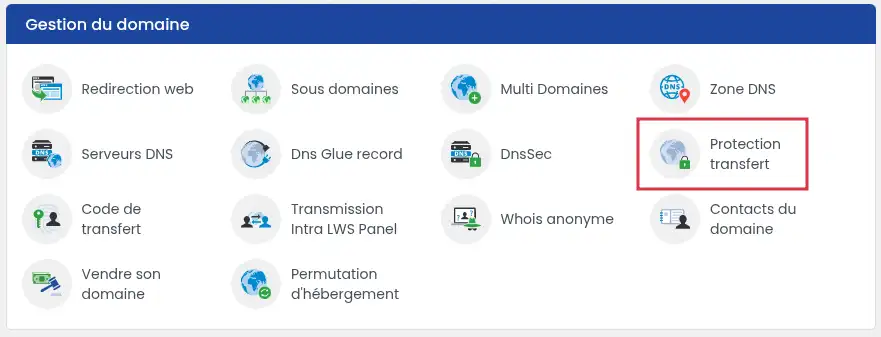
To retrieve the code:
click the "Transfer protection" icon in the "Domain management" section.
Disable the domain's transfer protection, then click the "Validate" button.
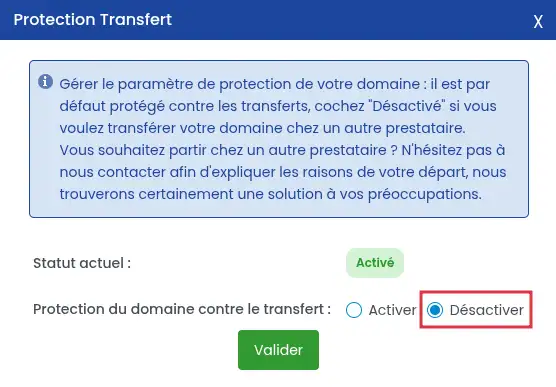
This operation does not transfer the domain.
It simply allows the transfer request to be authorized.
Once protection is disabled:
click the "Transfer code" icon in the "Domain management" section.
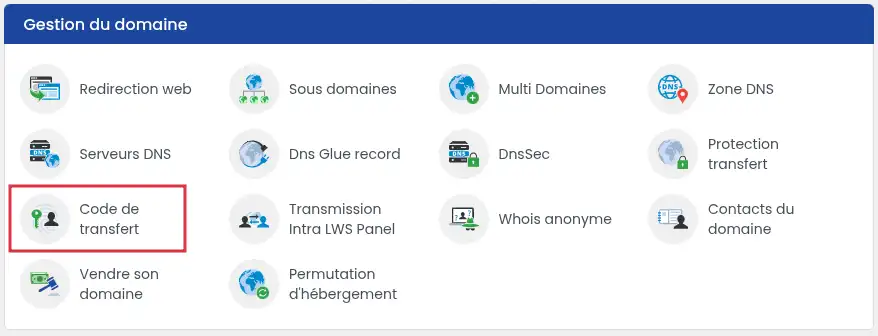
then click the "Request the code" button
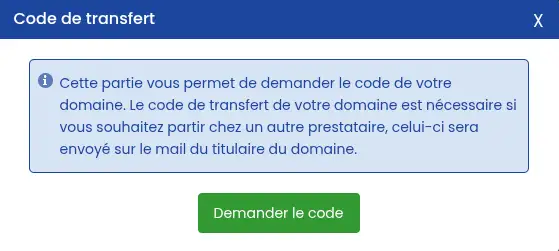
Your request is then recorded.
Don't forget to disable transfer protection before requesting the transfer code!
The Auth / EPP code is automatically sent by email to the address associated with the domain owner's contact.
The delivery time is generally quick, but may take up to 6 hours.
The procedure is successful when the message arrives at the email address associated with the domain owner's contact.
The code usually looks like a string of letters and numbers.
You can then copy this code and provide it to your new provider when requesting the transfer.
Check:
If you still do not receive anything after 6 hours, submit the request again or contact support.
Several reasons may explain this block:
If none of the above applies to you, contact LWS support to check the situation.
Some domain extensions do not require a transfer code:
Also make sure that LWS is indeed the manager of your domain name and not just the hosting provider.
If you are not in one of the above cases, contact support.
Transferring a domain name generally takes 8 to 10 days. This period may vary depending on the domain extension and therefore on the registry rules.
While some extensions can indeed be validated to speed up the transfer (this is the case for .fr, which LWS validates automatically), this is not the case for all extensions.
GDPR law makes the transfer validations that were once possible impossible.
It is therefore useless to ask LWS support to validate a transfer in order to reduce the standard transfer time.
We invite you to transfer your domain at least 15 days before its expiration to avoid any issue.
Likewise, we invite you to change your domain's DNS before requesting the transfer if your domain needs to use another hosting service.
Re-enable your domain name's transfer protection immediately.
If your transfer is not too far along, this may work, but the action is not guaranteed.
A .lu domain has neither a transfer code nor a TAG: there is no code for you to request from LWS. The transfer is requested with the new registrar, then the .lu registry (DNS-LU) asks for your approval by email. Without this approval, the transfer does not take place.
The .lu registry sends its approval request to the domain's administrative contact. Your domain's contact details come from those of the owner’s LWS account: check that its email address is correct and that you are reading it. If it needs to be changed, change the contact email address of your LWS account before starting the transfer.
Order the domain transfer from your new registrar. If its form asks you for a transfer code (Auth / EPP code) or a TAG, tell them that .lu does not use one: the registry verifies the request by writing to the domain's administrative contact. LWS, the old registrar, does not intervene in the transfer.
The registry sends the administrative contact an email with a unique link, valid for 15 days. Open this link and approve the transfer. If no approval is given within 7 days, a reminder is sent to the administrative contact and the new registrar. You can also approve by signing the paper document for approval of management transfer, to be returned to the .lu registry.
The transfer is complete when the new registrar informs you of it: it then opens a new subscription period for your domain. The full rules are described by the registry on its Change of registrar for a .lu domain page.
Check the Spam / Junk Mail folder of the owner's address. If the address is no longer correct, update it in your LWS account, then contact your new registrar: it is the one that submitted the transfer request to the registry.
Getting a transfer code:
The transfer will only begin when you use this code with your new provider.
Important:
Transferring a domain name does not automatically cancel your associated hosting plan.
If you no longer wish to use this hosting, remember to cancel the service or disable its automatic renewal from your customer area in order to avoid any unwanted renewal.
You are now able to transfer your domain name managed by LWS to another provider. Don't forget to disable transfer protection before making your request.
Ask the LWS team and the community. Answers are published after moderation.
 About LWS :
LWS is a 100% French web hosting company that focuses on quality and innovation and offers a responsive and competent technical service at affordable prices.



 Yes
 No