
Online help
The web host accessible to all
Procédure
It can be interesting and quicker to be able to modify some or all of your customer accounts in a single step when, for example, you change the web hosting packages you offer.
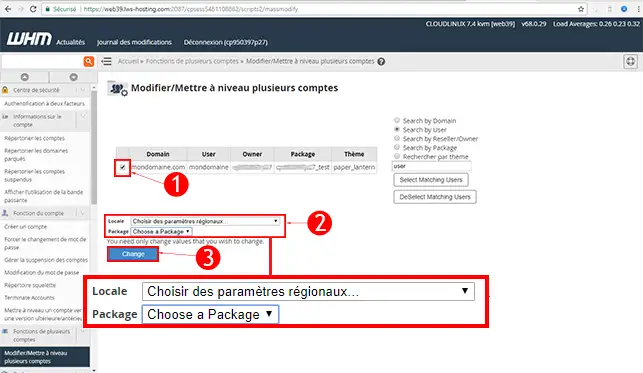
Bulk management allows you to change the language of the customer areas, as well as the package attached to each customer account.
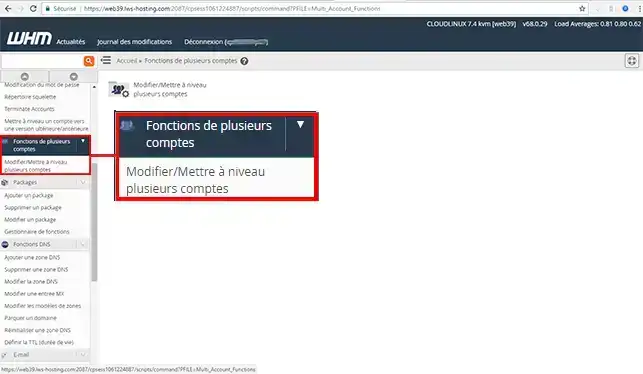
2. Click on the"Multiple account function" drop-down menu on the left of your screen
3. Tick the client accounts you wish to modify. Choose the language you wish to use for each of the client accounts and/or the Web Hosting Pack. Finally, click on the"Change" button to save your changes.
This section allows you to upgrade one or more customer accounts.
You can now make mass changes to all the customer accounts linked to your Web Reseller space with LWS. Bulk modification of certain information will save you time.
Don't hesitate to share your comments and questions!
Ask the LWS team and the community. Answers are published after moderation.
 About LWS :
LWS is a 100% French web hosting company that focuses on quality and innovation and offers a responsive and competent technical service at affordable prices.
About LWS :
LWS is a 100% French web hosting company that focuses on quality and innovation and offers a responsive and competent technical service at affordable prices.



 Yes
Yes No
No