
Online help
The web host accessible to all
Procédure
The Auth code, also known as the transfer code, is used to transfer the domain name to another provider. It also provides an additional security feature by guaranteeing that the customer transferring the domain really is the owner.
This code is required in order to transfer a domain name.
Before transferring a domain name, it is advisable to back up your data. Some service providers can cut off web space as soon as the domain name is no longer with them. To avoid any loss of data, it is therefore preferable to have a backup.
Before transferring your domain name, you can also change the DNS servers at Online to link your domain to your LWS web space. It will be impossible to change the DNS servers on most extensions during the transfer of your domain name, which can take from 5 to 10 days.
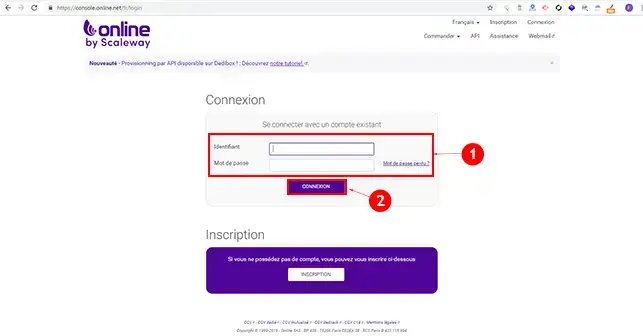
1. Log in to your Online customer area
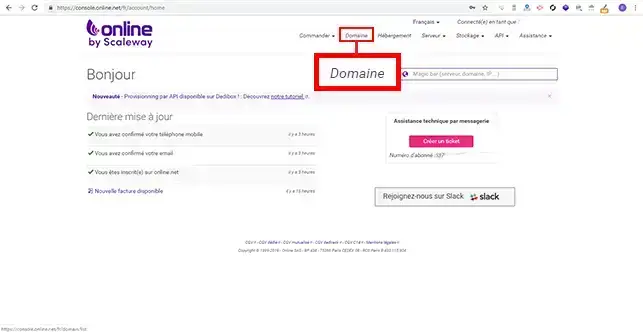
2. Click on the"Domain" tab in the menu at the top of your page to go to your domain configuration.
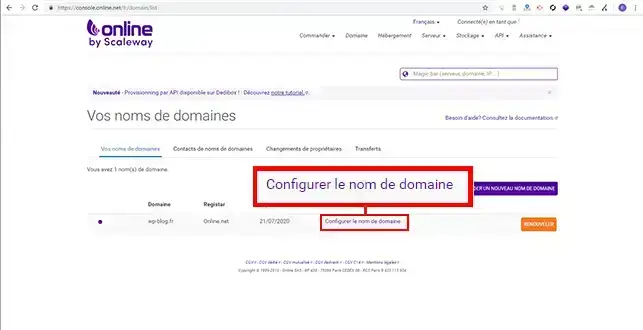
3. Click on"Configure the domain name".
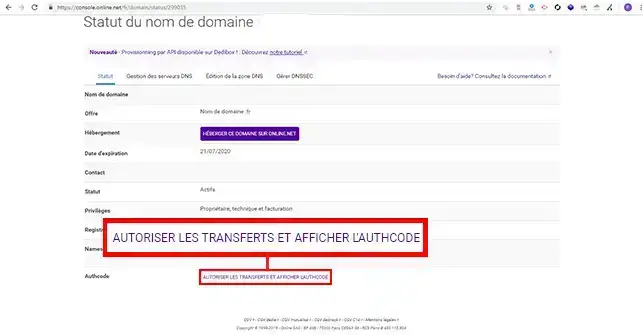
4. Go to"Authorise transfers and display AuthCode" to view the transfer code. Please note that you will not be able to access your transfer code for an Online domain if it is less than 60 days old.
Once you have clicked on the button, the AuthCode will appear in the same place when the page is refreshed.
For more information, follow the Domain Name Transfer Guide.
You can now retrieve the transfer code for an Online domain. As mentioned above, before any transfer, you shouldmake a backup of your data to avoid any loss. It is also advisable to change your DNS servers to those provided by LWS so that you can take full advantage of your web hosting during the transfer, which can take from 5 to 10 days.
Don't hesitate to share your questions and comments!
Ask the LWS team and the community. Answers are published after moderation.
 About LWS :
LWS is a 100% French web hosting company that focuses on quality and innovation and offers a responsive and competent technical service at affordable prices.
About LWS :
LWS is a 100% French web hosting company that focuses on quality and innovation and offers a responsive and competent technical service at affordable prices.



 Yes
Yes No
No