
Online help
The web host accessible to all
Procédure
The SSH password for your VPS dedicated server is an automatically generated password. It is made up of letters, numbers, lowercase and uppercase letters and is difficult to remember. If you lose the SSH password, you will need to request another one in order to access your server.
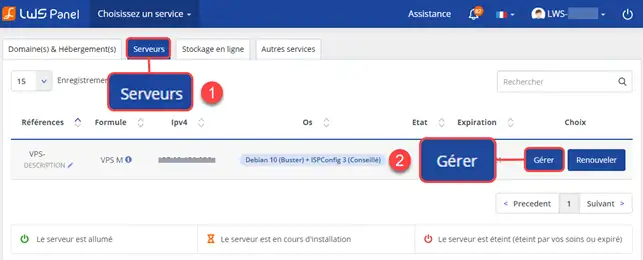
1. Connect to the administration of your VPS server.
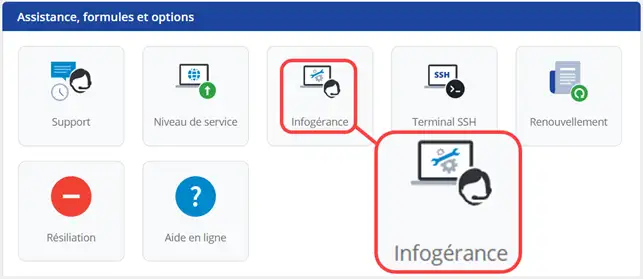
2. Click on the "outsourcing" icon
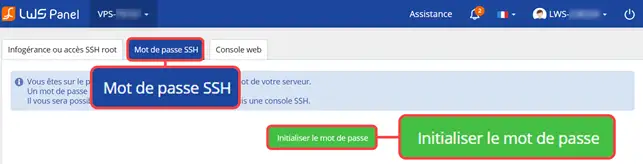
2. Then click on the "SSH password" tab and then on "reset password". The e-mail may end up in the Spam folder of your inbox. The password will be sent to you within 15 minutes of your request.
If your new password does not seem to be working or if an error persists when you try to connect to your VPS dedicated server via SSH, it is quite possible that traffic on port 22 (SSH port) is currently blocked. You will therefore need to check that this port is open.
You can now change the SSH password for your VPS dedicated server with LWS. When you enter the password in your SSH software (putty for example), it will not be displayed, which is perfectly normal.
Don't hesitate to share your comments and questions!
Ask the LWS team and the community. Answers are published after moderation.
 About LWS :
LWS is a 100% French web hosting company that focuses on quality and innovation and offers a responsive and competent technical service at affordable prices.
About LWS :
LWS is a 100% French web hosting company that focuses on quality and innovation and offers a responsive and competent technical service at affordable prices.



 Yes
Yes No
No