


How do I enable ROOT SSH on my ISPConfig dedicated server managed by LWS?

Procédure

What is SSH?

SSH , also known as Secure Socket Shell, is a network protocol providing Administrators with a means of accessing dedicated VPS servers and managing the system and applications remotely.

SSH allows commands to be executed to move files and folders more quickly, install a management interface such as cPanel or ISPConfig, secure a server and much more.

Managing a server using SSH ROOT is complex, which is why it is advisable to have a minimum of knowledge.

How does ROOT SSH access and LWS outsourcing work?

IMPORTANT :

  • Configuration not taken into account on servers where you have already made SSH modifications yourself.
  • Valid only for Debian 8 and 9 distributions with ISPConfig
  • You cannot switch back to managed mode if you have requested SSH root access and run commands (contact support for confirmation if necessary).

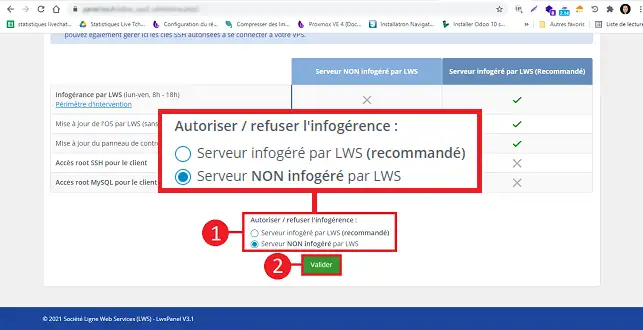
Type of support Server NOT managed
by LWS
Server managed
by LWS (recommended)
Server managed by L WS ** (Mon-Fri 8am-6pm) NO YES
OS update by LWS (without distribution upgrade) NO YES
ISPconfig control panel update by LWS NO YES
Unlimited hosting of websites, emails, databases, etc. YES YES
ROOT SSH access for the customer YES NO
MYSQL ROOT access for the client YES NO

** Scope of intervention for managed services

  • Configuration/installation of website, email and database in ISPConfig
  • Website publication
  • Spam and email reception problems
  • Problems sending emails
  • DNS management, advanced zone modification (DKIM, SPF)
  • Installing/configuring a site on the Cloudflare CDN
  • Configuring/creating an email inbox
  • Migration of mailbox content
  • Creating / configuring an FTP account
  • Creating/configuring a MySQL/MariaDb database
  • MySQL/MariaDB database import/export
  • PHP configuration
  • Analysis of email form problems
  • Modification / configuration of PHP parameters
  • Installation of applications included in the pack. (Wordpress, Prestashop...)
  • Set up CMD/store configuration file (Wordpress, Prestashop...)
  • Installation of SSL certificate, activation of HTTPS protocol on your site.
  • Anti-virus and spyware analysis of your site
  • Personalised diagnosis of your breakdown
  • Migration of your website from another hosting provider
  • Migration of your shared site to a dedicated/VPS/Cloud server
  • Optimisation of a MySQL/MariaDB server on a dedicated server/VPS/Cloud
  • ISPConfig dedicated server/VPS/Cloud
  • OS security updates (Linux Debian)

How do I enable ROOT SSH on my ISPConfig dedicated server managed by LWS?

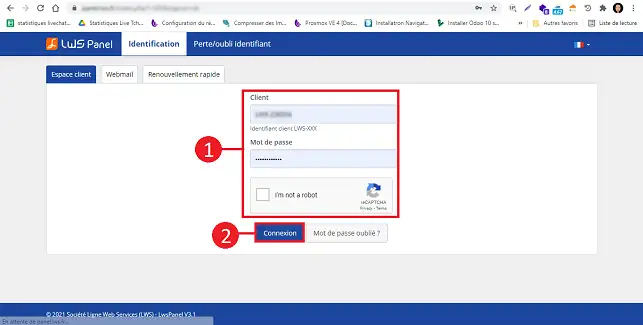
1. Log in to your LWS customer area.

How do I enable ROOT SSH on my ISPConfig dedicated server managed by LWS?

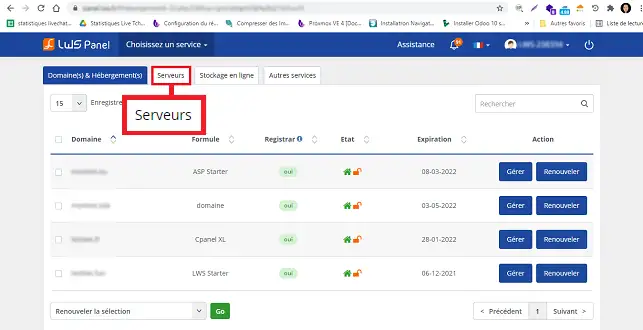
2. Click on the"Servers" tab.

How do I enable ROOT SSH on my ISPConfig dedicated server managed by LWS?

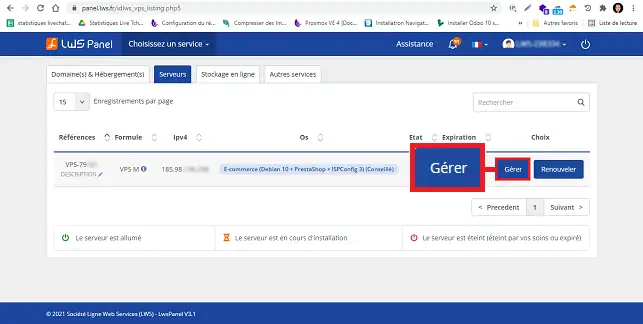
3. Click on the"Manage" button behind the domain concerned by your request.

How do I enable ROOT SSH on my ISPConfig dedicated server managed by LWS?


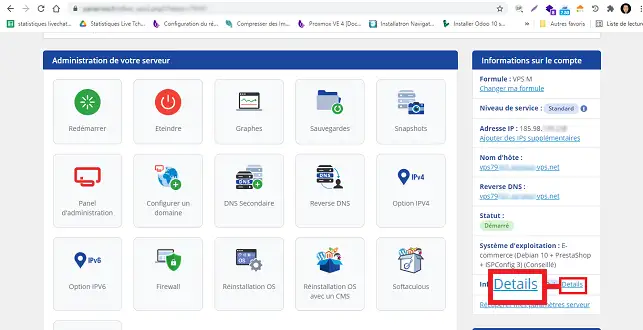
4. Click on the "Details" tab in the right-hand column of your page.

How do I enable ROOT SSH on my ISPConfig dedicated server managed by LWS?

5. At the bottom of the page, tick the box"Server not managed by LWS" and click on the"Validate" button. The request will be processed within 15 minutes of validation.

How do I enable ROOT SSH on my ISPConfig dedicated server managed by LWS?


Once you have validated your request, you will not be able to go back and ask for the server to be managed by LWS again.

What are the risks of ROOT SSH access on an ISPConfig dedicated server?

You should be aware that certain operations and commands typed in SSH can have harmful consequences for your ISPConfig dedicated server. In fact, certain commands, such as the Iptables commands, can permanently block your server without any possibility of repairing it at your level.

It is therefore preferable not to request SSH access to the server if you do not have a minimum knowledge of System Administration.

If you ask for ROOT SSH access for your ISPconfig dedicated server and you block your server permanently by manipulating it yourself, the cost of getting your server back up and running is likely to be higher than if you had asked for outsourcing. In fact, the cost of repairing the server and recovering the data can be well in excess of €100.

We strongly recommend that you let LWS manage your VPS server, unless you know exactly what you want to do. This avoids manipulations that could damage your services or cause you to lose precious time on the availability of your services.

Conclusion

You are now able to enable SSH root access on your ISPConfig dedicated server managed by LWS. However, it is advisable to have a minimum knowledge of System Administration in order to be able to manage your server via SSH without the risk of losing data or blocking your VPS.

Don't hesitate to share your comments and questions!

help.lws.net/a/1039
Was this article helpful?

Yes

No

Read 36 223 times

Thank you! Feel free to ask questions about our documentation if you would like more information, and help us improve it.

Similar articles

Questions about the article (4)

Ask a question
nicaise
4 mars 2023
Est ce possible d'avoir un serveur qui donne accès a l infogérence et au SSH
Benjamin-LWS Official answer
6 mars 2023

Bonjour,

Merci de votre retour.

Non malheureusement cela n'est pas possible, dès lors que vous optez pour l'accès au SSH, l'infogérance n'est plus disponible.

Je vous remercie de votre attention et reste à votre disposition pour toute autre question ou complément d'information.

Cordialement, L'équipe LWS 

Was this answer helpful?

Tom
31 mars 2023
Bonjour doit on alors passer par linfogerance pour la mise a jour dISPconfig ou peut on le faire soi meme sans casser par la suite la possiblite dune infogerance Bonne journee
Benjamin-LWS Official answer
4 avr. 2023

Bonjour,

Merci de votre retour.

Non malheureusement, il n'existe pas de solution pour mettre à jour ISP config sans désactiver l'infogérance, en revanche, nos techniciens se feront un plaisir de mettre à jour ISP Config pour vous si vous ouvrez un ticket au support. (https://aide.lws.fr/a/268)

Je vous remercie de votre attention et reste à votre disposition pour toute autre question ou complément d'information.

Cordialement, L'équipe LWS 

Was this answer helpful?
pnembot
23 janv. 2024
est-il possible d'avoir un access root ssh avec l'hebergement Cpanel L ?
Jordan-LWS Official answer
24 janv. 2024

Bonjour,

Je vous remercie pour votre message et comprends que vous ayez des besoins d'accès root à votre hébergement cPanel mais malheureusement cela n'est pas sur les formules mutualisées, si vous souhaitez avoir un accès root, il faudra prendre une formule adaptée à vos besoins, une solution de type VPS par exemple pourrait convenir à vos besoins. 

Nous restons joignables par téléphone si vous souhaitez avoir des informations complémentaires à ce propos et restons à l'écoute sur le support technique afin de vous diriger au mieux vers les formules dont vous auriez potentiellement besoins pour vos projets.

Je vous remercie pour votre attention et reste à votre disposition pour toute autre question ou complément d'information. Vous pouvez nous contacter directement depuis votre espace client ou directement par le biais de cette page.

Cordialement, L'équipe LWS.

Was this answer helpful?
kelli
23 juin 2025
Bonjour jai souscrit un service vps kvm, je voudrais un acces ssh Je ne trouve pas le bouton détails. Merci pour votre retour
Jordan-LWS Official answer
24 juin 2025

Bonjour,

Merci pour votre message.

Toutes les informations nécessaires à la configuration de votre VPS KVM, y compris vos identifiants de connexion SSH, vous ont été envoyées par e-mail après la validation de votre commande.
Si vous ne les retrouvez pas, pensez à vérifier également vos courriers indésirables.

Une fois connecté à votre serveur via SSH, nous vous recommandons de modifier le mot de passe par défaut pour des raisons de sécurité.
Voici comment procéder depuis le terminal :

  1. Connectez-vous à votre VPS en SSH

  2. Une fois connecté, tapez simplement : passwd

  3. Le système vous demandera d’entrer le mot de passe actuel, puis de saisir deux fois le nouveau mot de passe.

Après cela, votre mot de passe sera mis à jour.

Nous restons à votre disposition si vous avez besoin d’aide supplémentaire.

Je vous remercie pour votre attention et reste à votre disposition pour toute autre question ou complément d'information. 

Cordialement, L'équipe LWS 

Was this answer helpful?

A question about this article?

Ask the LWS team and the community. Answers are published after moderation.

Ask the LWS team and its community a question

RGPD : Responsable LWS-Ligne Web Services. Finalité : modération et publication publique de votre question, notification éventuelle d'une réponse. Base légale : consentement (art. 6.1.a RGPD). Conservation des emails : 90 jours après notification, 12 mois maximum sans réponse. Vous pouvez exercer vos droits via notre nos CGV - section RGPD.