
Online help
The web host accessible to all
Procédure
The cPanel Cloud Server packages allow you to create, modify or delete Web packages. LWS provides you with 3 ready-to-use packages so that you can get started straight away with the cPanel Cloud formula without having to configure your own Packs. The 3 ready-to-use packages are as follows:
These quotas differ depending on the cPanel Cloud Server package ordered.
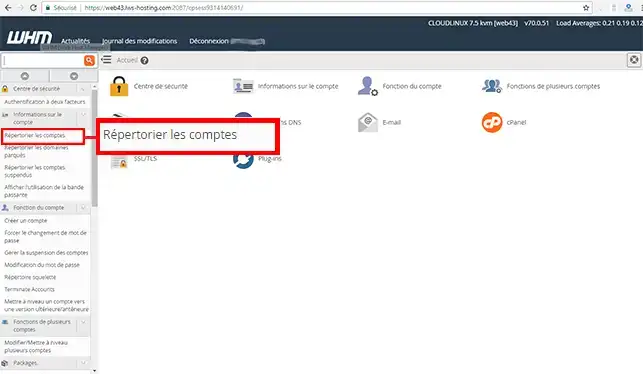
1. To modify the package of a customer account, log in to your WHM interface and click on the"List accounts" tab in the"Account information" section.
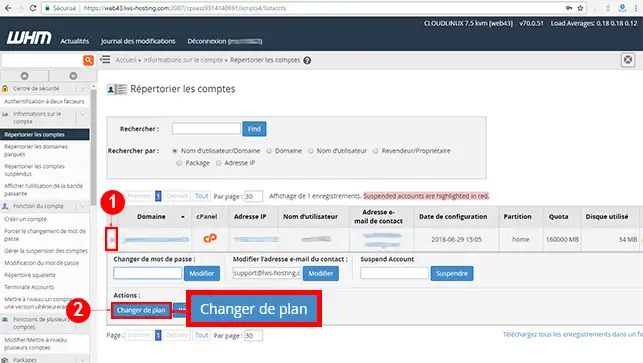
2. Click on the"+" icon in front of the domain name and then on"Change plan".
3. Choose the new plan by selecting it and then click on the"Upgrade/Downgrade" button.
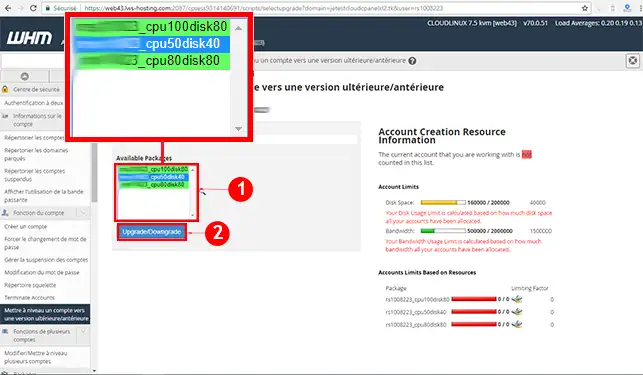
You can now modify the package of a customer account via the WHM interface of your cPanel Cloud Server with LWS. You can modify the package of a customer account as many times as you like. It is also possible to create a custom hosting package on WHM.
Don't hesitate to share your comments and questions!
Ask the LWS team and the community. Answers are published after moderation.
 About LWS :
LWS is a 100% French web hosting company that focuses on quality and innovation and offers a responsive and competent technical service at affordable prices.
About LWS :
LWS is a 100% French web hosting company that focuses on quality and innovation and offers a responsive and competent technical service at affordable prices.



 Yes
Yes No
No