


How do I modify a web hosting package?

Procédure

What is a cPanel web hosting package?

cPanel cloud servers allow you to create and modify Web hosting packages for your customers. A package allows you to define the resources that can be used by each customer account on cPanel. You can

  • Define the maximum disk space quota for the package as a whole
  • Define the maximum bandwidth for the package
  • Define the number of email addresses authorised per package and the maximum quota for each of them
  • Define the number of mailing lists
  • Define the authorised functions for each cPanel hosting package.

How do I modify a web hosting package?

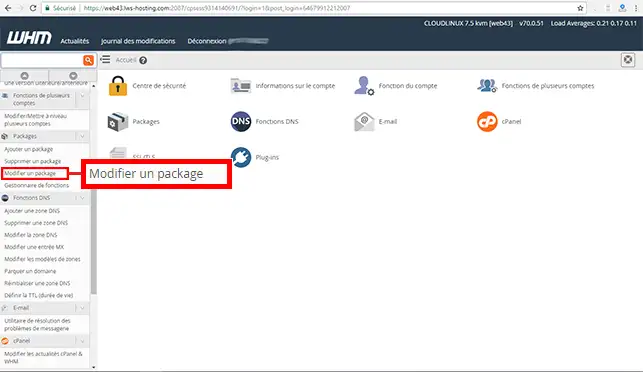
1. Log in to your WHM management interface and click on"Modify package" in the"Package" section of your space.

How do I modify a web hosting package?

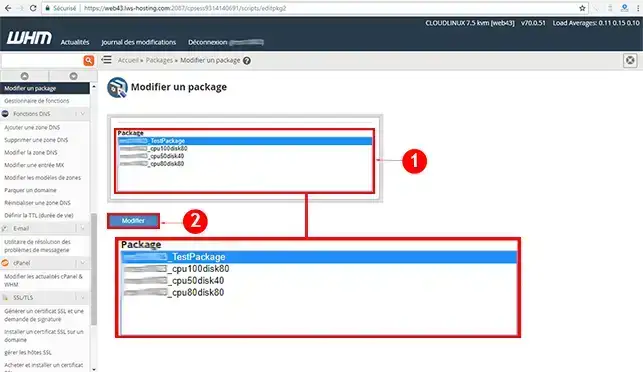
2. Select the cPanel hosting package you wish to modify and click on the "Modify" button.

How do I modify a web hosting package?

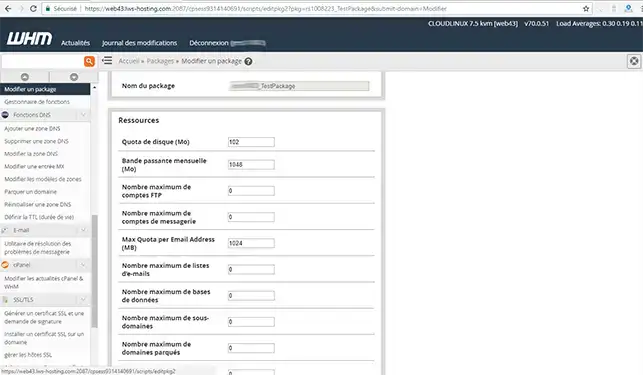
3. You can modify all the resources in the web hosting package. Only the name of the package cannot be modified. If you wish to change the name of the Pack, you will need to delete it before creating a new one. Once you have made your changes, click on the"Validate" button to save your pack.

How do I modify a web hosting package?

Conclusion

You can now modify your cPanel web hosting package with LWS. The WHM interface available on the cPanel cloud server lets you add, modify and delete a web hosting package whenever you want.

Don't hesitate to share your comments and questions!

help.lws.net/a/1193
Was this article helpful?

Yes

No

Read 17 365 times

Thank you! Feel free to ask questions about our documentation if you would like more information, and help us improve it.

Similar articles

Questions about the article 1

Ask a question
GTouchard
il y a 9 mois
J'ai un site hébergé chez LWS qui s'appelle electrostatique .org . Je voudrais modifier un fichier je ne sais pas comment faire ?
Jordan-LWS Official answer
il y a 8 mois

Bonjour,

Je vous remercie pour votre message.

Vous avez plusieurs options qui s'offrent à vous pour modifier vos fichiers, la plus simple reste tout de même de vous connecter à votre espace d'hébergement et d'accéder au gestionnaire de fichiers depuis votre espace client.

Cela vous permettra d'avoir un visuel complet sur l'arborescence de votre espace d'hébergement mais également sur les fichiers de votre site internet. 

La deuxième solution est d'utiliser un outil de gestion de fichiers FTP tel que FileZilla afin de pouvoir vous connecter avec les identifiants qui vous ont été fournis lors de la souscription à votre formule d'hébergement.

Au besoin, je vous invite à prendre connaissance de cette documentation à ce propos : https://aide.lws.fr/a/79

Je vous remercie de votre attention et reste à votre disposition pour toute autre question ou complément d'information.

Cordialement, L'équipe LWS

Was this answer helpful?

A question about this article?

Ask the LWS team and the community. Answers are published after moderation.

Ask the LWS team and its community a question

GDPR: Controller: LWS-Ligne Web Services. Purpose: moderation and public publication of your question, possible notification of an answer. Legal basis: consent (Art. 6(1)(a) GDPR). Email retention: 90 days after notification, 12 months maximum without an answer. To exercise your rights, see the GDPR section of our Terms and Conditions.