
Online help
The web host accessible to all
Procédure
Unfortunately, it is not possible to change the domain name of the default cPanel account. However, you can add an alias to your cPanel account to link it to the existing domain. The alias makes your website accessible from another domain name.
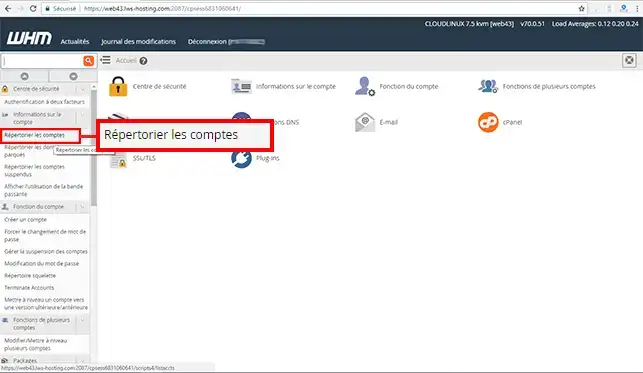
1. Log in to your WHM interface and click on"List accounts" in the"Account information" section.
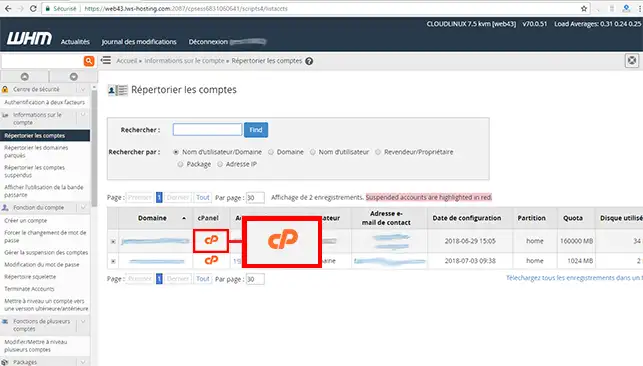
2. Click on the"cPanel" button of the default account.
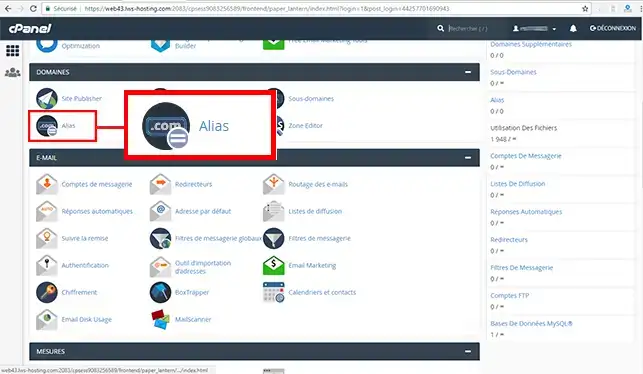
3. Click on the"Alias" button in the"Domain" section of your cPanel account.
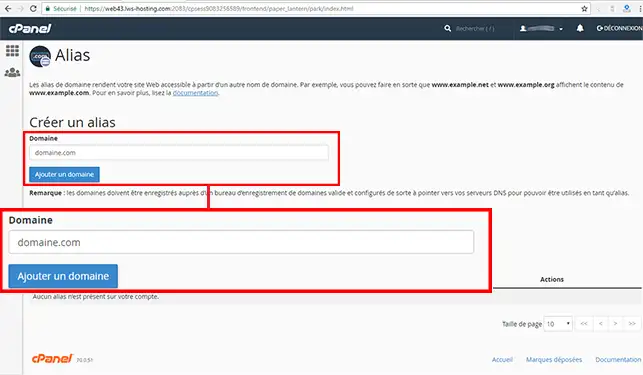
4. Enter the domain name you wish to add to your cPanel account and click on"Add Domain".
Now you know that you can't change the domain name of the default cPanel account for your cPanel Cloud Server with LWS. However, you can create a domain alias so that the new domain points to the old one.
Don't hesitate to share your comments and questions!
Ask the LWS team and the community. Answers are published after moderation.
 About LWS :
LWS is a 100% French web hosting company that focuses on quality and innovation and offers a responsive and competent technical service at affordable prices.
About LWS :
LWS is a 100% French web hosting company that focuses on quality and innovation and offers a responsive and competent technical service at affordable prices.



 Yes
Yes No
No