
Online help
The web host accessible to all
Procédure
Folder protection provides password protection for folders containing sensitive documents.
When you connect to the protected folder, for example yourdomain.com/Clients/, a popup window will open asking you to enter your username and password:
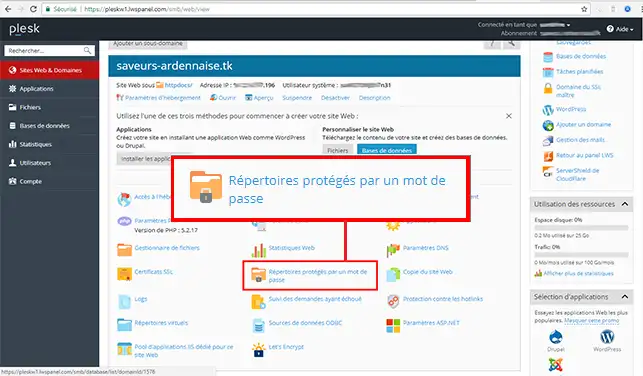
1. Connect to Plesk and select"Password protected folders".
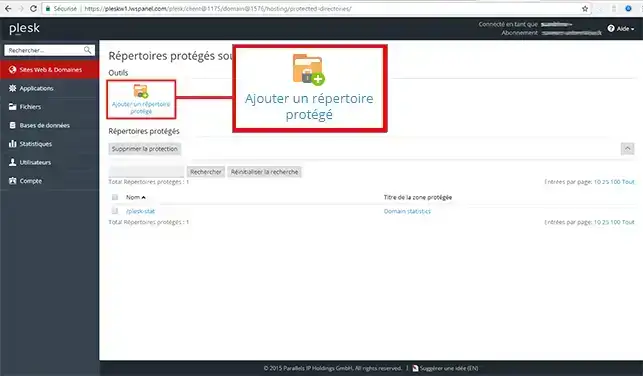
2. Once in the Protected password directories, click on"Add a Protected Directory".
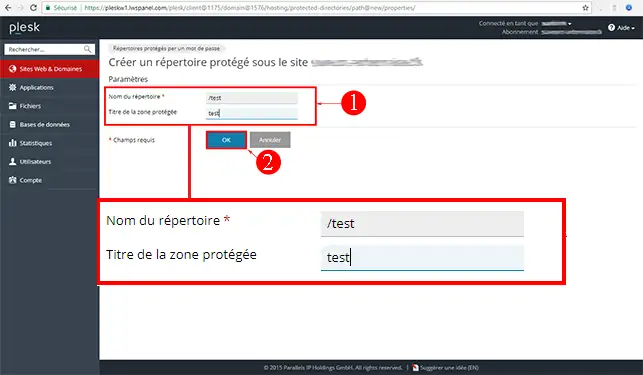
3. Fill in the fields Directory name (your domain name folder) , Title of the protected zone and click OK to confirm.
Ask the LWS team and the community. Answers are published after moderation.
 About LWS :
LWS is a 100% French web hosting company that focuses on quality and innovation and offers a responsive and competent technical service at affordable prices.
About LWS :
LWS is a 100% French web hosting company that focuses on quality and innovation and offers a responsive and competent technical service at affordable prices.



 Yes
Yes No
No