
Online help
The web host accessible to all
Procédure
In this second part you are going to set up the second Blogger record and the redirection of your domain.
1 In this part we're going to add the CNAME record to our DNS Zone:
To do this, choose CNAME as the field type and add the Blogger information.
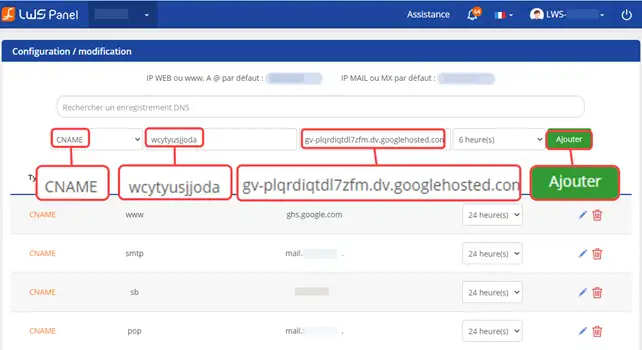
2. Next, to redirect your domain name from mondomainelws.fr to www.mondomainelws.fr you need to place an .htaccess file at the root of your hosting with the following content:
RewriteCond %{HTTP_HOST} !^www\. RewriteRule ^(.*)$ http://www.%{HTTP_HOST}/$1 [R=301,L] RewriteCond %{HTTPS_HOST} !^www\. RewriteRule ^(.*)$ https://www.%{HTTP_HOST}/$1 [R=301,L]
Note: If you only want to link a sub-domain to Blogger (e.g. blog.mondomainelws.fr) and use the main domain (mondomainelws.fr) to display your LWS-hosted site, you can skip step 2.
3. Then in the Blogger account settings (step 7 of the first part of this tutorial) click on the Save button, this time the message"We were unable to verify your rights to this domain" will have disappeared to mean that the domain is correctly linked to Blogger.
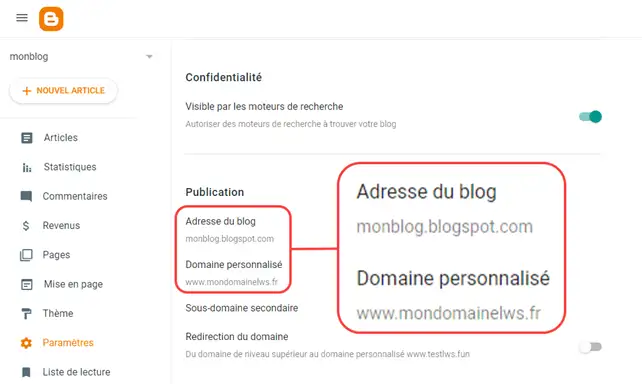
You are now able to use your LWS domain name with your Blogger website. Blogger is an online platform that lets you create your blog easily and without any knowledge.
Don't hesitate to share your comments and questions!
Ask the LWS team and the community. Answers are published after moderation.
 About LWS :
LWS is a 100% French web hosting company that focuses on quality and innovation and offers a responsive and competent technical service at affordable prices.
About LWS :
LWS is a 100% French web hosting company that focuses on quality and innovation and offers a responsive and competent technical service at affordable prices.



 Yes
Yes No
No