


Accessing a remote database on cPanel

Procédure

How to connect to a remote database in cPanel

cPanel's Remote MySQL tool allows you to remotely connect to your database.
This feature allows remote hosts to access the MySQL databases in your account.

This tutorial shows you how to access your database remotely

How to connect to a remote database in cPanel

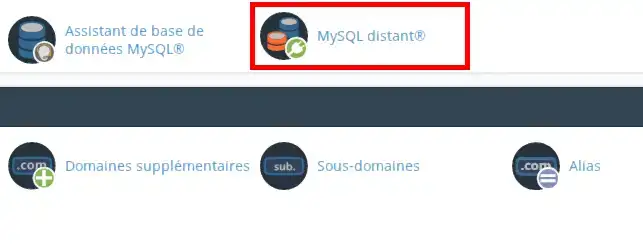
To authorise an ip address or domain to connect to your database, log in to your cPanel :

Accessing a remote database on cPanel

Then click on the Remote MySQL icon

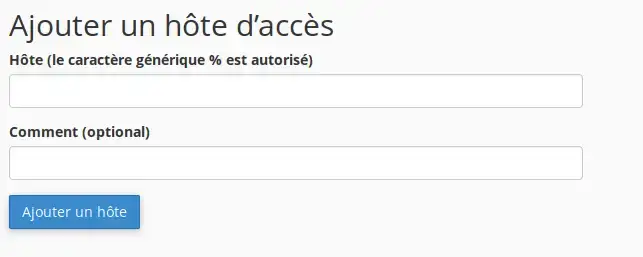
The following form will be displayed:

Accessing a remote database on cPanel

In the Host text box you can specify remote hosts that can access your cPanel's MySQL databases.

  • You must enter a full domain name (FQDN) for example: mon-domaine-lws.fr, an IPv4 address or an IPv6 address.

In the How text box, you can enter a description to identify the IP address. This step is optional and limited to 255 characters.

Then click on the Add a host button to save the changes.

Warning: Remote access to databases is tolerated on our hosting packages, but there are certain restrictions. Remote access to databases must be occasional. For example, using software such as mysql workbench, which allows you to connect to the database from time to time to perform operations on it, is not a problem. On the other hand, it will not be possible to have data from a site hosted by provider A and the database hosted on your hosting. Similarly, it will not be possible to have persistent or H24 access to a remote database.

Conclusion:

You have now learned how to remotely connect to your database in cPanel.
This is useful, for example, if you want to authorise shopping basket or guest book applications on other servers to access your databases.

Don't hesitate to share your comments and questions!

help.lws.net/a/1386
Was this article helpful?

Yes

No

Read 32 765 times

Thank you! Feel free to ask questions about our documentation if you would like more information, and help us improve it.

Similar articles

Questions about the article 4

Ask a question
hmosso
19 Jul 2022
Bonjour, Ok je voudrais ainsi savoir comment puis-je avoir une base de données hébergée à laquelle je pourrais avoir un accès permanent pour injecter des données saisie à partir d'une application sous Windows.
fabrice-LWS Official answer
20 Jul 2022
Bonjour, Pour cela, il vous sera nécessaire de disposer d'une adresse IP fixe au niveau de votre FAI. En effet, il n'est pas possible d'autoriser les connexions à la base de données depuis des plages d'ips, mais uniquement depuis une ip fixe. Si vous désirez pouvoir autoriser la connexion depuis des plages d'IPs, il vous faudra souscrire à une formule VPS qui vous permettra cela. Vous pouvez prendre connaissance des formules VPS en vous rendant sur le lien suivant: https://www.lws.fr/serveur-virtuel.php
Was this answer helpful?

hmosso
27 Jul 2022
Bonjour, Ok, comment transformer mon abonnement encours en VPS M
fabrice-LWS Official answer
29 Jul 2022
Bonjour, vous avez la possibilité pour cela, de passer par un changement de formule directement. Pour cela, une fois connecté à votre espace client LWS, cliquez sur "Gérer" se trouvant derrière votre formule puis sur "Changer de formule". Lors d'un changement de formule, le service technique VPS se chargera de la migration pour vous. Vous avez aussi la possibilité de souscrire directement à un VPS en passant par la page https://www.lws.fr/serveur-virtuel.php . Une fois le VPS souscrit, il vous faudra effectuer la migration par vous-même sur le VPS.
Was this answer helpful?
renaud1907
26 Aug 2022
Bonjour, est-il possible de se connecter à ma base de donnée distant d'un hébergement cpanal M depuis une application Android ?
fabrice-LWS Official answer
26 Aug 2022
Bonjour, cela sera possible à condition de disposer d'une adresse IP fixe pour votre application Android. Il vous sera dans ce cas, possible d'indiquer l'ip de votre application Android en vous rendant sur votre interface cPanel puis en cliquant sur "MySQL Distant". Si vous désirez pouvoir y accéder depuis plusieurs IPs ou des ips dynamiques, il vous sera nécessaire de changer de formule pour une formule VPS qui vous permettra cela. Vous pouvez prendre connaissance des formules VPS en vous rendant sur la page suivante: https://www.lws.fr/serveur-virtuel.php . Vous pouvez changer de formule pour une formule VPS en vous rendant sur votre espace client LWS, cliquez sur "Gérer" se trouvant derrière la formule concernée puis sur "Changer de formule" pour cela.
Was this answer helpful?
shadow
12 Feb 2025
bonjour. svp pourquoi moi j'ai pas l'option MySQL distant sur mon Dashboard?? normalement vous devez aussi pensez a cela. moi je voulais synchroniser mes bases. et pour cela, il faut que je me connecte d'abord a ma base distante que Jai héberger chez vous
Jordan-LWS Official answer
12 Feb 2025

Bonjour,

Merci pour votre message.

La documentation actuelle n'est plus totalement à jour, et l'intitulé de cette option a été modifié sur le Dashboard. Nous vous invitons à contacter notre service support technique via votre espace client. Nous vous assisterons pour activer et configurer l’accès MySQL distant selon vos besoins.

N’hésitez pas à nous solliciter pour toute autre question.

Cordialement, L'équipe LWS

Was this answer helpful?

A question about this article?

Ask the LWS team and the community. Answers are published after moderation.

Ask the LWS team and its community a question

GDPR: Controller: LWS-Ligne Web Services. Purpose: moderation and public publication of your question, possible notification of an answer. Legal basis: consent (Art. 6(1)(a) GDPR). Email retention: 90 days after notification, 12 months maximum without an answer. To exercise your rights, see the GDPR section of our Terms and Conditions.