
Online help
The web host accessible to all
Procédure
Sometimes you need to change the database password. For maintenance or security reasons, or if you are experiencing database connection errors.
In this article we'll take you through the steps involved in changing your database password using cPanel.
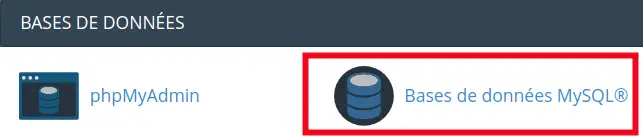
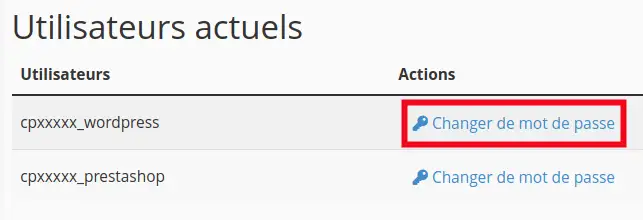
To change your MySQL database password :
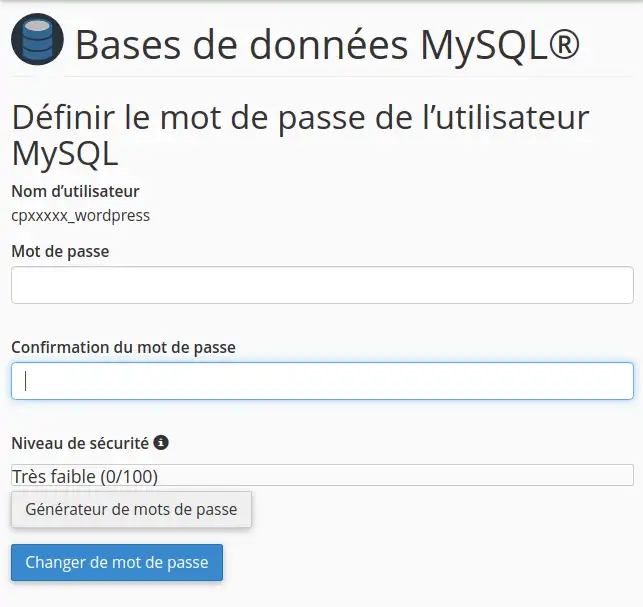
3. Then click on the "Password Generator" button to generate a password automatically, then on the "Change Password" button to save the changes.
The database password is listed in the configuration file for your software (such as wp-config.php if you have a WordPress site or configuration.php if you have a Joomla site).
These files are located in the "/public_html/" folder, you can use your cPanel file manager to find them.
Ask the LWS team and the community. Answers are published after moderation.
 About LWS :
LWS is a 100% French web hosting company that focuses on quality and innovation and offers a responsive and competent technical service at affordable prices.
About LWS :
LWS is a 100% French web hosting company that focuses on quality and innovation and offers a responsive and competent technical service at affordable prices.



 Yes
Yes No
No