How to change the DNS Zone in Plesk

Procédure

How to change the DNS Zone on Plesk

What is a DNS zone?
You access a website by typing its name in the browser's URL bar. The browser then associates the domain name with the IP address of the site and displays it. This connection is made possible by a linking protocol called DNS. The DNS zone is the database containing all the records for a domain name.

What is the TTL?
This section allows you to define the period during which information about your domain name can be stored in cache on your computer. After this time, the information will be considered obsolete and will be updated. The default time is 6 hours. After this time, the DNS server will check again to see if the records have changed. Reducing the time is useful for IP migration, but it is important to change the time before it expires. Once the migration is complete, it is advisable to reset the TTL to 24 hours.


How to change the DNS Zone on Plesk

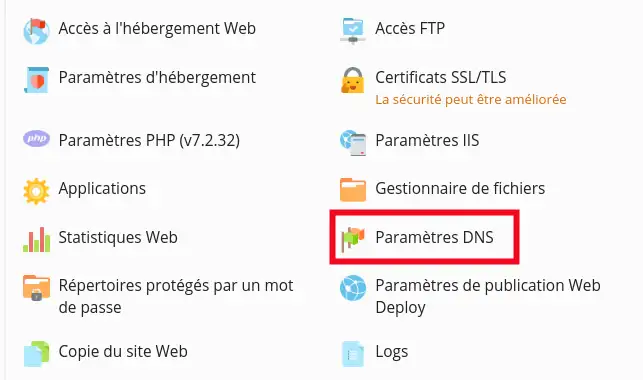
  • Connect to your Plesk Panel
  • Then click on"DNS Settings".

How to change the DNS Zone in Plesk

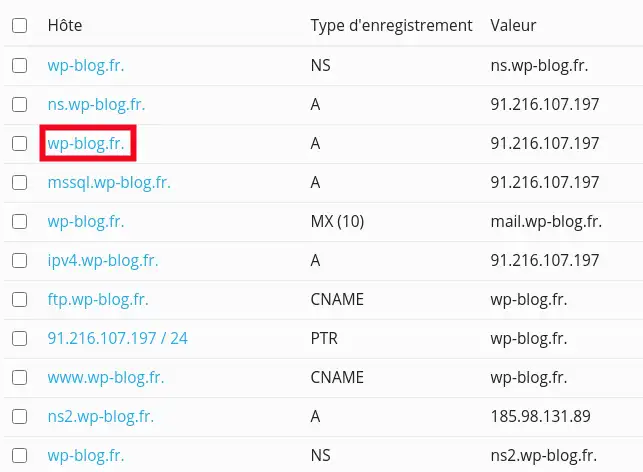
  • To change a DNS zone, simply click on the value you wish to change. For example, to point your domain to another IP address, click on the wp-blog.fr record. A (replace wp-blog.fr with your domain)

How to change the DNS Zone in Plesk

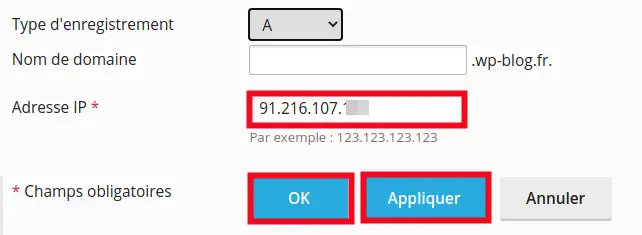
  • Then change the IP address in the"IP Address" field, and press the "Apply" and"OK " buttons in succession. Your change will usually be made within 12 hours.

How to change the DNS Zone in Plesk

Conclusion:

You are now able to manage your DNS Zones on your Plesk Panel. You can add, delete or initialise your DNS Zones quickly and easily.

Don't hesitate to contact our technical department via an incident ticket if you have any questions.

help.lws.net/a/1462
Was this article helpful?

Yes

No

Read 12 618 times

Thank you! Feel free to ask questions about our documentation if you would like more information, and help us improve it.

Similar articles

A question about this article?

Ask the LWS team and the community. Answers are published after moderation.

Ask the LWS team and its community a question

GDPR: Controller: LWS-Ligne Web Services. Purpose: moderation and public publication of your question, possible notification of an answer. Legal basis: consent (Art. 6(1)(a) GDPR). Email retention: 90 days after notification, 12 months maximum without an answer. To exercise your rights, see the GDPR section of our Terms and Conditions.