How to initialise your DNS Zone on Plesk

Procédure

How to initialise your DNS Zone on Plesk

If you have changed the DNS settings for your domain, you can easily and safely reset them to the default settings.

This tutorial shows you how to reset your DNS zone on your Plesk shared hosting.
How to initialise your DNS Zone on Plesk

  • Connect to your Plesk Panel
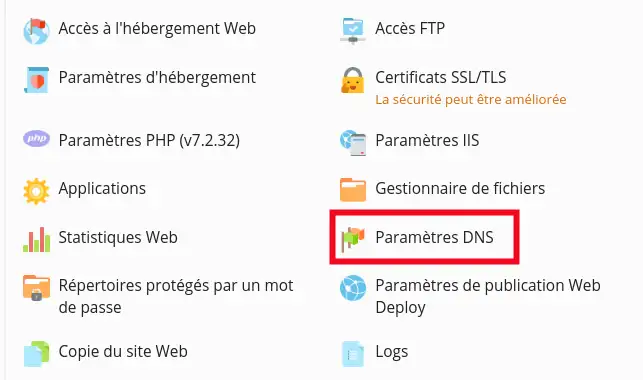
  • Click on"DNS Settings

How to initialise your DNS Zone on Plesk

  • Then click on the "Reset to initial settings" button

How to initialise your DNS Zone on Plesk

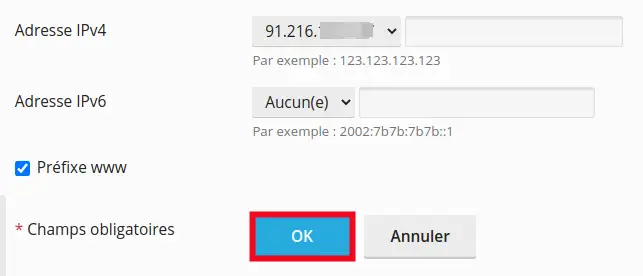
  • Click on "OK" to reset the DNS Zone

How to initialise your DNS Zone on Plesk

  • A confirmation message will be displayed. This change will usually be made within 12 hours.

How to initialise your DNS Zone on Plesk

Conclusion:

You are now able to initialise the DNS Zone of your domain on your Plesk hosting. Please do not hesitate to contact our technical department via an incident ticket if you have any questions.

help.lws.net/a/1463
Was this article helpful?

Yes

No

Read 9 476 times

Thank you! Feel free to ask questions about our documentation if you would like more information, and help us improve it.

Similar articles

A question about this article?

Ask the LWS team and the community. Answers are published after moderation.

Ask the LWS team and its community a question

GDPR: Controller: LWS-Ligne Web Services. Purpose: moderation and public publication of your question, possible notification of an answer. Legal basis: consent (Art. 6(1)(a) GDPR). Email retention: 90 days after notification, 12 months maximum without an answer. To exercise your rights, see the GDPR section of our Terms and Conditions.