How to sync the CalDAV address book on cPanel with another device

Procédure

What is CalDAV?

CalDAV is a protocol designed to allow users to access and share calendar information on a server.

This article gives you instructions to synchronize cPanel contacts using CalDAV on your Apple devices.

How to synchronize the cPanel CalDAV address book with another device

To synchronize the cPanel CalDAV address book with another device, you need to:
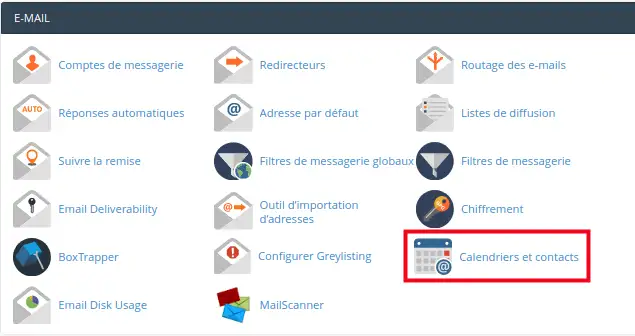
  • Log in to your cPanel
  • From the E-MAIL section, click on "Calendars and contacts"

How to sync the CalDAV address book on cPanel with another device

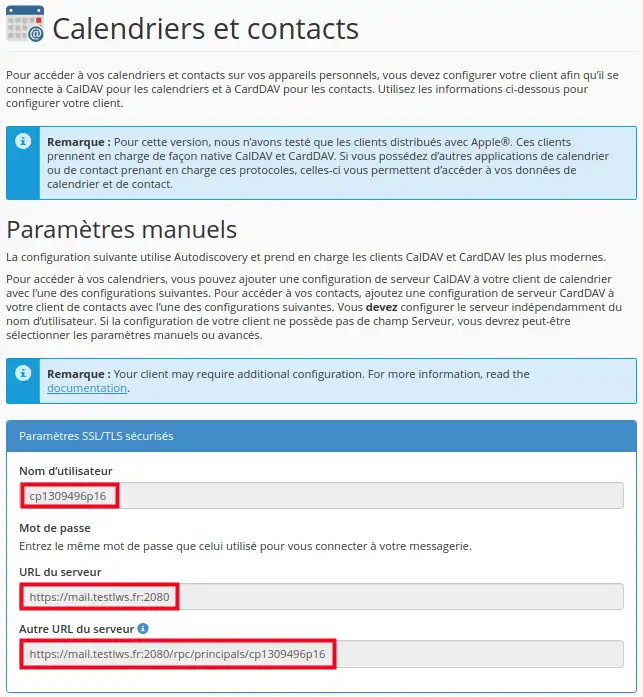
  • On the following page, retrieve the username and the server address to configure them on your device:

How to sync the CalDAV address book on cPanel with another device

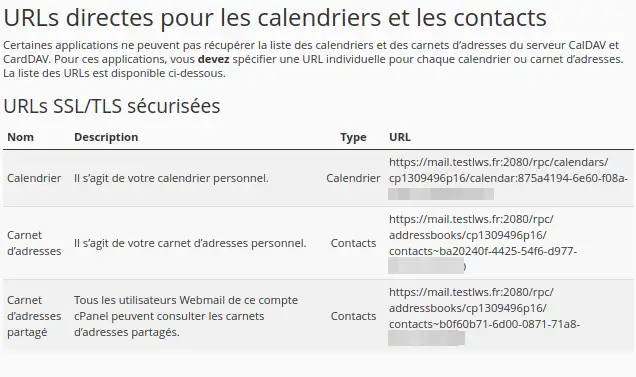
  • Some applications have limited support for retrieving CalDAV account information from the server. In this case, you need a direct URL, which is displayed at the bottom of the "Calendars and contacts".

How to sync the CalDAV address book on cPanel with another device

Conclusion:

You have learned how to retrieve the information needed to synchronize the CalDAV address book from your cPanel

Feel free to share your comments and questions!

help.lws.net/a/1469
Was this article helpful?

Yes

No

Read 17 979 times

Thank you! Feel free to ask questions about our documentation if you would like more information, and help us improve it.

Similar articles

A question about this article?

Ask the LWS team and the community. Answers are published after moderation.

Ask the LWS team and its community a question

GDPR: Controller: LWS-Ligne Web Services. Purpose: moderation and public publication of your question, possible notification of an answer. Legal basis: consent (Art. 6(1)(a) GDPR). Email retention: 90 days after notification, 12 months maximum without an answer. To exercise your rights, see the GDPR section of our Terms and Conditions.